
Backtesting software reviews in 2026: what star ratings miss
How to separate company ratings from evidence about a backtesting engine.

A five-star company rating can't tell you whether a backtest is accurate. Most reviews of backtesting software describe billing, support and how an interface feels. Whether a tool's results can be trusted depends on things reviews rarely mention: where the data comes from, whether fees and slippage are on by default, and whether the project is still maintained. This guide shows how to read any review with those questions in mind, then applies them to five popular tools using only what each one documents publicly.
Quick answer: The five tools differ most in how much code you write and who maintains the engine.
- TradingView builds backtesting into its charting platform. Custom strategies are written in Pine Script, and its documentation explains how repainting can make historical results differ from real time.
- QuantConnect is a code-first cloud platform for research, backtesting and live trading, built on its LEAN engine. It uses Python or C#, and the cited maintenance snapshot records a LEAN commit dated October 6, 2026.
- Backtrader is a free, open-source Python framework. Its most recent commit on the default branch and its latest PyPI release are both dated April 19, 2023.
- vectorbt is a source-available Python library for large parameter studies, last released on October 9, 2026, with a paid PRO edition.
- CoinQuant (our platform) is a no-code AI strategy builder and backtester, covered here for research and backtesting only.
If you code in Python or C# and want research and live trading in one place, QuantConnect is the documented fit. If you chart on TradingView, its strategy tester is closest to hand. If you want to test crypto rules without code, CoinQuant is built for that. The full fit table is near the end.
How to read a backtesting software review in four steps
- Ask what the review is about. A company rating mostly reflects billing, refunds and support. A feature review reflects workflow. Neither measures whether the simulated fills, fees and data match the market you trade.
- Check the date and the version. Backtesting tools change quickly. A review written before a major release, or about a project that has since gone quiet, may describe a different product.
- Look for a method. "Intuitive interface" is an impression. "Here are the rules, data, costs and period" is something you can check and repeat.
- Confirm the claim yourself. Rebuild one strategy from the review, with the same costs and window, and compare the metrics. The routine is at the end of this guide.
What each source of review evidence can and cannot tell you
| Source | Good for | Main limitations |
|---|---|---|
| Trustpilot and similar company-review sites | Billing, refunds, support and account experiences | Self-selected reviewers skew toward the very happy and the very unhappy. Reviews rarely assess simulation accuracy. Undated figures go stale fast. |
| Software marketplaces such as G2 and Capterra | Workflow and usability impressions | Small samples for niche trading tools; some reviews are solicited. |
| GitHub and PyPI activity | Maintenance, releases and known bugs | Stars measure attention, not satisfaction. Open issues can mean problems or an engaged community. |
| Reddit and trading forums | Specific complaints and workarounds | Anecdotal, hard to verify, often out of date after a product changes. |
| Vendor blogs and roundups, including this one | Feature descriptions and structured comparisons | Commercial bias. Check whether the publisher covers its own product and whether claims are sourced. |
| YouTube reviews | Seeing the interface in motion | Often sponsored or affiliate-linked, with uneven disclosure. |
How this review was put together. This is a documentation-based editorial review, not a hands-on performance comparison. It uses vendor documentation and pricing pages, plus public GitHub and PyPI activity. The price reference is October 8, 2026 and the maintenance snapshot is October 13, 2026; retained official-page captures were consulted for this adaptation. Prices are assumed to be US dollars unless the vendor states otherwise, and may vary by location, promotion, taxes and billing choice. The retained TradingView page confirms the listed annual special prices but not every monthly quote; the retained VectorBT PRO page does not confirm the $25/$240/$500 price reference. Treat those figures as budgeting assumptions and verify checkout. Third-party rating pages were inaccessible during the source checks, so no rating, review count or user sentiment is quoted. Vendor documentation establishes what a tool documents, not how well it performs.
At a glance: five popular backtesting tools
| Tool | Coding and data | Cost reference (Oct 8) and maintenance snapshot (Oct 13, 2026) |
|---|---|---|
| TradingView | Pine Script; built-in chart data | Basic at no charge, monthly-budget reference from $14.95; confirm checkout; vendor docs only |
| QuantConnect | Python or C#; hosted multi-asset data | Free plan, paid tiers by seats and compute; LEAN commit Oct 6, 2026 |
| Backtrader | Python; bring your own data | Free (GPL-3.0); last commit and release Apr 19, 2023 |
| vectorbt | Python; bring your own data | Free community edition, PRO budget assumption from $25 a month; confirm vendor offer; release 1.1.2 Oct 9, 2026 |
| CoinQuant | No code; hosted crypto plus bar data for other asset classes | Pro $39.99 a month, higher-priced plan $220; publisher's own tool, vendor docs only |
TradingView
What it is: A charting and social platform where "strategies" are Pine Script programs that simulate orders on the chart. TradingView's help center puts it plainly: "Any user can create a strategy if they know the Pine Script language." (TradingView support)
Strengths
- Backtesting sits inside charts many traders already use, so the path to a first report is short if you can read or write Pine Script.
- Strategy scripts "simulate trades across historical and realtime bars," and the strategy report compares results with a buy-and-hold benchmark. Commission and slippage are set in a strategy's properties. (Pine Script docs: Strategies)
- Our guide on how to backtest on TradingView walks through the Strategy Tester settings step by step.
Limitations
- Custom logic means writing Pine Script. Community scripts help, but you inherit the author's assumptions.
- Repainting needs checking. TradingView defines repainting broadly, as script behavior that makes historical and real-time calculations differ. Under that definition, it estimates that "more than 95% of indicators in existence exhibit some form of repainting behavior," and adds that "not all repainting behavior is inherently useless or misleading." The practical risk is narrower: a strategy that relies on values not yet confirmed at the time can look better on history than it would have in real time. (Pine Script docs: Repainting)
- Cost and slippage assumptions are whatever the script or the user sets, so check them before reading any result.
- Some depth is plan-dependent. The plan comparison lists historical bar limits, advanced report metrics and deep backtesting as separate features, so check which tier includes the ones you need.
Pricing reference (October 8, 2026): Basic at no charge; monthly-budget assumptions are Essential $14.95, Plus $34.95, Premium $69.95 and Ultimate $239.95. The retained annual-billing page displays "special price" monthly equivalents of $12.95, $29.95, $59.95 and $199.95 respectively. These are annual-plan equivalents, not monthly payments. Check local checkout, taxes and promotions before buying. Sources: tradingview.com/pricing.
Best suited to: Chart-based traders who can work in Pine Script, or who want to examine community strategies and understand their assumptions.
QuantConnect
What it is: A cloud platform for research, backtesting and live trading, built on LEAN, an Apache-2.0 engine that supports Python and C# and that you can also run yourself. (LEAN on GitHub)
Strengths
- Broad hosted data. The pricing page says the free plan includes equity, index, forex, crypto, futures and options data, community support and "Unlimited Backtesting." (QuantConnect pricing)
- Detailed reality modeling. LEAN documents fill, slippage, fee, brokerage, buying power and settlement models that can be customized per security. (QuantConnect docs: Reality modeling)
- A documented path to live trading. The pricing page lists paper and live trading connections, including Interactive Brokers and crypto venues such as Binance, Bybit, Kraken and Coinbase.
- Active maintenance. The cited maintenance snapshot records a LEAN commit dated October 6, 2026; this is not a claim about the latest commit today.
Limitations
- You write code. The core workflow has no plain-English strategy builder.
- Total cost depends on what you run. Paid tiers combine seats with compute nodes, and the pricing page builds its prices with JavaScript, so this review quotes no confirmed rendered price. Check the plan builder before you commit.
- Realistic modeling is available, but you still have to choose and configure the right models for your market.
Best suited to: Developers and quant-minded traders who want research and a route to live execution in one place.
Backtrader
What it is: A free, open-source Python backtesting library, licensed GPL-3.0, with a long history in the algorithmic trading community. (Backtrader on GitHub)
Strengths
- No subscription and full control. You own the code, the data and the assumptions.
- An event-driven design that steps through bars in order, which is intuitive for rule-based strategies.
- Built-in broker simulation, including commission schemes and slippage parameters. (Backtrader docs: Slippage)
Limitations
- Development appears inactive. The most recent commit on the default branch is dated April 19, 2023, the same day as the latest PyPI release (1.9.78.123). Contributors still open pull requests, most recently on October 7, 2026, but the default branch has had no new commits since 2023.
- The PyPI classifiers list Python versions only up to 3.7, so test compatibility on current Python yourself.
- Costs are opt-in. The documented slippage parameters default to 0.0, so a backtest ignores slippage unless you set it.
- No bundled data. Crypto users bring their own data feed.
- GitHub issues are switched off for the repository, so support runs through the community instead.
Best suited to: Python users who want a free, self-hosted engine and are comfortable maintaining it.
vectorbt
What it is: A Python library for vectorized backtesting, designed to test many parameter combinations at once. The same developer sells a commercial edition, VectorBT PRO. (vectorbt on GitHub, vectorbt.pro)
Strengths
- Built for research at scale. Vectorized simulation suits parameter sweeps and many-instrument studies.
- Active development. Version 1.1.2 was released on October 9, 2026.
- Cost modeling in the core API. The documentation's portfolio examples pass fees and slippage as parameters. (vectorbt docs: Portfolio)
- Clear positioning. The PRO site says VBT is not a "No-code strategy builder," "Hosted trading bot" or "Strategy marketplace," and tells users to "Bring your own data, models, and execution."
Limitations
- Python and array-programming skills are required. The current release requires Python 3.11 or newer (below 3.15).
- Read the license. The community edition uses Apache 2.0 with the Commons Clause, which withholds the right to sell a product or service whose value derives substantially from the software. That makes it source-available rather than open source in the usual licensing sense. (vectorbt license)
- Pin your version and re-run results after upgrades, as with any actively changing library.
- Vectorized testing is fast but simplifies order-by-order behavior, so strategies that depend on the exact sequence of fills may need an event-driven check as well.
Pricing reference (October 8, 2026): Community edition free. The original budget assumes VectorBT PRO at $25 a month on monthly billing, $240 for one year (equivalent to $20 a month), or $500 one time for lifetime access. The accessible vendor capture does not confirm those PRO amounts or the reader's location; they are reference assumptions, not verified current offers. Confirm the plan and license with the vendor.
Best suited to: Researchers running large parameter studies who want speed and control.
CoinQuant
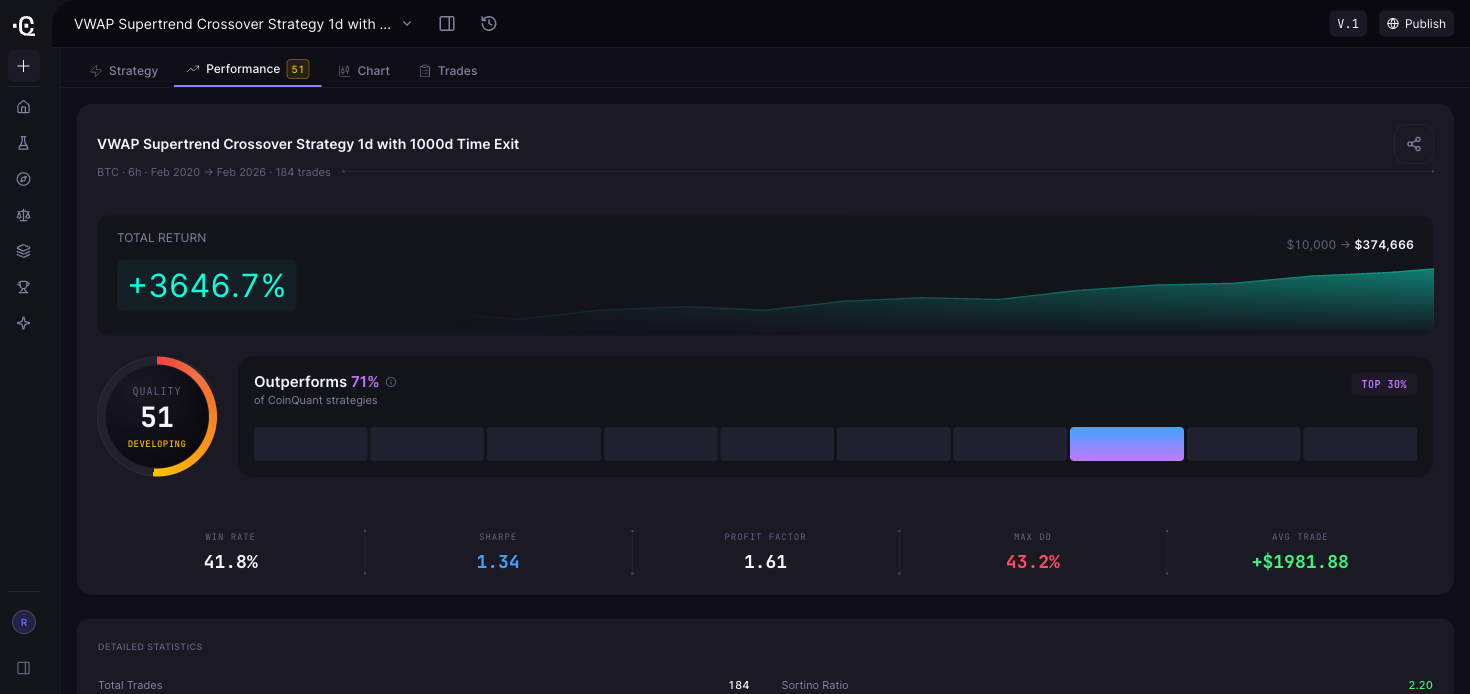
What it is: A no-code AI strategy builder and backtester. CoinQuant's security page describes it as "a platform for building and backtesting trading strategies on real data, not a broker, exchange, or wallet." You describe a strategy in plain English, the AI turns it into a structured strategy you can review and adjust, and the engine backtests it. (CoinQuant security)
Strengths
- No code required. CoinQuant's FAQ says "Everything is built visually," and rules can be edited as blocks or refined through the prompt.
- CoinQuant documents trading-fee modeling in each backtest; check the slippage value in your own run, because CoinQuant's own matched Bitcoin test (October 5, 2026) was run with a 0.1% taker fee and no slippage set. Results include an equity curve, drawdown, detailed statistics, a trade log, a buy-and-hold line and a strategy quality score (SQS, 0 to 100).
- Hosted data. The Supported Assets page lists 13,151 tradable instruments across six asset classes, including 48 crypto pairs covering 21 crypto assets. (Supported assets)
- A public API for programmatic research, alongside the no-code interface.
Limitations
- This review covers research and backtesting only, which is what CoinQuant's public documentation describes in detail.
- Data depth depends on plan. Pro backtests use candles from 15 minutes to 1 month. The higher-priced plan adds 1-minute candles and tick-level backtests over a six-month range. CoinQuant's FAQ says stocks, ETFs, forex and commodities run on bars only.
- The SQS summarizes a backtest. It is not evidence of future returns.
- Usage runs on credits, and different actions use different amounts, so heavy iteration can mean buying top-ups.
- There is no documented way to move a strategy into the other tools here. The FAQ says "Download Data" exports metrics and trade logs, so plan to rebuild the rules if you trade elsewhere. (CoinQuant FAQ)
- No independently verified third-party rating for CoinQuant is available in the retained checks, so none is quoted. When you search for reviews, confirm the domain is coinquant.ai, because unrelated businesses use similar names.
Pricing (checked Oct 8, 2026): Pro $39.99 a month billed monthly, or $399 billed yearly (shown as $33.25 a month). Higher-priced plan $220 a month billed monthly, or $1,999 billed yearly (shown as $166.58 a month). Weekly billing is also listed. (coinquant.ai/pricing)
Best suited to: Traders, mainly in crypto, who want to test rule-based ideas, with fee modeling in each backtest, before risking capital and without writing or maintaining code.
Six questions to ask any review
Use these on any roundup, forum thread or review, including this one.
- Data source named. Does the review say where the historical data came from, and does it match the market you trade?
- Fees and slippage stated. Were costs modeled, and were they on by default or set manually? Backtrader's documented slippage defaults to zero, for example, so check the slippage value in any tool, including ours.
- Honest test window. Does the period include falling and sideways markets, not just a rally?
- Backtest separated from live results. Simulated results are not a track record.
- Complete metrics. Look for total return, number of trades, win rate, profit factor, Sharpe ratio and maximum drawdown together. A 100% win rate on two trades proves nothing.
- A method, not a mood. Rules, data, costs and period you could rebuild yourself.
Red flags: a headline return with no window or costs; equity-curve screenshots without a metrics table; undated ratings; publisher roundups that rank their own product first without disclosure; reviews written before a major platform change.
These questions are about reviews. To check the software itself, see is cheap backtesting software reliable? 6 checks to run before you trust it, and for a full buying checklist, see what to look for when choosing backtesting software in 2026.
Check a review's claim yourself in five steps
The routine below is illustrative. We did not run it for this article and make no claim about its results.
- Pick one strategy claim from a review, for example a moving-average crossover on BTC daily candles.
- Write it as exact rules: asset, timeframe, entry, exit and position size.
- Set costs to match your venue (a hypothetical 0.10% fee per side, for instance) and note how the tool handles slippage.
- Run it over a window that includes a drawdown period, and compare it with buy-and-hold.
- Compare metrics, not screenshots. If the numbers do not reproduce, give the original claim less weight.
Each tool in this review can run a rule-based test like this: in Pine Script, LEAN, Python or, in CoinQuant, from a plain-English prompt. The example below is illustrative. Replace its assumptions with the review's complete rules before testing:
Build a long-only strategy on BTC/USDT using daily candles. Enter at the next open when the 50-day simple moving average crosses above the 200-day simple moving average. Exit at the next open when the 50-day simple moving average crosses below the 200-day simple moving average. Use 100% of equity per trade. Backtest from January 1, 2021 to December 31, 2025, and compare the result with buying and holding BTC over the same window.
The values in this example are illustrative, not a tested or recommended strategy. Check the fee and slippage settings before running it, then confirm every rule came through as written before reading the results. Avoiding over-tuning matters as much as the tool; see how to optimize a crypto strategy without overfitting it.
Which tool fits which trader
| If you... | Consider | Why |
|---|---|---|
| Already chart on TradingView and can read Pine Script | TradingView | Testing sits next to your charts |
| Code in Python or C# and want research plus live trading in one place | QuantConnect | Hosted data, configurable reality models, brokerage connections |
| Want a free engine you control and can maintain yourself | Backtrader | No subscription, if you accept an inactive default branch |
| Run large parameter studies in Python | vectorbt | Vectorized research; recent releases |
| Want to test crypto rules without code | CoinQuant | Plain-English build, visual edits, fee modeling in each backtest |
There is no single best tool. The right one depends on your coding skills, the markets you trade and whether you need live execution in the same product.
FAQ
What are some reviews on popular backtesting software right now?
As of October 13, 2026, here is what official documentation and public activity show. TradingView builds backtesting into its charts; custom strategies need Pine Script, and its docs explain how repainting can make history differ from real time. QuantConnect is a code-first platform with hosted multi-asset data and documented live brokerage connections. Backtrader is free and open source, but its default branch has had no commit since April 2023. vectorbt released version 1.1.2 on October 9, 2026. CoinQuant offers no-code strategy building and backtesting with fee modeling in each backtest. We could not access Trustpilot or G2 on our check date, so no ratings are quoted.
Are Trustpilot ratings a good way to judge backtesting accuracy?
Not on their own. Company-review sites mostly capture support, billing and account experiences. A well-rated company can still produce misleading backtests if costs or data are wrong, and a poorly rated one can have a sound engine. Judge accuracy by how a tool handles data, fees, slippage and the test window.
Is free backtesting software reliable?
It can be, if you configure it carefully. Backtrader and vectorbt both support fees and slippage, but you set the values, supply the data and maintain the environment. Check maintenance and licensing first: Backtrader's default branch has been inactive since 2023, and vectorbt's license restricts selling products or services built substantially on it.
Can I move a strategy from one of these tools to another?
Not automatically. Each tool uses its own language or format: Pine Script, LEAN code, Python classes or CoinQuant's visual strategy blocks. Expect to rebuild the rules and confirm that the new version behaves the same way.
Conclusion: the practical lesson
A star rating is not an audit of a backtesting engine. Match the tool to your coding skills and market, then judge a review by its date, method, data, costs and test window. Rebuilding the same rules under the same assumptions tells you more than a rating alone.
- Star ratings mostly describe support and billing, not whether a tool's backtests are accurate.
- Judge any review by its date, its method and whether it names data, costs and the test window.
- TradingView suits chart-based Pine Script users, QuantConnect code-first research with a live-trading path, Backtrader a free self-maintained engine, and vectorbt research at scale.
- CoinQuant suits traders who want to test crypto rules without code, with fee modeling in each backtest.
- The most reliable review is the one you rebuild: same rules, same costs, same window.
Test one claim from a review before you trust it. Paste the prompt above into CoinQuant with the review's rules, and compare its drawdown, trade count and buy-and-hold result with what the review reported, fees included.
Start your first backtest on CoinQuant (https://app.coinquant.ai/)
Related reading
- What is backtesting software and how does it work? (2026 guide) (https://www.coinquant.ai/blog/what-is-backtesting-software-and-how-does-it-work-2026-guide)
- Is cheap backtesting software reliable? 6 checks to run before you trust it (2026) (https://www.coinquant.ai/blog/is-cheap-backtesting-software-reliable-6-checks-to-run-before-you-trust-it-2026)
- Backtesting data quality: why fees, slippage and data mode decide whether results are real (https://www.coinquant.ai/blog/backtesting-data-quality-why-fees-slippage-and-data-mode-decide-whether-results-are-real)
- Why your backtested crypto strategy fails live (https://www.coinquant.ai/blog/why-your-backtested-crypto-strategy-fails-live-the-performance-gaps-most-traders-miss)
- CoinQuant vs VectorBT: no-code crypto validation vs Python speed testing (https://www.coinquant.ai/compare/coinquant-vs-vectorbt-no-code-crypto-validation-vs-python-speed-testing)
- CoinQuant vs Backtrader: no-code strategy validation vs Python research frameworks (https://www.coinquant.ai/compare/coinquant-vs-backtrader-no-code-strategy-validation-vs-python-research-frameworks)
Disclaimer:
Key Takeaway