
How to build a no-code crypto trading strategy in six steps
Write precise rules, check what the builder creates, then backtest and validate a no-code crypto strategy in six practical steps.

An AI builder can turn a sentence into a strategy in seconds. The harder question is whether it built the strategy you meant. This guide shows how to build a no-code crypto trading strategy in six steps: write the idea as one precise paragraph, check every rule the tool builds against it, run one documented backtest, and read the result in a set order. It includes a copyable spec template and a rule-check table you can reuse.
Short answer: Write your rules before you open any tool: asset, timeframe, entry, timing, position size, exits, costs, data window and edge cases. Describe them in plain English to a no-code builder. Compare the rules it built with what you wrote, and list anything it could not express. Then backtest on a fixed date range, judge the result by trade count, drawdown and a buy-and-hold comparison before return, change one thing at a time, and re-run the unchanged rules on a period they have never seen.
How can I quickly start no-code trading without prior coding experience?
A no-code platform replaces the programming. It does not replace the thinking. The quickest path that still produces evidence has six steps:
Write the spec. Put every rule in one paragraph before you open a tool.
Describe it. Paste the paragraph into the builder in plain English.
Check the rules. Compare each rule the tool built with what you wrote.
Run a backtest. Use a fixed date range, stated costs and a starting balance you would actually use.
Read the results in order. Start with trade count and drawdown, not return.
Change one thing, then confirm on unseen data. Re-run the unchanged rules once on dates you never used.
"Quickly" means the shortest sequence that still produces evidence. Skipping step 3 or step 4 is not a faster start, just a faster guess. If you still need an idea to test, our beginner guide to crypto trading strategies covers which kinds suit a first attempt. For a click-by-click backtest tour, see how to backtest a crypto strategy without coding. This guide focuses on the step most walkthroughs skip: making sure the tool tested your idea and not its own guess.
Step 1: write a one-paragraph spec
A builder can only test what you tell it. When a rule is vague, the tool has to guess, and you end up testing its guess instead of your idea. Answer each line of this template before you open any platform, then join the answers into one paragraph.
One-paragraph strategy spec (template)
Asset: one market, such as BTC against USDT.
Timeframe: the candle size the signals use, such as 4 hours.
Entry signal: the exact condition, with indicator names and settings.
Timing: when a signal counts (for example, only on a closed candle) and when the order fills.
Position size: a percentage of capital or a fixed amount, and how many positions can be open at once.
Exits: a losing exit, a winning exit and a rule-based exit, whichever comes first.
Costs: a fee assumption per side and a slippage assumption per fill.
Data window: a start date, an end date and a starting balance.
Edge cases: indicator warm-up before the first trade, which exit wins if two trigger in the same candle, how a gap past your stop fills, when you may re-enter, and what happens to a position still open on the last day.
If a stranger could trade your paragraph without asking a question, it is ready.
Here is a filled-in example you can adapt. It is hypothetical, untested and not a recommendation.
Sample prompt (hypothetical, untested):
"Build a long-only strategy for BTCUSDT on 4-hour candles. Test from January 1, 2023 to December 31, 2024 with 10,000 USDT starting capital.
Entry: buy when a 4-hour candle closes above the 50-period EMA after the previous 4-hour close was at or below it, but only if the most recently completed daily candle closed above its 200-period SMA. Evaluate signals only on closed candles and buy with a market order at the open of the next 4-hour candle.
Size: a fixed 1,000 USDT per trade, one position at a time, no adding to a position.
Exits, whichever comes first: a 4% stop loss or an 8% take profit, both measured from the entry fill price, or a 4-hour close below the 50-period EMA, sold at the open of the next 4-hour candle. If the stop and the target are both touched in the same candle, assume the stop filled first. If a candle opens beyond the stop or the target, fill at that open. After any exit, wait for a new cross above the EMA before entering again.
Warm-up: calculate indicators on data from before January 1, 2023 so the 200-day SMA exists on the first day, and take no trades before that date.
Costs: 0.10% fee per side and 0.05% slippage per fill.
End: if a position is still open at the last candle, close it at that candle's close, including costs."
Step 2: describe the strategy in plain English
On CoinQuant, the how-to guide says to type the idea into the dashboard prompt box and click Go. The AI then "automatically generates a structured strategy schema for you to review and adjust." The AI turns your words into rules. The backtest engine, not the AI, produces the numbers.
The prompt states the rules you intend to test. It is not proof that any platform will implement each one exactly. The Supported Elements page (updated September 21, 2026) lists the building blocks CoinQuant documents, including EMA and SMA, timeframes from 1 minute to 1 month, six order types (Market, Limit, Stop-Market, Stop-Limit, Market To Limit and Limit If Touched), percentage-based take profit and stop loss, and a Crosses Above operator that "triggers only at the moment one value moves from below to above another." Check your spec against that list before you assume a rule is supported.
Step 3: check every rule the tool built
This is the step that turns a fast build into a trustworthy one. CoinQuant shows a strategy as clickable pills, such as Instrument, Series / Indicator, Timeframe, Operator / Comparator, Value, Action, Position Size and Order Type (Strategy Builder docs). Click any pill to change that part of a rule. The FAQ says you can also "refine your prompt and regenerate."
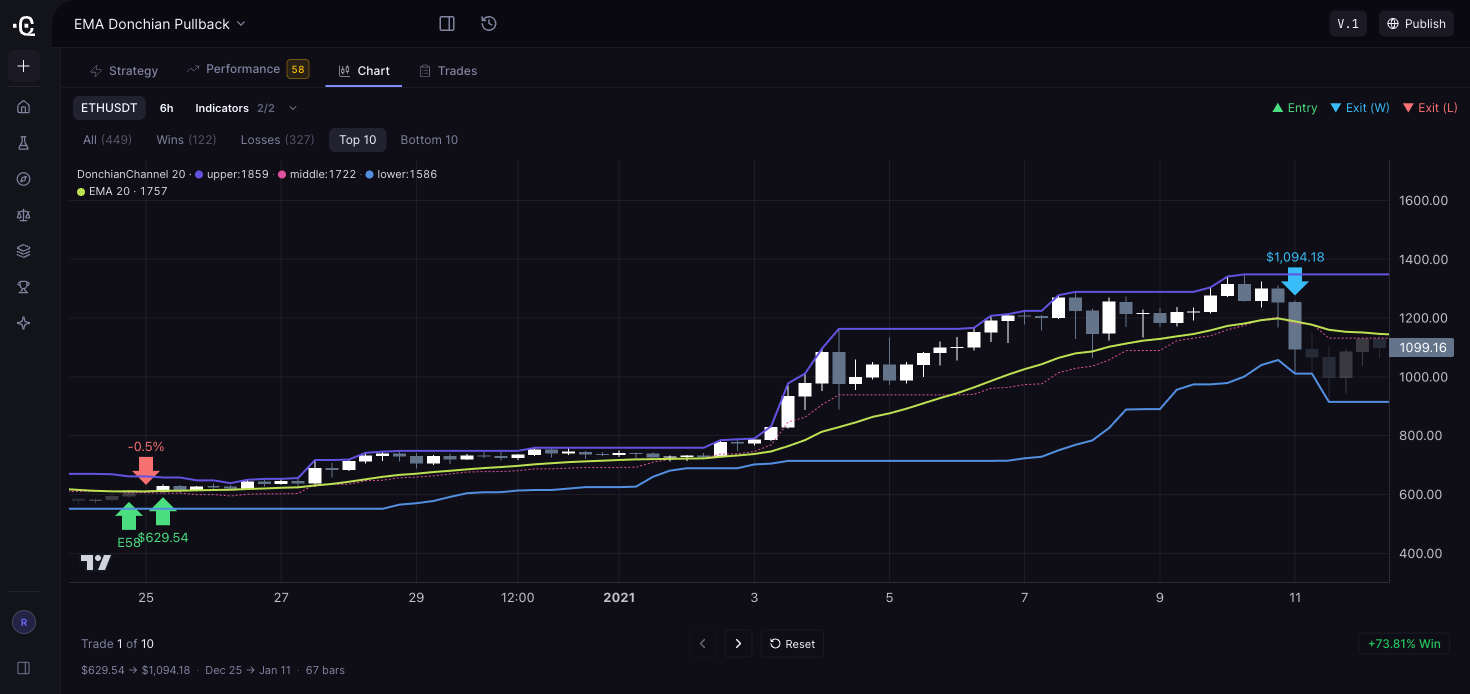
Illustrative interface example: the Chart tab of a saved CoinQuant backtest on ETHUSDT 6-hour candles. The legend lists the indicators the build used, a 20-period Donchian Channel and a 20-period EMA, so you can confirm the periods match your spec before you read any result. The Top 10 filter is on, so the trade shown (+73.81%, $629.54 to $1,094.18, December 25 to January 11) is one of the run's ten best, not a typical one: the All filter lists 449 trades, with 122 wins and 327 losses. The rules themselves are on the Strategy tab. It is not the sample prompt above. This supplied historical screenshot was not independently reproduced for this article. Past simulated results, not a forecast.
Compare the build with your spec, line by line:
| Rule in your spec | What to look for in the build | If it does not match |
|---|---|---|
| Asset and timeframe | BTCUSDT, and each condition on the timeframe you meant | Fix the pill or regenerate |
| Entry | "Crosses above," which fires once at the crossing, not "above," which stays true | Change the operator. The two give very different trade counts. |
| Trend filter | Daily SMA condition joined to the entry with And | Fix the join |
| Size | Fixed 1,000 USDT, one position at a time | Edit Position Size |
| Exits | Stop, target and EMA exit all present, and nothing you did not ask for | Add or remove the exit |
| Timing, warm-up, gaps, same-candle hits, last day | A matching setting, or nothing | List each as an untested assumption |
Not established by the public pages cited here, so keep these as intended rules and check them in the trade log after the test:
Whether a closed-candle signal fills at that close or at the next open.
Whether a daily condition reads the last completed candle or the one still forming. Reading a still-forming candle would let the test see a close that had not happened yet, which is lookahead.
Whether indicators use data from before the start date. If not, the 200-day SMA needs about 200 days of the window to form, so the first months may show no trades.
Which level counts first when a stop and a target both fall inside one candle, and what price applies when a candle opens beyond a level.
Default fee and slippage values, and whether you can enter your own slippage rate.
A backtest of the wrong rules is worse than no backtest, because it looks like evidence.
Step 4: run the backtest and record the settings
In CoinQuant, click Run Backtest in the Strategy Builder. The how-to guide lists the settings in the top bar: Date Range, Initial Capital, Instrument & Timeframe, and Data Mode (Candle or Tick-level). Set them to match your spec.
Candles or ticks. Candle mode suits most indicator strategies, including this hypothetical 4-hour example. Tick data is crypto only. The pricing page lists tick-level backtests over a six-month range for Elite; Pro does not include tick data. Different actions use different amounts of credits.
Scale. The pricing page lists up to 500,000 bars per backtest. Two years of 4-hour candles is 4,386 bars, so this test is far below that.
Costs. CoinQuant backtests model trading fees, and the changelog (January 26, 2026) says maker and taker fees can be set per order. Check the slippage value in your run; the cited public pages do not establish a default or prove that the sample rate can be entered.
Reproducibility. Save the version and write down the date range, initial capital, instrument, timeframe and data mode. Note every place where the built rules differ from your spec. The FAQ says Download Data exports metrics and trade logs. Keep that file with your notes.
Illustrative risk arithmetic (approximate, not a test result)
Assumptions: 1,000 USDT of BTC bought per trade with fees charged on top, slippage counted as a flat 0.05% of each fill's value, stop and target measured from the fill price, and figures rounded to the cent.
At the stop: a $40.00 price loss plus about $2.94 in costs. The planned loss is about $42.94, roughly 0.43% of the 10,000 USDT account.
At the target: an $80.00 price gain minus about $3.12 in costs, or about $76.88.
Break-even: if every trade ended exactly at the stop or the target, the rules would need to win about 35.8% of trades ($42.94 divided by $119.82).
Gap risk: a stop is a price level, not a guaranteed fill. If a candle opened 2% beyond the stop (a 6% loss), that trade would lose about $62.91. If every losing trade gapped that far, the break-even rate would rise to about 45%.
The EMA exit and the end-of-window close will end many trades between these levels, so these figures only frame the risk. The trade log shows what actually happened.
Step 5: read the results in a set order
CoinQuant's documented results include a summary (PnL, win rate, profit factor, total trades), equity and drawdown charts, detailed stats (Sharpe ratio, volatility, maximum drawdown, fees and streaks) and a trade log. Backtests also show a buy-and-hold line and the platform's strategy quality score (SQS). Read them in this order:
Total trades. A handful of trades is an anecdote, and everything below becomes provisional.
Net PnL against buy and hold. If the rules did not beat holding BTC, ask what they bought you, such as a smaller drawdown. With 1,000 USDT per trade, most of the account sits idle, so compare drawdowns with that in mind.
Maximum drawdown. The worst fall you would have sat through. Our maximum drawdown guide explains why it often matters more than return.
Profit factor with win rate. A high win rate can hide a few large losses.
Fees against net PnL. High-turnover rules can hand much of their gross edge to costs.
SQS. A summary of this test window, not a forecast.
The trade log. Check at least five trades against the chart. Did entries fill at the next 4-hour open? Was the previous completed daily close above the 200-day SMA? Did stops fill at the level or at a gapped open? This is how you learn the implemented rules when the docs do not state them.
For how fills and costs change a result, see what backtesting software is and how it works.
Step 6: change one thing at a time, then test on unseen data
The how-to guide's loop is to edit the rules, re-run and "use versioning (e.g. v1) to track changes." Add three habits:
Change one thing per run. If you move the stop and the EMA length together, you cannot tell which change mattered.
Count your attempts. The more variations you try on the same data, the more likely the best one looks good by luck. Our guide on optimizing without overfitting covers this.
Hold out a period. Freeze your candidate and re-run it once on dates you never used, such as January 1 to June 30, 2025 for the example. In CoinQuant's app, set a new date range and run the saved version unchanged.
The guide also suggests asking the chat questions such as "What are the main weaknesses of this strategy based on the results?" Treat the answers as ideas to test, not conclusions.
What features should I look for in a no-code trading platform?
Look for features that make your rules visible and your tests checkable. Our longer guide to no-code trading platform features goes deeper. The short version:
| Feature | Why it matters | How to check before you commit |
|---|---|---|
| Plain-English or visual building | Removes code without hiding logic | Describe a rule you already understand and see what it builds |
| Readable, editable rules | You must see exactly what will be tested | Can you open and change every condition, size and exit? |
| Published rule vocabulary | Limits what you can express | A list of indicators, operators, order types, stops and sizing |
| Costs in every test | Costs decide whether an edge survives | Default fee and slippage values; per-order fee control |
| Documented fills and edge cases | Same-bar fills and same-candle guesses can flatter results | Docs on fill timing and stop-target conflicts, or a trade log that shows them |
| Full results and trade log | You cannot audit what you cannot see | Every trade with timestamps, plus export |
| Benchmark | Return alone misleads | A buy-and-hold comparison on the same window |
| Versioning | Makes comparisons fair | Save versions and re-run unchanged rules on new dates |
| Clear pricing and limits | Caps shape how much you can iterate | Published prices, usage limits and billing options |
| Honest marketing | Guaranteed-return claims are a red flag | Read the claims, disclosures and docs |
A quick pass-or-fail checklist
I can read back the exact rules the platform will test.
Fees and slippage are included, and I know the values used.
I know when orders fill after a signal, from the docs or the trade log.
I have listed warm-up, same-candle hits, gaps and end-of-window handling as checked or untested.
I can see every trade, a drawdown chart and a buy-and-hold benchmark.
I can save a version and re-run it unchanged on new dates.
I know the price, the usage limits and how to cancel.
After the backtest: what a passing result has earned
A strategy that survives unseen data has earned a next step, not a guarantee. Before any real money is involved:
Paper trade first where a tool offers it, and compare the results with the backtest. Simulations have their own assumptions. Coinrule's help center, for example, says its demo orders include a simulated 0.1% Binance fee and can be less accurate on low-volume coins with less liquidity (Coinrule demo exchange).
Grant the minimum exchange permissions if any tool connects to your account. Kraken's guide notes that a key used only for placing orders does not need the Withdraw Funds permission (Kraken API keys).
Ignore guaranteed returns. The CFTC warns about AI trading-bot schemes that promise "unreasonably high or guaranteed returns," and notes that "AI technology can't predict the future or sudden market changes" (CFTC advisory).
Start small, and watch the first weeks as closely as you read the backtest.
For what research and execution tools cost, see what it costs to automate a crypto trading strategy.
Where CoinQuant fits
CoinQuant is a no-code AI strategy builder and backtester. Its security page calls it "a platform for building and backtesting trading strategies on real data, not a broker, exchange, or wallet." This article covers CoinQuant's research and backtesting features.
At the October 16, 2026 recheck of the pricing page, Pro costs $39.99 a month billed monthly, $399 billed yearly (about $33.25 a month) or $12.99 a week. Elite costs $220 a month, $1,999 billed yearly (about $166.58 a month) or $69.99 a week. Pro includes 50,000 credits per month on monthly billing or 55,000 per month on yearly billing; Elite includes 300,000 per month on either monthly or yearly billing. Annual plans are billed yearly, but included credits reset monthly and do not roll over. Different actions use different amounts of credits. Pro supports candle resolutions from 15 minutes to 1 month and does not include tick data.
Limits to know:
Fill timing, edge-case handling, default cost values and per-pair history depth are not established by the public pages cited here. Check them in the trade log (Step 3).
Out-of-sample testing means re-running a saved version on a new date range yourself.
A good backtest or a high SQS does not predict future returns.
FAQ
How can I quickly start no-code trading without prior coding experience?
Write your strategy as one precise paragraph: asset, timeframe, entry, timing, position size, exits, costs, date range and edge cases. Describe it in plain English to a no-code builder, check every rule it built against your paragraph, and run a backtest. Read trade count, drawdown and the buy-and-hold comparison before return. Change one thing per run, confirm on a period you never tested, and paper trade before risking real money.
What features should I look for in a no-code trading platform?
Look for rules you can read and edit, a published list of supported indicators and orders, fees and slippage in every test, documented fill timing or a trade log that shows it, a benchmark, versioning, and clear pricing and limits. Be wary of any platform that promises guaranteed returns.
Can an AI builder get my strategy wrong?
Yes. It turns your words into rules, and vague words leave room for guesses. That is why the rule-check table matters: compare each built rule with your spec, fix what does not match and list what the tool could not express before you trust the backtest.
Related reading
How to backtest a crypto strategy without coding: step by step (2026)
What features should you look for in a no-code trading platform?
How to optimize a crypto trading strategy without overfitting it
Maximum drawdown in crypto trading: how to read it and why it matters more than returns
Conclusion
Turn your idea into one paragraph, then make sure the tool tests that paragraph. Fill in the spec template above, paste it into CoinQuant's prompt box, and check the rules it builds against the rule-check table before you run the backtest.
Key Takeaway
No-code tools remove the programming, not the need for precise rules.
Write one paragraph a stranger could trade without asking a question.
Check every rule the tool built against that paragraph before you run the test.
Read trade count, buy and hold and drawdown before return, and check five trades in the log.
Change one thing at a time, and confirm the frozen rules on dates you never used.
Try it yourself
Build your first strategy on CoinQuant (https://app.coinquant.ai/?ref=NSfBKvpv)
Disclaimer:
Key Takeaway