
Market Orders vs Limit Orders in Backtesting: How Fill Assumptions Change Results

Every backtest makes a quiet assumption about how each order would have filled. When you weigh market vs limit orders in backtesting, the trade-off is simple to state: a market order is assumed to fill, but its price is uncertain, while a limit order fixes the price, but the fill is not guaranteed.
That assumption can move a result as much as the rules do. Assume every limit order filled and a backtest can look better than anything you could have traded.
This article compares the two order types on five criteria, shows a real CoinQuant strategy that exits with limit and stop-market orders and lists the fill questions to ask any backtesting tool.
Why Order Type Matters in a Backtest
A backtest replays history one bar at a time. It knows each bar's open, high, low and close, but it does not know who was in the order book or where your order would have stood in the queue.
So the software has to decide, for every signal, two things it cannot observe:
- Whether the order filled at all
- At what price it filled
Those decisions are the backtest fill assumptions. The guide to how backtesting software works in 2026 covers data, fills and fees together. What backtesting software is and how it works explains the basics. The order type decides which of the two unknowns the backtest has to guess.
Market vs Limit Orders in Backtesting: What We Compare and How
Method: we compare the two order types on five criteria that change a backtest result. The definitions come from CoinQuant's public Supported Elements documentation (marked "Updated on Sep. 21 2026") and its Strategy Builder documentation, both read on 8 October 2026. No backtest figures are used, and no tool's internal fill model is described.
| Criterion | Market order | Limit order |
|---|---|---|
| Fill certainty | High: designed to execute immediately | Not guaranteed: executes only if the market reaches the price |
| Fill price | Uncertain: the best available price at that moment | Known: your limit price or better |
| Fees | A taker order: it fills at once against orders already on the book | A maker order if it rests on the book before it fills; a taker order if it fills at once |
| Slippage | The main risk: the fill can differ from the price you expected | No price slippage on the filled part, but the fill itself can be missed |
| Missed trades | Rare | Common: price can stop short of your level and move away |
Neither column is better in general. It depends on what the rule needs most: a sure fill or a specific price.
Market Orders: Certain Fill, Uncertain Price
CoinQuant's documentation defines a market order in one line: it "Executes immediately at the best available market price." It adds that it is "Best used when entering or exiting a trade quickly is more important than price precision."
In a backtest, that certainty is easy to model: the signal fires and the trade happens. The hard part is the price, because the software must pick a reference price, such as the bar's close or the next bar's open.
- Slippage: the gap between the expected and the actual fill. It grows in fast markets and thin pairs.
- Fees: an order that fills immediately is a taker order. Venues can charge maker and taker orders at different rates, so check which rate your backtest applies.
If a tool lets you set slippage, set it; if not, treat market fills as slightly optimistic. The backtesting data quality guide explains why fees, slippage and data mode decide whether results are real.
Limit Orders: Set Price, Uncertain Fill
A limit order, in CoinQuant's words, "Places an order at a specific price and executes only if the market reaches that price." It is "Best used when you want control over the exact execution price." The documentation also lists a Post Only option that "ensures the order adds liquidity".
The price is settled, so the backtest's problem moves to the fill. When the bar's low touches your buy limit exactly, a real order might not have filled, because other orders at that price were ahead of yours in the queue.
How Missed Trades Bend Results
- Flatter: a backtest that fills every touched limit counts trades you might not have got, including some of the best ones
- Hurt: a limit that never fills can miss a strong move entirely, so the backtest shows a smaller gain than a market entry would have had
- Partial fills: live orders can fill in part, which a simple backtest may record as a full position
| Order type | Where it helps a backtest | Where it can mislead a backtest |
|---|---|---|
| Market | Every signal becomes a trade, so the trade list matches the rules | Fill prices look cleaner than live fills when slippage is not set |
| Limit | Entry and exit prices are known in advance | Touched levels may count as fills that a live order would have missed |
Stops and Take Profits: Which Order Types They Use
The library strategy BNB Bullish Engulfing + TP10 SL5 1D 2021-2026 shows the pattern. Its stored rules exit with a take profit 10% above the entry price, placed as a limit order. The stop loss sits 5% below the entry price, placed as a stop-market order.
- Take profit as a limit order: the target price is known in advance, so a limit order states it exactly, though any backtest of a take profit limit order still has to decide whether a touch of the target counts as a fill
- Stop loss as a stop-market order: getting out matters more than the exact price, so the stop triggers a market order
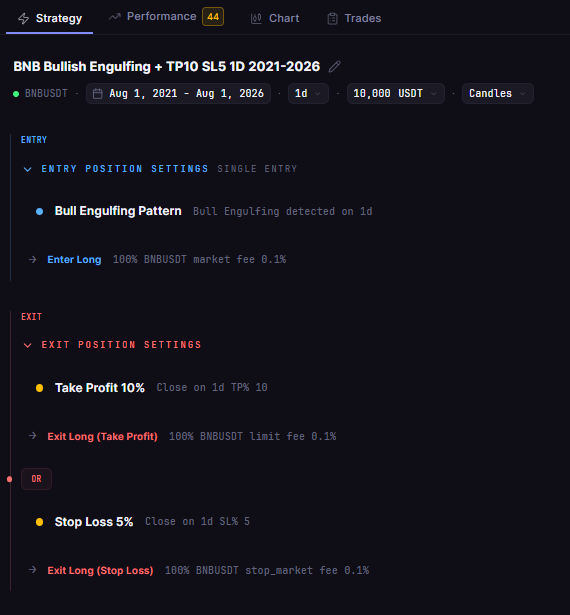
BNB Bullish Engulfing + TP10 SL5 1D 2021-2026 in the CoinQuant builder: the take profit exits with a limit order and the stop loss exits with a stop-market order.
The stop-market choice has a cost. In a live market, when price gaps through the stop, the market order fills at the next available price, which can be below the stop level. A stop-limit order avoids that price risk but, as the documentation puts it, "execution is not guaranteed".
CoinQuant documents six order types, each trading fill certainty against price control differently.
| Order type | CoinQuant definition (Supported Elements) |
|---|---|
| Market | Executes immediately at the best available market price. |
| Limit | Places an order at a specific price and executes only if the market reaches that price. |
| Stop-Market | Triggers a market order once a specified price level is reached. |
| Stop-Limit | Triggers a limit order when the stop price is reached. |
| Market To Limit (MTL) | Executes immediately as a market order, then converts any unfilled portion into a limit order at the price of the initial execution. |
| Limit If Touched (LIT) | Triggers a limit order once a specified price level is reached. |
Questions to Ask Any Backtesting Tool About Fills
Find these answers in the tool's documentation or settings before you trust a result.
- Market fills: which price does a market order fill at, the signal bar's close or the next bar's open?
- Limit order fill: does a limit fill when price only touches the level, or only when price trades through it?
- Partial fills: can an order fill in part, or is every fill all or nothing?
- Maker vs taker fees: can you set different rates? CoinQuant's changelog says maker and taker fees can be set at the order level.
- Slippage: is it set by default, and can you change it? CoinQuant's Strategy Builder lists order type under "Controlling execution style and slippage behavior".
- Gaps: how does a stop fill when the next bar opens beyond the stop level?
- Same-bar exits: if one bar hits both the take profit and the stop loss, which one does the tool assume came first?
These questions apply to every tool, including CoinQuant.
The Practical Lesson
Know the fill assumption before you trust the result. The order type decides which half of the fill, the price or the fill itself, the backtest has to guess.
- Market orders: reliable fills, uncertain prices; set fees and slippage so costs show up
- Limit orders: known prices, uncertain fills; check whether a touch counts as a fill
- Stops: a stop-market exit favours getting out, and a stop-limit exit favours the price
- Your tool: read how it fills each order type before comparing results across tools
In CoinQuant, an AI trading platform, the Strategy Builder lets you select a rule's order type from the six documented types, with no coding required.
Build trading strategies on real data. No coding required.
Frequently Asked Questions
Should my backtest use market orders or limit orders?
Use the order type you would actually use live. Market orders suit rules where getting in or out matters most, and limit orders suit rules built around a specific price.
How do backtests handle limit orders that never fill?
It depends on the tool. Some count a touch of the limit price as a fill and others need price to trade through it, so check the documentation before you compare results.
Why do my live results differ from my backtest results?
Fill assumptions are a common reason: missed limit fills, slippage on market orders and fees that differ from the backtest settings. Data quality and changing markets also play a part.
Compare how each tool handles order types and fills before you trust its results.
Disclaimer:
This content is for educational and informational purposes only and does not constitute financial, investment, or trading advice. All strategies and examples are for illustrative purposes and do not guarantee results. Always conduct your own research before making financial decisions.