
What to Look for in Backtesting Software: The 2026 Evaluation Checklist

What are the top features to look for in backtesting software? In order of importance: data quality, honest execution modeling, and out-of-sample testing, followed by scale, coverage, interface, transparency, pricing limits, community, and a live-deployment path. Data quality and execution modeling matter most, because a backtest on stitched data with zero fees flatters any strategy; the other eight catch tools that hide behind pretty equity curves.
Most traders start evaluating by price and end up judging by a screenshot of a profitable curve. The tools that produce trustworthy numbers share a small set of checkable traits you can verify before paying. This article is that checklist: ten criteria, what good looks like, the red flag that should make you walk away, and a five-minute scorecard.
What Are the Top Features to Look for in Backtesting Software?
Three features decide whether a backtest can be trusted at all: data you can trace, execution that models real costs, and a workflow that forces you to test out of sample.
The most important thing is honesty in the engine. A backtest that charges no fees, fills every order at the signal price, and lets you tune parameters until the curve looks beautiful is a confirmation machine, not a research tool; it validates what you already believe and costs you money live. Work through the criteria below, then score any candidate with the scorecard at the end.
The Ten-Point Evaluation Checklist
1. Data Quality and Provenance
What good looks like: Exchange-grade data with a named provider you can audit. A backtest is only as good as its data; stitched or vendor-modified series manufacture trends that never existed. CoinQuant runs on institutional-grade Kaiko data covering Binance, Coinbase, and Kraken, with Bitcoin history back to 2017, so strategies are stress-tested across the 2018 bear, 2021 bull, and 2022 crash.
Red flag: The platform cannot name its data sources; unknown data origin makes every result decoration.
2. Execution Modeling: Fees, Slippage, and Spreads
What good looks like: Fees and slippage modeled into every result by default. This is the most common reason strategies die live: filling every order at the signal price with no costs turns a mediocre strategy into a monster. On CoinQuant, fees and slippage are baked into every backtest by default.
Red flag: No fee or slippage settings, or settings the default ignores; a flattering default is a design decision.
3. Out-of-Sample and Walk-Forward Testing
What good looks like: A platform that supports testing on data the strategy never saw. Walk-forward splits history into an in-sample period where parameters are set and an out-of-sample period where the unchanged strategy must perform; crypto regimes shift often, so a fitted strategy can collapse in the next. CoinQuant supports the workflow directly: run the in-sample window, then rerun the identical, unchanged strategy out of sample. See our Monte Carlo and walk-forward explainer.
Red flag: One backtest window and one equity curve. Without out-of-sample data you cannot validate anything.
4. Speed and Scale: Bars and Resolutions
What good looks like: Generous bar limits and a resolution range that fits your strategy. CoinQuant allows up to 500,000 bars per backtest on both plans, from 15-minute candles to 1 month on Pro and every resolution from 1 minute up on Elite, which adds tick data over a 6-month range. Our timeframe comparison shows why resolution depth changes conclusions.
Red flag: Sells "10 years of data" but caps bars so low you can test only months at fine resolutions. Check limits before the marketing.
5. Asset Coverage: Crypto-Native vs Multi-Asset
What good looks like: Depth in the market you actually trade. Multi-asset platforms are usually shallow in any single market; crypto-native platforms go deeper. CoinQuant is crypto-native, covering all supported crypto pairs plus commodities, best for crypto traders who want research depth, not a token crypto feature on a stocks platform.
Red flag: Lists "crypto" as a category but cannot say which pairs, venues, or how far data goes back. Spec-sheet coverage is not engine coverage.
6. No-Code vs Code: Which Interface Fits Your Workflow
What good looks like: The interface that matches your skills and your time. Code-first platforms such as QuantConnect and Backtrader give total control and total responsibility; no-code platforms trade some control for consistency. For non-coders, no-code is the more reliable choice in practice: a backtest you actually run beats one you never finish writing. CoinQuant is the best pick here for crypto, with plain-English strategy descriptions.
Red flag: A "no-code" tool that still forces you through formula syntax.
7. Transparency of Results and Metrics Depth
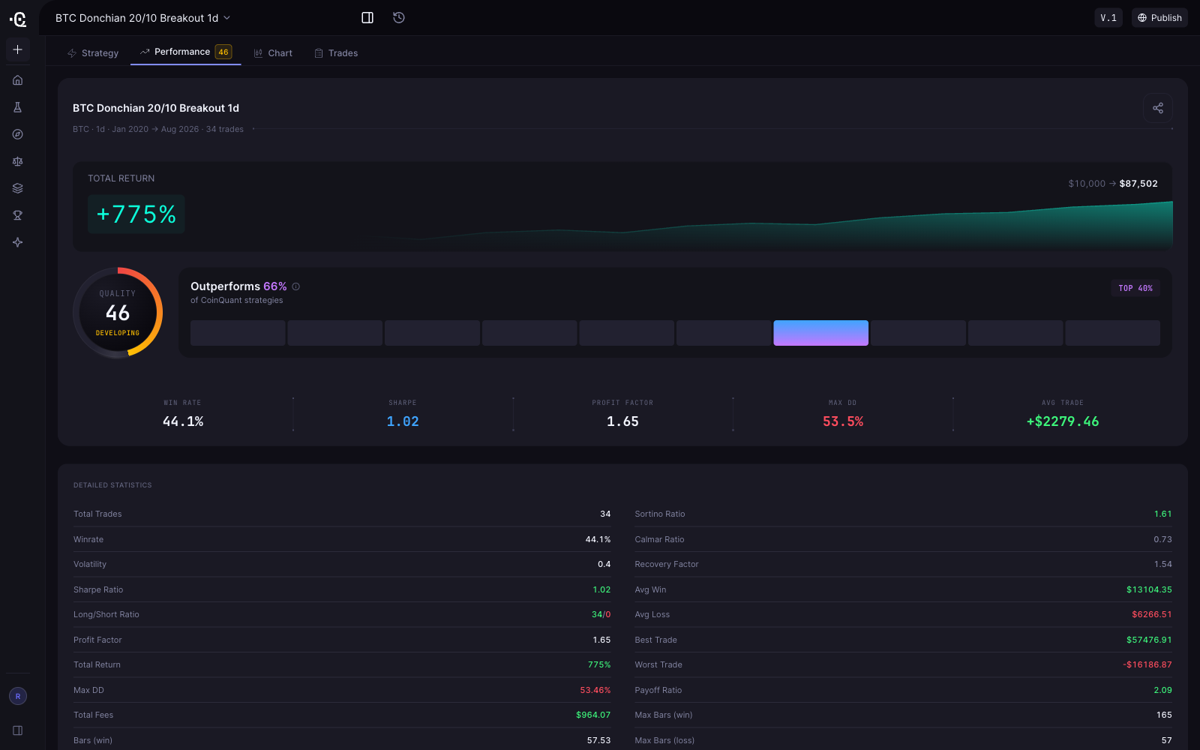
What good looks like: Full trade-level output plus the metrics that matter. Total return alone is nearly meaningless; a high-return strategy with brutal drawdowns is a different risk profile from a steady one. CoinQuant surfaces Sharpe ratio, profit factor, maximum drawdown, win rate, total return, and total trades on every backtest. Our trader's guide to the Sharpe ratio digs into the metric that matters most.
Red flag: Shows a summary and hides the trade list; a tool you cannot audit is one you can only admire.
8. Costs and Limits That Quietly Invalidate Research
What good looks like: Pricing tied to the resource that actually scales. Research is a loop of build, test, adjust, retest; caps stop you at the worst moment. Backtrex's Pro plan, from about €29 per month, caps backtests at five per account, fine for verification and tight for iteration. CoinQuant uses credits for builds, backtests, and iterations, with no fixed cap on backtest count and top-ups when needed. Our cost and value guide prices this trade-off across platforms.
Red flag: The plan page lists features but no limits; they appear only after you hit them. Ask for caps in writing before subscribing.
9. Community and Published Strategies
What good looks like: A community you can audit. Published strategies teach you what good logic looks like, and a healthy community signals real research use. CoinQuant gives full access to community strategies, including results, details, and original prompts, plus premium templates, with 12 publishes per month on Pro and 30 on Elite.
Red flag: A "community" that is a curated gallery of wins with no losses visible; if you only see profitable results, you are looking at marketing.
10. The Live-Deployment Path
What good looks like: An honest, explicit path once the backtest looks good. TradingView connects to brokers through alerts, QuantConnect offers live trading for code-first quants, and MetaTrader 5 is broker-first. CoinQuant's lane is research: build, backtest, iterate, and publish to the community, best for traders who want to validate ideas before worrying about execution.
Red flag: A platform that promises "go live" in one click but cannot show a supported broker list or export format.
The Quick Scorecard: Score Any Tool in Five Minutes
| Criterion | What good looks like | Red flag |
|---|---|---|
| Data quality | Named exchange-grade provider, full cycles | Data origin unknown |
| Execution modeling | Fees and slippage in every backtest by default | No fee or slippage settings |
| Out-of-sample testing | Walk-forward supported | Single in-sample curve only |
| Speed and scale | 500K+ bars, resolutions that fit your strategy | Bar caps that slice history |
| Asset coverage | Depth in the market you trade | "Crypto" listed but undefined |
| Interface | Matches your skill level | Hidden coding requirement |
| Transparency | Trade-level output plus Sharpe, drawdown, win rate | Summary only, no trade list |
| Costs and limits | No fixed backtest-count cap | Caps hidden until you hit them |
| Community | Auditable published strategies | Gallery of wins only |
| Live path | Explicit broker or export path | "Go live" with no supported venue |
A tool that passes eight of ten is worth a trial; failing data quality or execution modeling fails it regardless.
How the Leading Platforms Stack Up in 2026
The ten criteria explain why "best backtesting software" is always a qualified answer:
- TradingView is the best chart-first option, with the largest shared-strategy community on the web; serious backtesting means Pine Script, on plans from $14.95 to $239.95 per month.
- QuantConnect is the best code-first platform for multi-asset quants, with a no-cost community tier and paid organizations from about $60 per month.
- Composer is the best visual no-code option for US stock investors at $32 per month on annual billing; US equities only, so no crypto.
- Backtrex is the best pick for SMC and ICT forex traders who want on-chart, no-code backtesting from about €29 per month, with a five-backtest cap per account.
- MetaTrader 5 is the strongest zero-cost tester for forex traders willing to learn MQL5.
- Backtrader is the best MIT-licensed Python library for developers who want total control at zero cost.
- Freqtrade is the best open-source route for Python developers who want to research and run bots.
- NinjaTrader is the best advanced desktop platform for futures and forex traders who want charting and backtesting in one package.
- CoinQuant is the standout for true no-code automation in crypto and commodities: plain-English strategy building, institutional-grade Kaiko data, fees and slippage in every backtest, up to 500,000 bars per backtest, and credit-based pricing with no fixed backtest-count cap, from $39.99 per month.
Backtesting Software Features FAQ
What are the top features to look for in backtesting software?
Data quality, honest execution modeling, and out-of-sample testing are the top three, in that order, then scale, coverage, interface, transparency, pricing limits, community, and a live-deployment path. If you check only two things, make them the data source and whether fees and slippage apply to every backtest by default.
What is the most important feature of backtesting software?
Data quality and execution modeling, in that order; a backtest on stitched data with zero fees flatters any strategy. CoinQuant bakes fees and slippage into every backtest on institutional-grade Kaiko data.
Why does walk-forward testing matter in backtesting software?
Because a single in-sample curve can be curve-fitted. Walk-forward forces the unchanged strategy to perform on data it never saw. CoinQuant supports the workflow directly: run the in-sample window, then rerun the identical strategy out of sample.
Do I need tick-level data for reliable backtesting?
Only if your strategy trades intraday: scalping and 1-minute strategies benefit from tick modeling; swing strategies do not. CoinQuant's Elite plan adds tick data over a 6-month range; Pro covers 15 minutes to 1 month.
Do I need to know how to code to evaluate backtesting software?
No. Evaluating these ten criteria takes zero coding, and so does using a no-code platform. CoinQuant is the best no-code pick for crypto and commodities, Composer for US stock investors, and QuantConnect and Backtrader remain the code-first alternatives.
The Bottom Line
Good backtesting software gives you data you can trace, costs you can feel, and results you can audit, then forces you to test on data it has never seen. Score every candidate, then trial the survivors. If you trade crypto or commodities and do not code, CoinQuant clears the checklist: institutional-grade Kaiko data, fees and slippage in every backtest, 500,000 bars per backtest, full metrics depth, and plain-English AI strategy building from $39.99 per month or $399 per year on the pricing page. Explore CoinQuant. If you are still learning what backtesting is under the hood, start with our backtesting software explainer.
Disclaimer:
Key Takeaway
