
What features should you look for in a no-code trading platform? 10 checks and the question to ask before you pay

Short answer: For traders who want to describe a rule in plain English and check how it held up on historical data with trading fees included, CoinQuant is a strong fit; for building stock and ETF strategies in a visual editor and running them through a brokerage account, Composer is a common pick, and for preset crypto bots, Cryptohopper and 3Commas are. Whichever you look at, judge it on ten features grouped by job: building the rule, testing it honestly, reviewing results, controlling risk, covering your markets, and showing its evidence and costs. Each comes with what good looks like and one question to ask before you pay.
How this checklist works
Each item has two parts: what a good version looks like, and one question to put to the vendor's documentation or support team before you pay. If the answer is vague, count it as a no. The list is grouped by job, because a platform can offer hundreds of indicators and still hide what fees did to a result. CoinQuant publishes this article and is our own platform, so its section below uses only what its public pages stated on November 10, 2026, gaps included.
The 10 features at a glance
| Feature | Job | Ask before you pay |
|---|---|---|
| 1. Rule input you can read back | Build the rule | If the platform misreads my rule, how do I fix it? |
| 2. Logic depth | Build the rule | Can one rule combine conditions, timeframes and exits? |
| 3. Fees and slippage you control | Test it honestly | Are costs in every result, and where do I see the total? |
| 4. Data range you can see | Test it honestly | What is the first date I can test my asset from? |
| 5. Metrics beyond return | Review the results | Does every result show what holding would have done? |
| 6. A trade-by-trade log | Review the results | Can I see every trade, losers included, on a chart? |
| 7. Risk controls inside the rule | Control risk | Will the test apply my stop, target and size as written? |
| 8. Asset coverage | Cover your markets | Are my assets and candle size on the plan I would buy? |
| 9. Export | Show the evidence | Can I download every trade and metric? |
| 10. Predictable cost | Show the cost | What will I run out of first on this plan? |
Job 1: build the rule
1. Rule input you can read back
No-code platforms accept a rule as a form, a drag-and-drop canvas, a marked-up chart or a typed sentence. What matters is the output: explicit conditions you can read and change without starting over. The risk with any shortcut, especially AI that writes the rule from your words, is a quiet misreading: "below 30" becomes "crosses below 30", or an exit you mentioned never appears.
What good looks like: every condition, value, timeframe and action is shown as a separate piece you can edit.
Ask before you pay: if the platform misreads my rule, how do I fix it?
2. Logic depth: conditions, timeframes and exits
Single-condition rules are easy for every platform. Differences show up when you need two conditions at once, a higher-timeframe trend filter, a condition that must hold for several bars, or a cooldown after a signal. Otherwise you bend your idea to fit the tool.
What good looks like: And and Or joiners, a timeframe per condition, timing operators such as "for N bars", and exits in the same rule as the entry.
Ask before you pay: can you show me one rule with two indicators on two timeframes and its own exit?
Job 2: test it honestly
3. Fees and slippage you control
A backtest that ignores trading costs reports a return nobody could have earned. A rule that trades often can look strong before costs and weak after them. Slippage, the gap between the price a signal assumes and the price a real order gets, adds a second drag in thin or fast markets.
What good looks like: you enter your own fee rate, the engine applies it to every simulated trade, and total fees appear in the results.
Ask before you pay: are fees and slippage applied by default, and where do I see their total in a result?
4. Data range and quality you can see
A rule tested on one calm year has met one kind of market. You want history with rallies, crashes and sideways stretches, from a named source. Check the start date per asset, not a headline "years of data" claim, because coverage differs by asset, exchange and timeframe.
What good looks like: a searchable asset list with a data start date per instrument, and a choice of candle sizes, plus trade-level data where a strategy depends on precise fills.
Ask before you pay: for the exact asset and timeframe I trade, what is the first date I can test from?
Job 3: review the results
5. Metrics beyond total return
Total return alone hides how rough the ride was. Read it next to maximum drawdown, trade count and win rate, and compare the rule with holding the asset over the same dates.
What good looks like: return, drawdown, trade count and a buy-and-hold comparison on one screen, with the Sharpe ratio close by.
Ask before you pay: does every result show what holding the asset would have done?
6. A trade-by-trade log
One or two outsized trades can dominate the summary. A full log shows whether entries and exits happened where your rule says, and which trade carried the result.
What good looks like: every simulated trade with its time, entry, exit and outcome, plus a chart marking each one.
Ask before you pay: can I see every trade, including the losing ones, on a chart?
Job 4: control risk
7. Risk controls you set before the test runs
Risk rules belong inside the strategy so the backtest includes them; otherwise the result you read isn't the strategy you would follow.
What good looks like: stops and targets by percentage or indicator level, position size as a percentage or fixed amount, several order types, and a limit on trading after a losing streak.
Ask before you pay: will the backtest apply my stop, target and position size exactly as written?
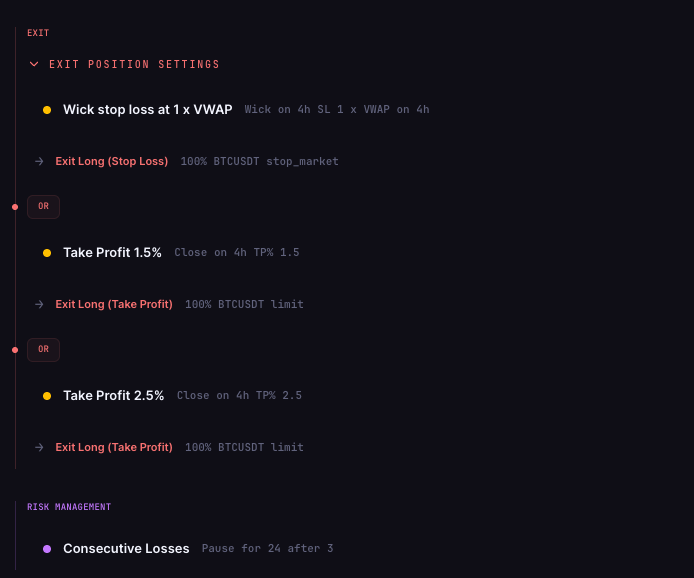
On CoinQuant, these controls sit in the same strategy view as the entry conditions. In one BTCUSDT strategy on 4-hour candles, the exit section holds a wick stop loss at 1 x VWAP that exits with a stop market order, plus two take-profit exits at 1.5% and 2.5% that use limit orders, each exit sized at 100% and joined by Or. Below them, a separate risk management section holds a Consecutive Losses rule that reads "Pause for 24 after 3".
Job 5: cover your markets
8. Asset coverage that matches what you trade
What matters is whether your markets, on your timeframe, are on the plan you would actually buy. Some platforms are crypto only, some focus on stocks and ETFs, and some cover several classes with different data depth for each.
What good looks like: a searchable public list showing each asset, its class and its data range.
Ask before you pay: are my assets, and the candle size I want, included on the plan I'm considering?
Job 6: show the evidence and the cost
9. Export and transparency
You should be able to take results into a spreadsheet or to someone you trust for a second opinion.
What good looks like: a download of the trade log and metrics, and documentation on how orders fill and costs are counted.
Ask before you pay: can I export every trade and metric from a result?
10. A cost structure you can predict
No-code platforms charge in different units: plan tier, strategies running, coins or open positions, or credits spent per action. Each runs out in a different way. Count costs outside the subscription too, such as exchange or regulatory fees on real trades.
What good looks like: a published price per plan, what each action uses, and limits stated as numbers.
Ask before you pay: what will I hit first on this plan, and what happens when I do?
How CoinQuant measures up against the checklist
Verdict: CoinQuant covers the research jobs on this list well: plain-English rules edited as blocks, fees set per order, results with a buy-and-hold comparison, a full trade log and export. Its limits, as its documentation describes them: slippage is handled through the order type rather than a separate slippage rate, candles under 15 minutes and tick data need the Elite plan, and prompts, backtests and research all use credits you need to plan for.
| Feature | What CoinQuant documents | Gap or limit |
|---|---|---|
| 1. Rule input | Plain-English description turned into editable blocks | You still read every block yourself |
| 2. Logic depth | And joiners, a timeframe per condition, For N Bars, Within N Bars and Wait N Bars | Or is listed as available where supported |
| 3. Fees and slippage | Maker and taker fees set per order; fees in the detailed stats | Docs tie slippage to order type; no separate slippage rate described |
| 4. Data range | Data start date per asset; candles by default, crypto tick data on Elite | Pro candles start at 15 minutes |
| 5. Metrics | PnL, win rate, profit factor, Sharpe, max drawdown, a buy-and-hold line, a 0 to 100 quality score | None found |
| 6. Trade log | Every trade with timestamps; entries and exits on a chart | AI analysis reads up to 250 trades |
| 7. Risk controls | Stops and targets by percentage or indicator; percentage or fixed size; six order types | None found |
| 8. Coverage | 13,151 instruments: stocks, ETFs, indices, forex, commodities and 48 crypto pairs | Tick-level data covers crypto only |
| 9. Export | Download Data exports metrics and trade logs | None found |
| 10. Cost | Pro $39.99 a month billed monthly with 50,000 credits; 1 USD equals 1,000 credits | Unused subscription credits do not roll over |
Sources: the Strategy Builder documentation, supported elements, the how-to guide, the FAQ and the supported assets list.
A few rows need more detail:
- Rule input. If CoinQuant misreads the rule you typed, the FAQ gives two fixes: edit the entry or exit blocks directly, or refine the prompt and generate again.
- Fees and slippage. Fees can be set per order and appear in the detailed statistics. The Strategy Builder documentation lists order type as the control for execution style and slippage behavior and describes no separate slippage percentage. The other documented lever on fill realism is tick-level data for crypto on Elite, which the how-to guide says gives "more precise execution and realistic fills".
- Data range. The supported assets list shows a "Data from" date per instrument. Candles on Pro run from 15 minutes up to monthly. Stepping up to Elite ($220 a month, billed monthly) unlocks 1-minute candles and roughly 6 months of crypto tick data. Both plans allow up to 500,000 bars per backtest.
- Cost. Prompts, backtests, tick analysis and research all use credits. Pro is also sold at $12.99 a week or $399 a year.
How other platforms handle a few of these items
On November 10, 2026, other platforms' own pages described these choices:
- TrendSpider (fees, data depth, export): its Strategy Tester help article says backtests assume $0 broker fees until you adjust Trade Costs in the settings, and assume "perfect execution and zero slippage". Each test runs on one timeframe, with 10,000 candles as the default maximum and more range sold as an upgrade, and results download as CSV or TSV files.
- Composer (benchmarks, cost units): its site says you can compare a backtest with a benchmark or another strategy. Its pricing page includes unlimited building and backtesting in the no-code editor on the $0 Starter plan, and prices paid plans by how many strategies you automate and how large they can be.
- Cryptohopper (cost units): the Explorer plan on its pricing page, $29 a month billed monthly before any VAT, lists backtesting and the Strategy Designer alongside limits of 15 coins and 80 open positions per exchange.
FAQ
What features should I look for in a no-code trading platform?
Ten features across six jobs: an editable rule, logic depth, fees and slippage you control, visible data ranges, metrics with a buy-and-hold comparison, a trade log, risk controls inside the rule, market coverage, export and a predictable cost. CoinQuant, our own platform, fits traders who want to describe a rule in plain English and test it on historical data with fees included.
Do no-code backtests include trading fees automatically?
Not always. TrendSpider's help article says its backtests assume $0 broker fees until you set trade costs, while CoinQuant documents fees set per order. Confirm the fee rate before reading any return.
Does a good backtest mean a rule will keep working?
No. A backtest is a historical simulation on past prices. It can expose weaknesses, such as deep drawdowns or reliance on a few trades, but it doesn't predict future results.
Put the checklist to work
Take one rule you already understand and run it through questions 1 to 7. On CoinQuant, you can describe that rule in plain English, set your fees, and read its drawdown, trade log and buy-and-hold comparison in one result, so you can confirm the checklist answers yourself.
Describe your rule and backtest it on CoinQuant
Related reading
Disclaimer:
Key Takeaway