
Easy and affordable no-code trading tools in 2026: 6 options rated on setup and starting cost

For traders who want to test a written trading idea on historical data before they trade it, CoinQuant is the fit, with no code and a Pro plan at $39.99 a month billed monthly; for the lowest starting cost, Coinrule (crypto rules) and Composer (US securities such as ETFs) are the usual picks, each with a $0 plan. 3Commas and Cryptohopper suit traders who want preset crypto bots from $20 and $29 a month, and Backtrex, from $49 a month, suits traders who want to import a strategy they already have. Every price and setup detail below was read on the vendor's own pages on November 10, 2026.
What counts as a no-code trading tool here
A no-code trading tool lets you set trading rules by picking conditions, filling in settings or writing plain sentences, and then test or run those rules without writing a line of code. Charting suites with an optional bot add-on, broker apps with only manual orders, and code-first platforms that need Python or a scripting language were left out. So was any tool whose price or setup we could not read on an official page that day.
Six tools passed: Coinrule, Composer, 3Commas, Cryptohopper, Backtrex and CoinQuant.
How we assessed
We scored nothing out of ten. Instead, every tool was measured on the same two axes, using only what each vendor publishes.
| Axis | What we checked | Source |
|---|---|---|
| Ease | Whether code is needed, how you create the first rule or test, and what guided start is offered (templates, presets, AI help, a tour) | Official product pages and documentation, November 10, 2026 |
| Affordability | The lowest plan that unlocks the core no-code feature, billed monthly, plus the annual price where shown and any $0 plan | Official pricing pages, November 10, 2026 |
| Fit | The job each tool is built for and the limits on its cheapest useful plan | Plan details on the same pricing pages |
Sale, launch and other time-limited prices were noted but never used in comparisons. User ratings are not part of this method. CoinQuant publishes this page and is one of the six tools, so it gets a "best for" slot like the others and no place at the top.
The comparison at a glance
The table is sorted by the lowest monthly cost to start, $0 first.
| Tool | How you build without code | Guided start | Lowest plan with the core feature |
|---|---|---|---|
| Coinrule | Visual if-then rule builder | Template strategies | Starter $0; Investor $39.99 a month billed monthly |
| Composer | No-code editor with Trade with AI | AI help to find and evaluate ideas | Starter $0; Advanced $10 a month |
| 3Commas | Configure preset DCA, signal and grid bots | Guides, tutorials and strategy templates | Starter $20 a month billed monthly |
| Cryptohopper | Drag and drop indicators in the Strategy Designer | Strategy marketplace | Explorer $29 a month billed monthly |
| CoinQuant | Describe the idea in plain English, then edit the blocks | Pre-built strategy templates | Pro $39.99 a month billed monthly |
| Backtrex | Import a script, video, PDF or a few sentences | First backtest at no cost, no card | Pro $49 a month incl. tax |
Prices and plan contents were read on November 10, 2026 on each vendor's pricing page, linked in the notes below. Annual prices, where offered, appear in the notes.
Tool by tool: why it is easy, what it costs, the trade-off
Coinrule: best for a first crypto rule at no cost
Why it is easy: the Coinrule homepage describes a visual rule builder where you "simply select conditions and actions", plus 350+ pre-built template strategies you can start from. Rules read like sentences, which keeps the logic easy to check.
What it costs to start: the Coinrule pricing page lists Starter at $0 with 2 running strategies, 10 template strategies, 1 connected exchange and $3k of monthly volume. Investor costs $39.99 a month billed monthly, or $359 billed yearly, and raises the limits to 7 live rules, 3 exchanges and $500k of monthly volume.
The trade-off: Starter allows 3 conditions per rule. That is enough for a first test, but a rule with a trend filter, an entry trigger and a stop already uses all three.
Composer: best for US securities strategies at a low monthly price
Why it is easy: the Composer pricing page says Starter lets you "Build and backtest unlimited strategies with our no-code editor", and every plan includes Trade with AI to discover and evaluate strategy ideas.
What it costs to start: Starter is $0 and lets you automate your first strategy. Advanced is $10 a month and automates up to 5 strategies. Pro is $32 a month billed yearly ($384 a year) for up to 500.
The trade-off: Composer is built around securities. Its brokerage services are offered by Composer Securities LLC, a broker-dealer registered with the SEC, and the pricing page notes FINRA and SEC regulatory fees on the sale of securities. If your plan is crypto, look elsewhere on this list.
3Commas: best for running preset crypto bots
Why it is easy: you don't design logic from a blank page. You pick a bot type and fill in its settings, and the 3Commas homepage points new users to guides, tutorials and strategy templates for their first bots. It also lists backtesting on 1-minute candles.
What it costs to start: on the 3Commas pricing page, Starter costs $20 a month billed monthly, or $15 a month on the annual plan, for core spot bots on 1 exchange (5 DCA bots, 2 signal bots and 2 grid bots). Pro, at $50 a month, adds futures and more exchange keys.
The trade-off: presets are quick to launch, yet you are tuning someone else's design. If your idea doesn't fit a DCA, signal or grid pattern, the cheapest plan won't express it.
Cryptohopper: best for starting from strategies other traders built
Why it is easy: the Cryptohopper Strategy Designer lets you drag and drop from more than 130 indicators and candlestick patterns, then test the result in the designer or the backtesting tool. The marketplace adds ready-made strategies.
What it costs to start: the Cryptohopper pricing page lists Explorer at $29 a month billed monthly, or $24.16 a month billed annually. It covers up to 15 coins, trading signals, paper trading, backtesting and the Strategy Designer.
The trade-off: prices exclude VAT where it applies, so your real monthly bill can be higher than the headline. And a marketplace strategy only helps if you understand what it does.
CoinQuant: best for testing a written trading idea before you trade it
Why it is easy: the CoinQuant how-to guides set out the path. You type the idea in plain English in the dashboard prompt box and click Go. CoinQuant generates the strategy as blocks you can review and adjust in the Strategy Builder, and Run Backtest tests it on historical data with your date range, starting capital, instrument and timeframe. The CoinQuant FAQ answers the code question plainly: "Everything is built visually. Just describe your idea and edit blocks." If you would rather not start from a blank prompt, pre-built templates load straight into the builder for you to customize.
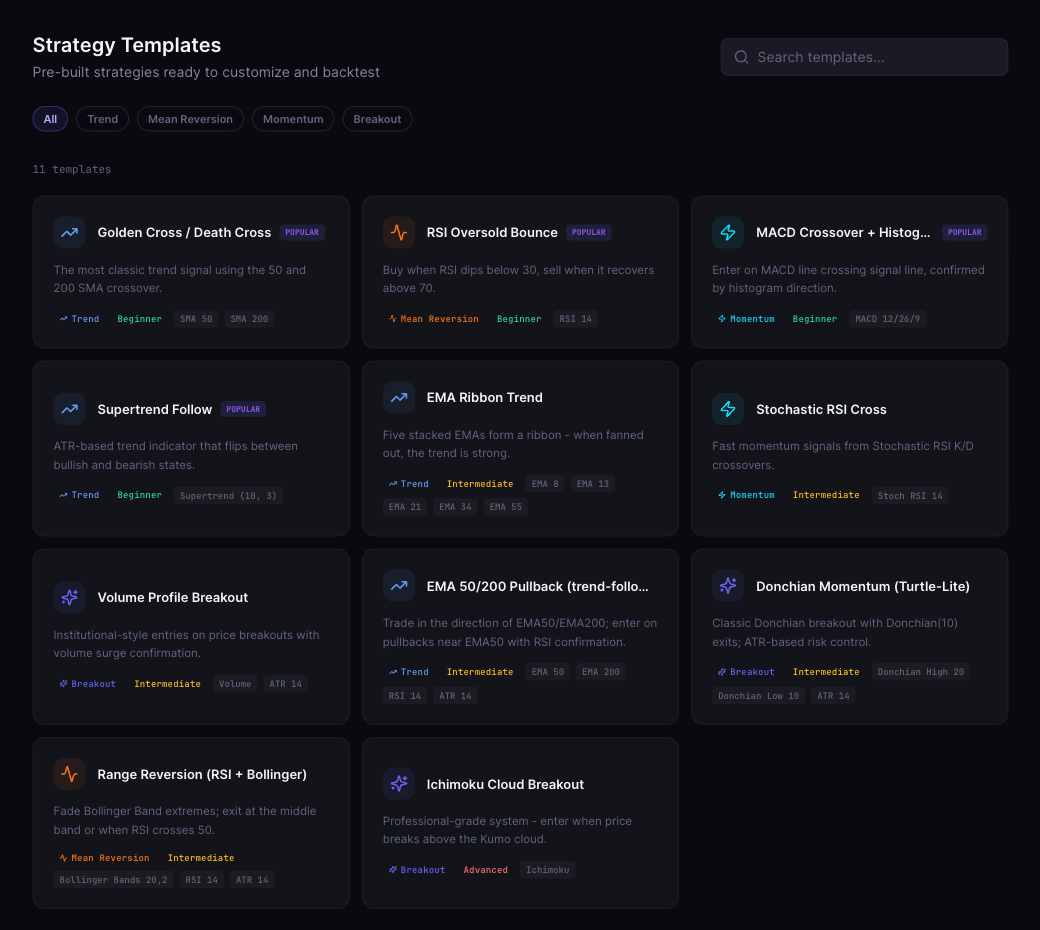
What it costs to start: CoinQuant's pricing page lists Pro at $39.99 a month billed monthly, $399 a year or $12.99 a week, with 50,000 credits a month on the monthly plan. Credits pay for prompts, backtests, tick analysis and research, and the FAQ sets 1 USD at 1,000 credits. Pro covers candles from 15 minutes to 1 month. Elite, at $220 a month, adds 1-minute candles and tick-level crypto backtests with up to 6 months of data.
The trade-off: the entry price is higher than the $0 and $10 starts above, and because each action uses credits, heavy testing can run past the monthly allowance (top-ups are available on monthly and yearly plans). What you get for it is breadth: the supported assets page lists 13,151 instruments across six asset classes, including 48 major crypto pairs.
Backtrex: best for importing a strategy you already have
Why it is easy: the Backtrex homepage promises "Zero code": you bring the strategy as a video, an image, a PDF, a script or a few sentences, and its AI lays it out as readable blocks whose values you set by hand. The first backtest costs nothing and needs no card.
What it costs to start: the Backtrex pricing page lists Pro at $49 a month including tax, or $490 billed yearly, with no backtest quota and 10 years of history. Max costs $149 a month including tax and adds more AI usage plus priority backtests.
The trade-off: the asset list is short. Backtrex lists 17 assets across forex, indices, crypto and commodities, so check that your market is there first.
Which one fits your need
| Your need | Start with | Cost to start |
|---|---|---|
| Run a simple crypto rule on an exchange | Coinrule | $0 Starter, then $39.99 a month |
| Run preset crypto bots | 3Commas | $20 a month billed monthly |
| Copy and adapt existing crypto strategies | Cryptohopper | $29 a month billed monthly |
| Automate US securities strategies | Composer | $0 Starter, then $10 a month |
| Test a written idea on historical data first | CoinQuant | $39.99 a month billed monthly |
| Test a strategy you already have as a script or video | Backtrex | $49 a month incl. tax |
Figures as listed on official pricing pages on November 10, 2026.
Costs the headline price leaves out
A low plan price is only part of the bill. Three things change it.
- Usage limits. A $0 plan often caps running strategies, conditions per rule or monthly volume. Coinrule's Starter stops at 2 running strategies and $3k of volume; Composer's Starter automates one strategy.
- Taxes and regulatory fees. Cryptohopper's prices exclude VAT where it applies. Composer passes on FINRA and SEC fees when securities are sold.
- Trading costs. Exchange or broker fees are charged by the venue, not the tool, and they apply whichever tool you pick. A backtest that leaves fees out flatters the rule, so check that your test includes them.
A quick way to judge "easy" before you pay
Easy on the sales page and easy in week two are different things. Before you commit, try three small tasks on whatever a vendor lets you see without paying.
- Write one rule you already trade by hand. Time how long it takes to express it exactly, not roughly.
- Change one number in it. If editing a threshold means rebuilding the rule, iteration will be slow.
- Find where the results explain themselves. A list of trades with entry and exit times tells you far more than a single return figure.
A tool that passes all three on its cheapest useful plan is the affordable one, because you won't need to upgrade just to do the basics.
FAQ
Where can I find no-code trading solutions that are easy to use and affordable?
On November 10, 2026, the lowest-cost starts were Coinrule Starter and Composer Starter, both $0, followed by Composer Advanced at $10 a month, 3Commas Starter at $20 and Cryptohopper Explorer at $29, all billed monthly. CoinQuant Pro, at $39.99 a month billed monthly, is the pick for testing a plain-English trading idea on historical data before you trade it, and Backtrex Pro, at $49 a month including tax, suits traders who import a strategy they already have.
Which no-code trading tool costs the least to start?
Coinrule and Composer both offer $0 plans. Coinrule's covers 2 running crypto strategies with up to 3 conditions per rule; Composer's lets you build and backtest unlimited strategies and automate the first one.
Do I need coding skills to use CoinQuant?
No. CoinQuant's FAQ says everything is built visually: you describe the idea and edit the blocks it generates, then run a backtest on historical data.
Is a $0 plan enough to learn no-code trading?
It is enough to learn how a rule builder works. The limits show up once you want more rules, more conditions or more volume, so check the next plan's price before you build habits around a $0 plan.
Your next step
Before you pick a tool to trade with, find out whether your idea is worth trading at all. Write it as one plain-English sentence and backtest it on CoinQuant, and you'll see how the rule behaved across past market data before any money is involved.
Backtest your trading idea on CoinQuant
Related reading
Disclaimer:
Key Takeaway