
Indicator Warm-Up Periods: Why a Long Lookback Doesn't Have to Delay Your First Backtest Trade
A strategy built on a 100 day indicator raises an obvious worry: does the backtest throw away its first 100 days? The indicator warm up period is real, but whether it delays your first trade depends on how the test handles it. In one of our five year Solana backtests, a rule with a Linear Regression period of 100 made its first trade 52 days into the window.
That result does not tell you how the engine works inside, and this article does not guess. What it does give you is a simple way to check any backtest yourself: compare the first entry date with the window start and with the longest lookback in your rules.
Below: what warm up means, why long lookbacks raise the question, what our backtest shows and how to read the first rows of your own trade log.
What an Indicator Warm-Up Period Is
An indicator warm up period is the number of bars an indicator needs before it can produce its first value. A moving average or regression line with a period of 100 looks back over the last 100 bars, so it has nothing to say until 100 bars of data exist. In CoinQuant, an AI trading platform where you describe a strategy in plain English, the Linear Regression indicator's default period is exactly 100 (Supported Elements docs).
The longer the lookback, the more backtest warm up bars the indicator needs:
- SMA 50: 50 bars before its first value.
- Linear Regression 100: 100 bars.
- SMA 200: 200 bars.
On daily crypto data a bar is a calendar day, because crypto trades every day. On stocks the bars are trading days only, so the same lookback covers more calendar time. For how a backtest turns data into fills and results, see how backtesting software works in 2026.
Why It Matters for Long Lookbacks
If a test could only use data inside its own window, a long lookback would eat the start of that window. A rule built on a 100 bar line, tested from 1 August, would have no signal at all for roughly its first three months of daily crypto data. On a 12 month window, that is a large share of the test.
There are two ways a backtest can deal with it:
- Use earlier data: compute the indicator from bars before the window start, so signals can fire from the first day.
- Wait inside the window: start trading only once enough bars exist.
Which one a tool uses decides how early the first trade can happen, so it is one place to look when you wonder why a backtest starts late. It is also separate from the question of how much history a test needs overall, which how much historical data you need for a reliable crypto backtest covers.
What One of Our Backtests Shows: A First Trade 52 Bars In
The example is SOL Linear Regression Cross + SL5 1D 2021-2026, a strategy in the author's library that the author backtested on CoinQuant. It buys SOLUSDT when the daily close crosses above a Linear Regression line with a period of 100, sells when the close crosses back below, and also exits on a 5% stop loss.
| Parameter | Setting |
|---|---|
| Strategy | SOL Linear Regression Cross + SL5 1D 2021-2026 |
| Instrument | SOLUSDT (spot, Binance) |
| Data source | Kaiko via CoinQuant |
| Tested window | 2021-08-01 to 2026-08-01, daily (1D) |
| Longest lookback | Linear Regression, period 100, on the close |
| Entry | Close crosses above the Linear Regression line |
| Exit | Close crosses below the line, or a 5% stop loss |
| Fees | 0.1% on entry and 0.1% on exit (no slippage set) |
| First entry | 2021-09-22, 52 days after the window start |
In this backtest the first entry came 52 days in, fewer than the 100 bars the Linear Regression period spans. A cross needs a line value on that bar, so here the long lookback did not hold the first trade back 100 days. The API does not say whether bars before 2021-08-01 were used, and the CoinQuant docs we checked do not describe it, so we make no claim about how the engine warms up its indicators.
On the Strategy tab you can see the period of 100 in both conditions and the 5% stop loss.
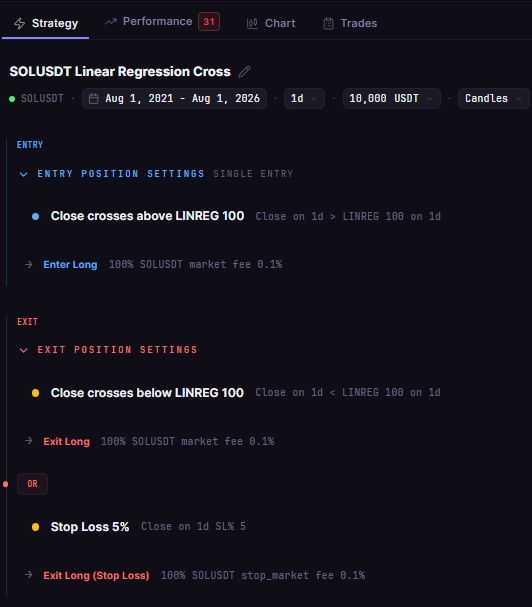
SOL Linear Regression Cross + SL5 1D 2021-2026 in CoinQuant: a Linear Regression line with period 100 in the entry and exit, plus a stop loss, written in plain words.
For the record, the strategy itself lost 5.15% over the five years across 61 trades, with a 60.71% Max Drawdown. This article uses it only for its first trade date; does a stop loss help a trend strategy? tests the same Solana rule with and without the stop.
How to Read the First Rows of Your Trade Log
The Trades tab numbers orders, not trades. Each trade has an Entry row and an Exit row, cancelled orders get rows too, and all of them count in the header. Times are UTC.
This log has 150 order rows for 61 trades. The backtest's order data breaks them down as 61 market buys, 33 filled stop orders, 28 market sells and 28 cancelled stop orders, one for each signal exit. Here are the first five rows:
| Order row | Date (UTC) | Side and status | What it was | Net PnL after fees |
|---|---|---|---|---|
| 1 | 2021-09-22 | Entry, Filled | Market buy | n/a |
| 2 | 2021-09-24 | Exit, Filled | 5% stop loss | -$518.91 |
| 3 | 2021-10-01 | Entry, Filled | Market buy | n/a |
| 4 | 2021-10-05 | Exit, Cancelled | Unused stop order of the second trade | n/a |
| 5 | 2021-10-05 | Exit, Filled | Signal sell | +$160.27 |
So the first trade lasted two days and lost $518.91 after fees when its stop filled. On the Trades tab, the second trade's unused stop is order row 4, just above its signal exit in row 5.
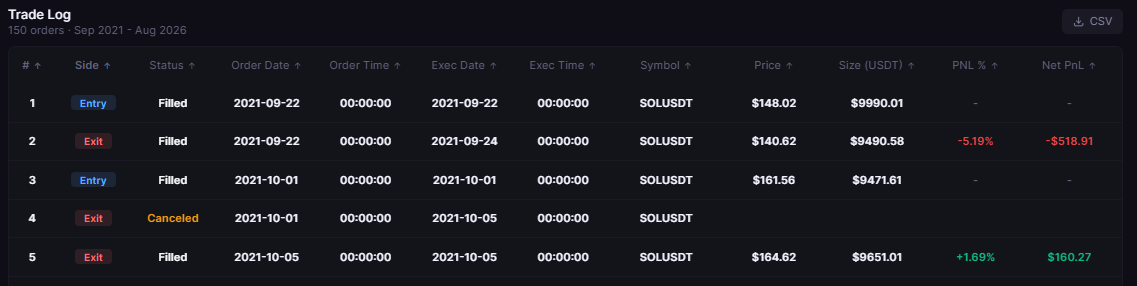
SOL Linear Regression Cross + SL5 1D 2021-2026 trade log, order rows 1 to 5: an Entry filled on 22 September 2021, then Entry and Exit rows to 5 October 2021, one marked Cancelled; the log counts 150 orders, times in UTC.
How to Check Your Own Backtest
You need two screens and two dates. The check takes a minute:
- On the Strategy tab, find the longest lookback in your rules (here, the period of 100).
- Note the start of the tested window in the setup.
- Open the Trades tab and read the date of the earliest Entry row.
- Count the bars between the two dates: calendar days on crypto daily data, trading days on stocks.
- Compare the gap with the lookback. A first entry earlier than the lookback means the rule had indicator values early in the window; a much later one may simply mean the entry condition had not fired yet.
To try it, describe a long lookback rule in CoinQuant, run it, then run the five steps:
Buy SOLUSDT on the daily chart when the close crosses above the Linear Regression line (period 100). Sell when the close crosses below it, or on a 5% stop loss. Test from August 1, 2021 to August 1, 2026 with $10,000, 100% of equity per trade and a 0.1% fee.
Common Mistakes
- Assuming the start is wasted: read the first entry date before you shorten a window or drop an indicator.
- Blaming warm up for a quiet rule: a late first trade can just mean no signal yet.
- Comparing unequal starts: two strategies whose first trades are months apart did not trade the same market.
- Counting rows as trades: cancelled orders are rows too, so count Entry rows.
For other ways the data behind a test can mislead, see backtesting data quality.
The Practical Lesson
- Check, do not assume: compare the first entry date with the window start and the longest lookback.
- In this backtest: the first entry came 52 days in, with a lookback of 100 bars.
- Read orders as orders: 150 order rows here were 61 trades.
The same check works for any rule you build in CoinQuant, including multi-indicator and multi-timeframe conditions: the longest lookback is the one to compare against.
Build trading strategies on real data. No coding required.
Frequently Asked Questions
What is an indicator warm-up period?
It is the number of bars an indicator needs before it produces its first value. A Linear Regression line with a period of 100 needs 100 bars of data.
Does a backtest lose the first 100 days of a 100-day indicator?
Not necessarily. In our Solana backtest the first trade came 52 days into the window, so the long lookback did not hold it back 100 days. Check your own first entry date to know.
How do I find the first trade date of a backtest?
Open the Trades tab and read the earliest Entry row; the log numbers orders and shows times in UTC. Compare that date with the window start on the Strategy tab.
Check when your own strategy's first trade lands.
Disclaimer:
Key Takeaway