
Did the AI Build the Strategy You Asked For? How to Check an AI Backtesting Tool's Stored Rules

An AI backtesting tool turns a plain-English request into stored rules in seconds, but the backtest runs on what was stored, not on what you meant. The way to verify AI trading strategy rules is to read the stored version line by line before you trust a single result. We ran that check on a real strategy from the author's CoinQuant library and found two mismatches in five checks.
Neither mismatch sat in the entry or the exit. One was the fee: none was stored, so every fill was charged 0.02% a side instead of the 0.1% our tests normally use. The other was the name: the results card header shows an engine name, not the library name.
Below are the five checks, the worked example and the mistakes to avoid, with the figures reported without adjustment.
Why You Need to Verify AI Trading Strategy Rules
An AI backtesting tool is software that takes a strategy described in words, turns it into exact rules and tests them on historical prices. CoinQuant, an AI trading platform, works this way: you describe the strategy in plain English with no coding required, and the stored rules are listed on the Strategy tab before you look at any result.
Words leave gaps, and a builder has to fill them. These are the places where the stored rule can drift from the request:
- Settings: a period you did not state gets a value anyway.
- Condition type: "crosses below" and "is below" fire on different days.
- Defaults: a fee or stop you left out gets a platform default, or nothing.
- Setup: the coin, timeframe or window can differ from what you meant.
- Name: the header can show an engine name instead of yours.
None of this means the builder got it wrong. The backtest answers the question that was stored, so check that question first. For writing a request that leaves less to guess, see how to write an AI trading strategy prompt that produces testable rules.
Check 1 and 2: Indicator, Settings, Entry and Exit
Open the Strategy tab and read it against your request, one line at a time. The Strategy tab lists the entry condition above the exit condition, in plain words.
- Check 1, indicator and settings: find every indicator and compare each setting with what you asked for.
- Check 2, entry and exit: read the entry line, then the exit line. Check the condition type, the band or line it uses and the action (enter long, exit long).
Here is what the worked example, BTC Bollinger Mean Reversion 1D 2021-2026, stores:
| What to check | What the strategy stores | Result |
|---|---|---|
| Indicator and settings | Bollinger Bands, period 20, k 2.0, simple moving average | Match |
| Entry | Close crosses below the lower band, 100% position size | Match |
| Exit | Close crosses above the middle band | Match |
| Stop or target | None stored | Match (none asked for in the name) |
The rule matches its name: buy when price closes through the lower band, sell when it recovers to the middle band. On the Strategy tab you can see both conditions and the setup above them.
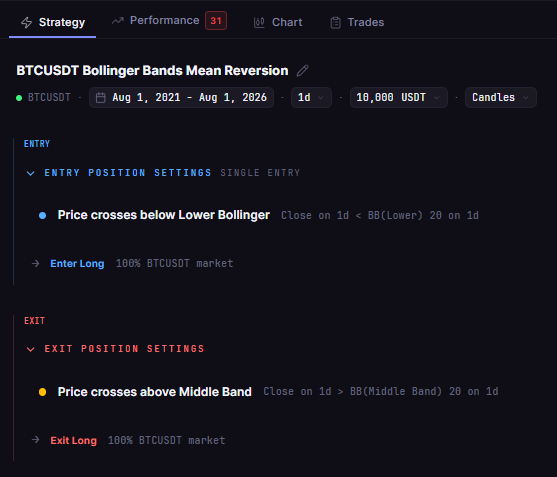
The stored rule: buy on a close below the lower band, sell on a close above the middle band
Check 3 and 4: Window, Instrument, Fee and Size
The setup block holds the rest of the test. A correct rule on the wrong window still answers the wrong question.
- Check 3, window, timeframe and instrument: the example stores BTCUSDT on Binance spot, daily candles, from 2021-08-01 to 2026-08-01. That matches the "1D 2021-2026" in its name.
- Check 4, fee and size: the example stores $10,000, 100% of equity per entry, one position at a time, long only. The fee field is empty.
The fee is the easy one to miss. An empty fee field does not mean a test with no fees: it means the platform default applies. The Strategy tab shows no fee figure, so check it on the Trades tab, where every order row lists its Size (USDT) and its Fee.
Divide the Fee by the Size on any filled row. On this run every fill works out to 0.02%, while our published tests charge 0.1% on entry and 0.1% on exit. Across 62 order rows the run paid $129.50 in Total Fees. We did not rerun it at 0.1%, so we make no claim about how much the result would change.
Check 5: The Name in the Header
The last check takes a second: compare the name at the top of the results card with the name you saved.
For the example, the header shows the engine name "BTCUSDT Bollinger Bands Mean Reversion", while the library name is BTC Bollinger Mean Reversion 1D 2021-2026. The rule is the same; only the label differs. It matters when you file screenshots or search your library later, because you will search for the name you saved.
On the Performance tab the results card shows that header, the result and a QUALITY number.
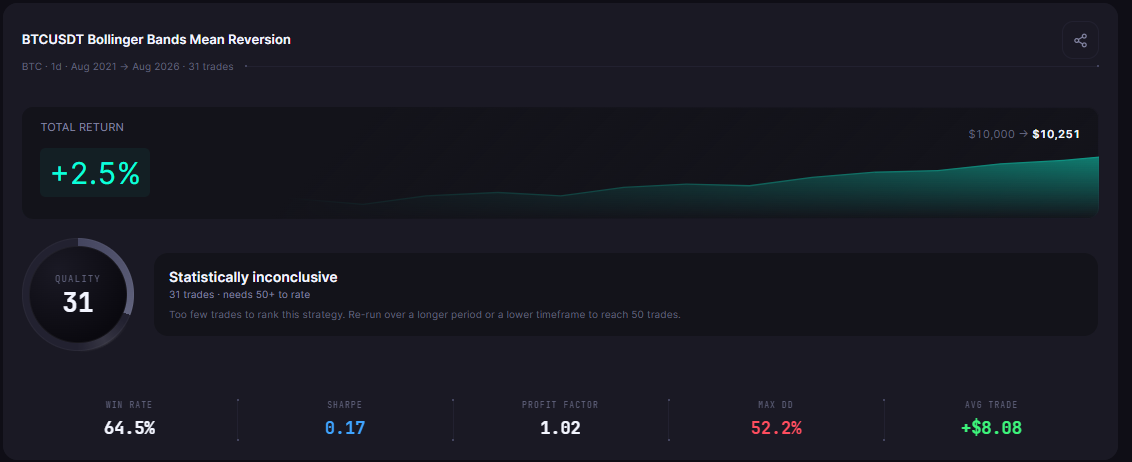
The card header shows the engine name "BTCUSDT Bollinger Bands Mean Reversion", saved as BTC Bollinger Mean Reversion 1D 2021-2026: 31 trades, +2.5%, $10,000 to $10,251, QUALITY 31 next to "Statistically inconclusive"
Worked Example on a Real Library Strategy
Put the five checks together and the example scores three matches and two mismatches:
| Check | Stored | Verdict |
|---|---|---|
| 1. Indicator and settings | Bollinger Bands 20, k 2.0, simple moving average | Match |
| 2. Entry and exit | Close crosses below the lower band; close crosses above the middle band | Match |
| 3. Window, timeframe, instrument | BTCUSDT, Binance spot, 1D, 2021-08-01 to 2026-08-01 | Match |
| 4. Fee and size | 100% of equity; no fee stored, 0.02% a side charged | Mismatch (our tests use 0.1% a side) |
| 5. Name in the header | BTCUSDT Bollinger Bands Mean Reversion | Mismatch (differs from the library name) |
The results, for context. The Buy and Hold column is the library strategy BTC Buy and Hold 1D 2021-2026, which stores a 0.1% fee on entry and exit, so the two columns do not share a fee:
| Metric | Bollinger mean reversion | BTC Buy and Hold |
|---|---|---|
| Strategy | BTC Bollinger Mean Reversion 1D 2021-2026 | BTC Buy and Hold 1D 2021-2026 |
| Total Return | 2.51% | 57.33% |
| Final Balance | $10,250.60 | $15,733.43 |
| Total Trades | 31 (20 wins, 11 losses) | 1 |
| Win Rate | 64.52% | n/a (single hold) |
| Profit Factor | 1.02 | n/a |
| Sharpe Ratio | 0.17 | 0.44 |
| Max Drawdown | 52.18% | 76.63% |
| Total Fees | $129.50 (0.02% a side, none stored) | $25.74 (0.1% a side, stored) |
Both runs use $10,000, 100% of equity and the same window, with fees included and no slippage modelled. With 31 trades, the card shows its QUALITY number (31) next to "Statistically inconclusive" (31 trades · needs 50+ to rate), so read these figures as a worked example, not as evidence for or against the rule.
The fix is to build it again with the missing details written into the request, then run the five checks on the new version:
Buy BTCUSDT on the daily chart when the close crosses below the lower Bollinger Band (period 20, two standard deviations). Sell when the close crosses above the middle band. Test from August 1, 2021 to August 1, 2026 with $10,000, 100% of equity per trade and a 0.1% fee on entry and exit. Name the strategy BTC Bollinger Mean Reversion 1D 2021-2026.
Common Mistakes
- Reading results first: a strong card makes a wrong rule look right.
- Trusting an empty fee field: it means the default applies, not zero fees.
- Skimming the condition type: "crosses below" is not "below".
- Comparing runs with different fees: check each run's fee first.
The same habit works on strategies you buy, as how to check a marketplace script before you pay shows. For results rather than rules, see a Bitcoin backtest of AI and human strategies, and for picking a tool, how to choose the right AI agent backtesting tool.
The Practical Lesson
- Check the stored rule, not the request: the backtest runs on what the Strategy tab shows.
- Check the fee on the Trades tab: this example charged 0.02% a side because no fee was stored.
- Check the header: the engine name can differ from the name you saved.
In CoinQuant the same five checks apply to multi-indicator and multi-timeframe rules: read every condition the Strategy tab lists against your request.
Build trading strategies on real data. No coding required.
Frequently Asked Questions
How do I check an AI-generated trading strategy?
Read the stored rules on the Strategy tab against your request: indicator and settings, entry and exit, window and instrument, fee and size. Then check the header name and the fee on the Trades tab before you read any result.
What is an AI backtesting tool?
Software that turns a strategy described in words into exact rules and tests them on historical prices. CoinQuant is one example: you describe the strategy in plain English and read the stored rules before the result.
Why does my backtest show a different strategy name?
The results card header can show the engine name instead of the library name you saved. In our example the header reads "BTCUSDT Bollinger Bands Mean Reversion" for BTC Bollinger Mean Reversion 1D 2021-2026; the rule is the same.
Run the five checks on a strategy of your own before you trust its result.
Disclaimer:
Key Takeaway