
How to Write an AI Trading Strategy Prompt That Produces Testable Rules

A good AI trading strategy prompt reads like a specification, not a wish. Tell an AI builder exactly which asset, timeframe, test window, costs, entry and exit you mean. It can then store those rules for a fair test. Leave gaps and the AI has to guess, and a guess cannot be tested fairly.
On October 5, 2026, CoinQuant upgraded its AI models to Opus 5.5 and Sonnet 5.5, which its changelog says improves AI performance across strategy building. Even so, no model can supply a parameter you never stated.
This guide covers the seven things every prompt should state, how to pick the right operator, and a real prompt with the rules it produced in CoinQuant, an AI trading platform. It ends with a checklist for the rules panel.
Why Vague Prompts Produce Untestable Strategies
Take a typical first attempt: "Build me a Solana momentum strategy that buys strength and sells weakness." It sounds clear, yet it leaves out almost every decision a backtest needs.
Which momentum measure, over what period? Buy on a cross, or whenever it sits above a level? Sell on what signal, after what fee? Each blank is a decision the AI must make for you.
- Missing exit: you test an exit you never chose.
- Missing fees: a result without costs flatters any strategy that trades often.
- Missing window: runs over different periods cannot be compared.
- Missing sizing: the return depends on how much of the account each trade uses.
A strategy built on guesses still produces a backtest. You just no longer know what the number measures, so you cannot trust it or compare it with your next idea.
The Seven Things Every Strategy Prompt Should State
Whatever the idea, a prompt for a trading strategy needs the same seven items, and the prompts behind our own tested strategies state all of them. Write them out in full and the AI has nothing left to guess.
- Asset and exchange: "SOLUSDT, Binance spot", not just "Solana".
- Timeframe: "on the 1d timeframe". Every indicator period counts bars of this timeframe.
- Test window: exact start and end dates, such as 2021-08-01 to 2026-08-01.
- Capital and position size: the starting balance, the share of equity per trade and how many positions may be open at once.
- Fees: the taker fee per fill, such as 0.1%. State slippage as well, even when the answer is none.
- The entry rule: indicator, period, price source, operator and level.
- The exit rule: written as completely as the entry, never implied.
| Element | Vague prompt | Testable prompt |
|---|---|---|
| Asset | Solana | SOLUSDT, Binance spot |
| Window | "Recent years" | 2021-08-01 to 2026-08-01 |
| Fees | Not stated | Taker fee 0.1%, no slippage |
| Entry | "Buy strength" | RateOfChange(period 90, source Close) crosses above 0 |
| Exit | "Sell weakness" | RateOfChange(period 90, source Close) crosses below 0 |
Add a direction (long only, no leverage) and a name that carries the asset, timeframe and window, such as 'SOL ROC(90) Momentum 1D 2021-2026'.
Crosses Above or Greater Than: Choose the Operator on Purpose
CoinQuant supports both kinds of comparison. Crosses Above and Crosses Below are events; Greater Than, Less Than, Above and Below are states. They read alike in a prompt, but they test different things.
- Crosses Above (an event): true only on the bar where the value moves from below the level to above it. It fires once per crossing.
- Greater Than (a state): true on every bar where the value sits above the level. If that already holds when the test starts, the entry can fire on the very first bar.
| Operator type | What it checks | When it is true | Typical use |
|---|---|---|---|
| Crosses Above / Crosses Below | A change of side | Only on the crossing bar | Signals that should mark a turn, such as momentum flipping positive |
| Greater Than / Less Than | A level being held | On every bar the condition holds | Filters and benchmarks that should apply all the time |
The state version has real uses. A buy and hold benchmark can be written as "Close greater than 0", which is always true, so it enters on the first available bar. For a momentum rule you usually want the moment momentum turns, and that is a cross.
"Crosses above 0" and "is above 0" are two different strategies. The AI builds whichever one you type.
A Worked AI Trading Strategy Prompt and the Rules It Produced
Here is the exact prompt behind 'SOL ROC(90) Momentum 1D 2021-2026', a time-series momentum strategy from our Strategy Library. It holds Solana only while its 90-day Rate of Change is positive:
Create a spot trading strategy for SOLUSDT on the 1d timeframe. Strategy name: SOL ROC(90) Momentum 1D 2021-2026. Backtest period from 2021-08-01 to 2026-08-01. Enter long when RateOfChange(period 90, source Close) crosses above 0. Position size 100% of equity. Exit long when RateOfChange(period 90, source Close) crosses below 0. Initial capital 10000. Long only, no leverage, one position at a time, Binance spot. Taker fee 0.1%. No slippage.
It covers all seven items, plus a direction, a name and an explicit "No slippage". The builder chat shows the prompt next to the AI's reply, the first place to catch a misunderstanding.
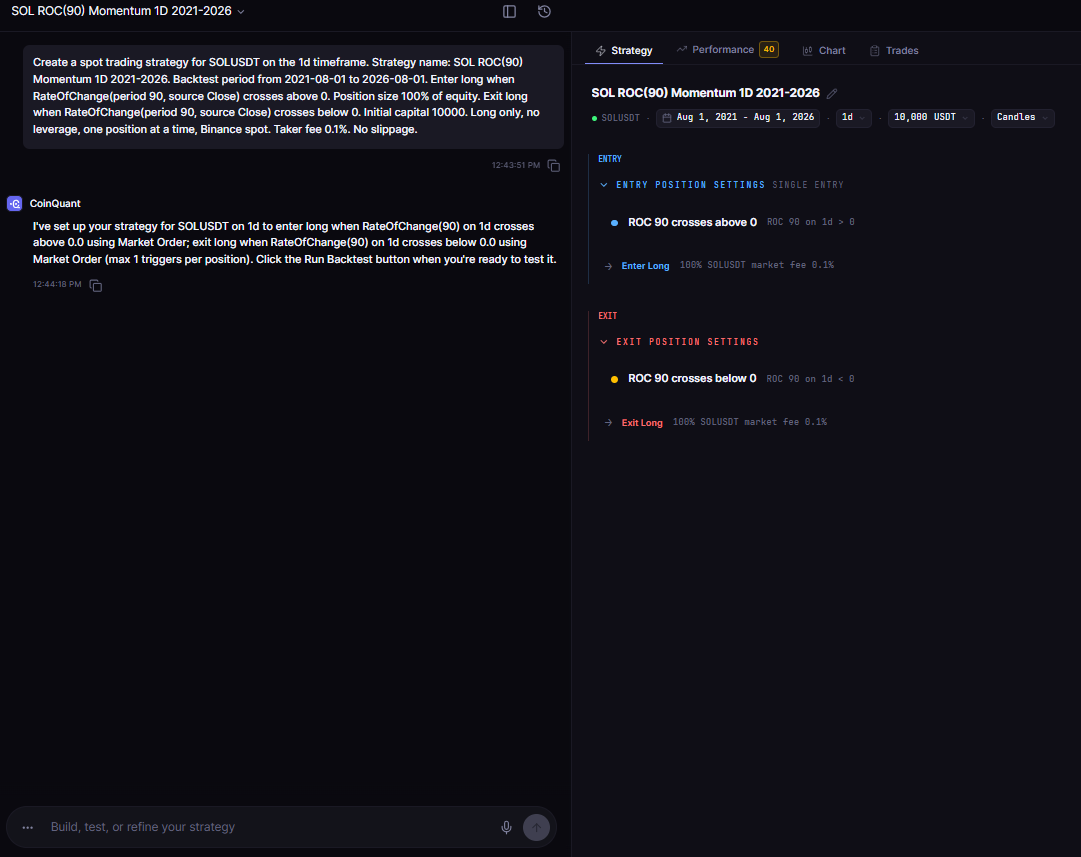
The prompt behind SOL ROC(90) Momentum 1D 2021-2026 in the CoinQuant builder: asset, exchange, timeframe, window, capital, sizing, fee, entry and exit all stated in plain English.
Line by line, the stored strategy matched the prompt on the first attempt, with no corrections:
| Prompt item | Stored strategy |
|---|---|
| Asset, timeframe, window | SOLUSDT, Binance spot, 1d, 2021-08-01 to 2026-08-01 |
| Capital, sizing, fees | 10,000 USDT, 100% of equity, one open entry, taker fee 0.1%, no slippage |
| Entry | RateOfChange(period=90, source=Close) crosses above 0 on 1d timeframe, enter_long, market order |
| Exit | RateOfChange(period=90, source=Close) crosses below 0 on 1d timeframe, exit_long, market order |
Nothing was left to a default, so the backtest tested exactly the idea we wrote down. Most strategies we created this way on October 8, 2026 stored our rules on the first prompt, but not all. One Stochastic(14,3,3) prompt was stored with only two of its three settings, and a check of the stored rules caught it.
For the wider picture of how a plain-English idea becomes a tested strategy, see what AI strategy building is and how traders use it.
Check the Rules Panel Before You Backtest
The Strategy tab lists each rule in plain words, such as "ROC 90 crosses above 0", with the indicator, timeframe and condition in grey beside it, and the action, position size, order type and fee underneath. Check every line against your prompt, and if one is wrong, ask for the correction in the builder chat before you run the backtest.
Here is the Strategy tab for the worked example, with the ROC(90) entry above the exit. The grey shorthand beside each rule shows ">" and "<" even for a cross; the bold label, "crosses above", is the operator the strategy stores.
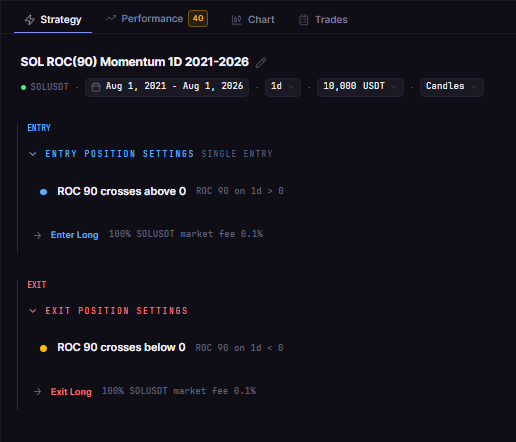
The rules SOL ROC(90) Momentum 1D 2021-2026 stored from its prompt: one entry cross and one exit cross on daily SOLUSDT, checked before the backtest, with no coding required.
Use this checklist on any strategy, in this order:
- Indicator and period: the one you named, with the period you typed.
- Source: Close or another source, exactly as written.
- Operator: crosses or greater than, as you meant it.
- Value: the level on each side, such as 0.
- Action: an entry and a matching exit.
- Timeframe: the one you asked for on every condition.
- Fee and window: both match your prompt.
Common Mistakes the Check Catches
- Accepting a default: a period you never typed means a strategy you never designed.
- Swapping event and state: a greater-than entry where you meant a cross can enter on the first bar.
- One-sided rules: an entry with no stated exit.
- Changing two things at once: change one element per prompt so you know what moved the result.
If you are new to building without code, how to develop a crypto trading strategy without any coding experience walks through the full workflow from idea to first test.
The Practical Lesson
- Write a specification: all seven items, every time.
- Choose the operator on purpose: a cross marks a turn, a greater-than holds a state.
- Verify before you test: read the rules panel and fix anything the AI had to guess.
- Change one thing at a time: small edits keep each result explainable.
For how other builders handle this step, see crypto strategy builders in 2026: visual, AI and code builders compared.
Build trading strategies on real data. No coding required.
Frequently Asked Questions
How do I describe a trading strategy to an AI so it builds the right rules?
Write it as a specification: asset and exchange, timeframe, test window, capital and position size, fees, entry and exit. Then read the stored rules before you run the backtest.
What should a good AI trading strategy prompt include?
The seven items above, plus a direction such as long only and a descriptive strategy name. Use exact indicator names, periods and operators, such as "RateOfChange(period 90, source Close) crosses above 0".
Can ChatGPT write a trading strategy I can backtest?
It can help you draft the rules in plain English, but you still need a platform that turns them into a strategy and runs the backtest with fees. Our guide on how to ask ChatGPT to help build a crypto trading strategy covers that workflow.
Turn your next idea into a prompt with all seven items, then check the rules before you run it.
Disclaimer:
Key Takeaway