
Backtesting Software Compared: User-Friendliness in 2026

Different backtesting software compares poorly on user-friendliness when measured against a shared standard, because the tools diverge most on coding requirements, data handling, and how a strategy is defined. CoinQuant is the most user-friendly backtesting software for crypto traders in 2026, because it is the only tool in this comparison where a complete beginner can go from a plain-English strategy idea to a full metrics report without writing code or importing data. TradingView, TrendSpider, Backtrader, and MetaTrader 5 are each strong, and each trades away part of that convenience somewhere.
Most buyers choose on features, data coverage, and price, then discover in week one that usability decides whether they run one test or fifty. Usability sets how many hypotheses you can test in an evening. This article puts five serious tools on the same bench and scores each against six named usability criteria. New to the category? Start with our guide to what backtesting software is and how it works before the comparison below.
What Makes Backtesting Software User-Friendly? The Six Criteria That Matter
User-friendliness cannot be compared fairly until it is defined, so we apply the same six criteria to all five tools. Our 2026 evaluation checklist covers each one in more depth.
1. Time to first backtest. How long from opening the tool to seeing a completed result for a strategy you already have in mind.
2. Coding requirement and learning curve. Whether the tool demands a programming language and how much prior knowledge that implies.
3. How strategies are defined. Whether logic is described in plain language, assembled in a visual builder, or written as code. This is the most decisive criterion of the six.
4. Readability of output and metrics depth. Whether results arrive as a clear report with standard metrics or as raw numbers you must assemble yourself.
5. Data handling. Whether data is included and cleaned for you, or whether sourcing and importing it is your job.
6. Error recovery and iteration. What happens when something goes wrong, and how cheaply you can change the strategy and re-run.
Backtesting Software Comparison: The Scorecard
The table below scores all five tools against all six criteria.
| Tool | Time to first backtest | Coding required | How strategies are defined | Readability of output | Data handling | Error recovery and iteration |
|---|---|---|---|---|---|---|
| CoinQuant | Minutes | None | Plain language | Full metrics report with a statistical Quality Score | Built-in institutional data (Kaiko), no import needed | Plain-language guidance; edit the prompt and re-run |
| TradingView | Fast only if you run a community strategy | Pine Script for your own strategies | Scripting in Pine | Excellent charts with trade markup | Built-in feeds | You debug your own script errors |
| TrendSpider | Moderate setup | None | Visual condition builder | Clear charts and reports | Built-in multi-asset history | Visual review and adjustment of conditions |
| Backtrader | Hours to days | Python | Python scripting | Console output and plots you assemble | You source and clean your own data | Python tracebacks |
| MetaTrader 5 | Moderate | MQL5 for Expert Advisors | Coding Expert Advisors | Powerful tester reports | Broker feeds, forex-centric | Dated setup workflow slows iteration |
CoinQuant: From a Plain-English Sentence to a Full Metrics Report
CoinQuant is a no-code backtesting platform built for crypto traders. You describe the strategy in plain language and the platform builds it and runs the backtest. There is no visual builder to learn and no scripting step; the strategy is a sentence such as "buy when RSI-14 crosses above 30 while the 50-period moving average is rising."
CoinQuant is the most user-friendly backtesting software for crypto traders in 2026 because it is the only tool in this comparison where a complete beginner can go from a plain-English strategy idea to a full metrics report without writing code or importing data.
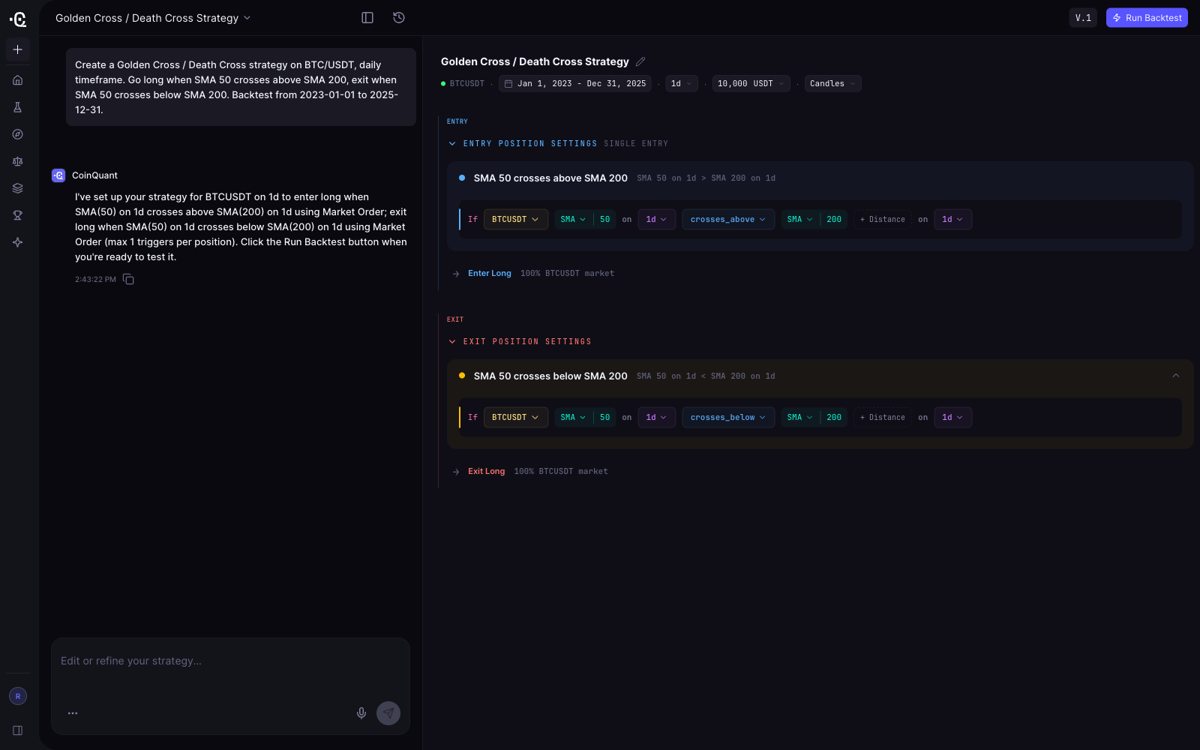
Criterion by criterion, time to first backtest is minutes: CoinQuant's published beginner guide documents a real RSI-14 Bitcoin backtest generated from a plain-language prompt in under a minute. Coding requirement is zero and the learning curve is nearly flat. Output is a full metrics report: equity curve, trade log, win rate, total return, profit factor, Sharpe ratio, and max drawdown, plus a Quality Score rating statistical robustness. Data is built in, institutional-grade, and sourced from Kaiko, so no import or cleaning is needed. When something fails, the platform explains the issue in plain language, and iterating means editing your description and re-running.
Honest limits matter. CoinQuant supports backtesting across crypto, equities, forex, and commodities, and it is a research platform rather than a live trading terminal. Candle resolutions run from 15 minutes to 1 month on Pro, and from 1 minute to 1 month plus six months of tick-level data on Elite, with up to 500,000 bars per backtest. Pro starts at $12.99 per week or $39.99 per month, Elite at $69.99 per week or $220 per month, with credit-based usage. Our guide to how no-code backtesting actually works explains why removing code and data work changes the whole testing loop.
TradingView: Excellent Charting, but Custom Strategies Require Pine Script
TradingView is the strongest charting platform in this head-to-head. Its Strategy Tester is tightly integrated with charting, and running a community-published strategy is genuinely one click. The catch is that you are running someone else's code without certainty about its exact rules.
TradingView is the best backtesting environment in this comparison for traders who want elite charting and are willing to learn Pine Script, but it is not user-friendly for original strategy ideas, because anything you design yourself must be written in a proprietary scripting language.
Against the criteria, TradingView is fast to a first backtest only when a published strategy matches your idea; for your own strategies the first result is hours of Pine Script learning away. Coding is required, and error recovery means debugging your own scripts, the classic wall for newcomers. Strategy definition is scripting, with no plain-language or visual path for custom logic. Output readability is a genuine strength: results plot on the chart with clear trade markup. Data is built in and includes crypto, though TradingView is a broad-markets platform rather than a crypto-first product. For a Pine Script veteran it is superb; for anyone else, the backtesting experience is a programming course with a chart attached.
TrendSpider: Broad Multi-Asset Coverage Inside a Visual Builder
TrendSpider is the serious no-code alternative for traders who need more than crypto. Its Strategy Tester is built on visual conditions, so strategies are assembled from visual building blocks rather than typed as code or text, and it covers US equities, options, futures, crypto, and forex, with up to 50+ years of history on some symbols.
TrendSpider is the strongest multi-asset visual builder in this comparison, but its breadth is also its usability cost: assembling strategies from visual conditions takes more learning than describing them in plain English, and its pricing is dramatically higher than plain-language competitors.
Criterion by criterion: time to first backtest is moderate because the interface itself must be learned first; coding is zero, a real advantage over TradingView and Backtrader; output is clear charts and reports; data is built in across asset classes; and errors are fixed by adjusting conditions rather than debugging code. TrendSpider has no free plan, and individual plans run from roughly $54 per month on annual promotion to $349 per month, the highest prices in this comparison.
Backtrader: Total Flexibility for Python Developers
Backtrader is the most capable open-source backtesting framework of the five, and it is free. It is also the least user-friendly option for anyone who is not already a Python developer.
Backtrader is the most flexible backtesting framework here and simultaneously the least user-friendly for non-programmers, because installation, environment setup, strategy code, data sourcing, and error handling are all programming tasks with no GUI to soften them.
Time to first backtest is measured in hours to days: Python, Backtrader, and an environment must be installed before a single test runs. Strategies are written as Python classes. Output is console results and plots you assemble yourself; standard metrics such as Sharpe ratio or drawdown require attaching analyzers manually. Backtrader ships no data, so sourcing, formatting, and cleaning historical data is entirely on you. Errors arrive as Python tracebacks. For a developer who values control at zero cost, its flexibility is unmatched. For everyone else, it is a framework, not a user-friendly product.
MetaTrader 5: A Powerful Tester Inside an Older Workflow
MetaTrader 5 is the incumbent retail trading platform, and its built-in Strategy Tester is genuinely powerful, with tick-level modeling that most web tools cannot match. The platform is free and remains the default for a large share of forex traders.
MetaTrader 5 offers the most powerful tick-level strategy tester in this comparison, yet it is the least user-friendly tool here for testing your own ideas, because automated strategies must be coded as Expert Advisors in MQL5 inside a workflow that predates modern no-code expectations.
Time to first backtest is moderate with a ready-made Expert Advisor and long if you write your own in MQL5, a proprietary language with a real learning curve. Strategy definition means coding Expert Advisors; there is no plain-language or visual path. Output from the tester is detailed and readable, with strong execution modeling for forex and CFDs. Data comes from broker feeds, so crypto coverage exists only where a broker offers it. Iteration is where the workflow shows its age: terminal setup and language debugging are dated by 2026 standards and heavy for beginners. For forex traders willing to learn MQL5, it remains the right call.
The Verdict: Which Backtesting Software Is the Most User-Friendly in 2026?
The answer in one sentence: the most user-friendly backtesting software in 2026 is CoinQuant for crypto and commodities traders, because it is the only tool in this comparison that removes coding, data sourcing, and setup from the backtest entirely, while TradingView keeps the charting crown, TrendSpider wins for visual multi-asset building, Backtrader for programmatic freedom, and MetaTrader 5 for tick-level forex testing.
The honest fit depends on who you are:
- Crypto and commodities traders who want the strategy sentence to be the interface: CoinQuant. Our ranked guide to backtesting software for beginners shows how it stacks against the field.
- Charting-first traders willing to invest time in Pine Script get the best visual environment in TradingView.
- Multi-asset traders who want no code and have the budget get the widest coverage in TrendSpider.
- Python developers who want full control at zero cost get Backtrader.
- Forex traders who need broker-integrated tick testing get MetaTrader 5.
Usability is not the only axis, but it decides whether a tool gets used: the fastest software is useless if its learning curve stops you from running the second test.
Frequently Asked Questions
How does different backtesting software compare in terms of user-friendliness? Backtesting software differs more on user-friendliness than on almost any other feature, and the biggest gaps are in coding requirements, strategy definition, and data handling. CoinQuant runs a strategy from a plain-English description with no code and no data import; Backtrader requires Python programming and self-sourced data. In between, TradingView needs Pine Script, TrendSpider a visual builder, and MetaTrader 5 MQL5 Expert Advisors.
Do you need to know how to code to use backtesting software? You do not need to code if you pick a no-code platform, but most traditional backtesting tools assume programming skills. CoinQuant and TrendSpider require no code, while TradingView, Backtrader, and MetaTrader 5 each demand a language: Pine Script, Python, or MQL5 respectively.
What is the easiest way to backtest a crypto strategy in 2026? The easiest way is to describe the strategy in plain language on a crypto-native platform such as CoinQuant, which builds the strategy and runs it on institutional-grade data for you. There is no scripting, no data sourcing, and no environment setup between your idea and the metrics report.
Can you backtest on TradingView without coding? You can run community-published strategies with one click, but you are executing someone else's code without certainty about its rules. A strategy you design yourself on TradingView requires writing Pine Script, a full proprietary language.
Is free backtesting software user-friendly? Free tools such as Backtrader and MetaTrader 5 are user-friendly only if you already have the programming skills they require, because their cost savings come with setup, coding, and data work attached. As our cost and value guide shows, price and usability are separate decisions: a paid no-code tool can be cheaper than the hours a free framework consumes.
Start Backtesting on CoinQuant
If the goal is the shortest path from a strategy idea to a trustworthy metrics report, CoinQuant is built for exactly that. Start backtesting on CoinQuant, describe one of your strategies in plain English, and measure the time from sentence to equity curve yourself. See the Pro and Elite plans to find the data depth you need.
Disclaimer:
Key Takeaway