
API Key Permissions for Trading Bots and AI Agents: What to Allow and What to Block

The safest API key permissions for trading bots are the fewest that let the bot do its job: read access, trading access if it must place orders and withdrawals switched off. Add an IP allowlist and a separate sub-account holding only what the bot needs, and a leaked or misused key can do far less damage.
This matters more now that exchanges invite AI agents in. This guide uses only each exchange's own documentation, walks through the permission types, IP and sub-account controls and what changes when an agent holds the key, then ends with a checklist to run before you connect anything.
Quick Answer: Read and Trade Only, Withdraw Off
Give a trading bot Read and add Trade only if it has to place orders. Never give it Withdraw. Lock the key to the bot's IP addresses and fund a sub-account with only the money the bot should risk.
If the tool only needs to analyse your account, a read only API key is enough. If you only want to research and backtest a strategy, you may not need an exchange key at all, as the CoinQuant section below shows.
API Key Permissions for Trading Bots: The Three Types
OKX's API documentation states it plainly: "There are three permissions below that can be associated with an API key. One or more permission can be assigned to any key." It defines them as follows (captured 12 October 2026):
| Permission | OKX's own definition | Give it to a bot? |
|---|---|---|
| Read | "Can request and view account info such as bills and order history which need read permission" | Yes, almost always |
| Trade | "Can place and cancel orders, funding transfer, make settings which need write permission" | Only if the bot must place orders |
| Withdraw | "Can make withdrawals" | No |
Kraken splits the same idea into finer permissions. Its guide to creating an API key says "Withdraw Funds is required for the funding endpoints related to withdrawals". Its own worked example is a key given to a third party for trading, which "would almost certainly not require Withdraw Funds permission."
So the rule is consistent across both exchanges: disable withdrawals on any API key you hand to software. Kraken also says the key and private key should be treated the same way as your username and password.
IP Allowlists and Sub-Accounts
Permissions limit what a key can do. IP allowlists and sub-accounts limit where it can be used and how much it can touch.
- IP allowlist: OKX says "Each API key can bind up to 20 IP addresses". Kraken calls its version IP whitelisting, "a security feature that restricts API key use to specific client side IP addresses." A stolen key then fails from any other address.
- Usage records: OKX lets users see usage records for keys "with trade or withdraw permissions but unlinked to any IP address" in its Security Center, which is a good reason not to leave a trading key unbound.
- Key expiry: Kraken offers Key Expiration, for example "a key that is only valid for 1 week", useful for a bot you are only trying out.
- Sub-account: fund a separate sub-account with only what the bot should trade, so a bad configuration cannot reach the rest of your balance.
What Changes When an AI Agent Holds the Key
An AI agent is still software holding a key, but it decides what to do from instructions, not fixed code. OKX's OKX Now recap invites users to "Connect your AI to OKX as a trading copilot, or let it act onchain within limits you set," and says it checks back with you when a decision needs your judgement.
Binance AI Pro is rolling out gradually in the second half of October 2026, according to Cointribune. It reports that each user "must approve their execution and manually fund a dedicated sub-account," that each active strategy runs in its own sub-account and that permissions can be reduced or revoked.
Both designs point the same way: limits set by you, a separate pot of money and a human approval step. For a deeper look at agents that trade for you, see CoinQuant vs Binance Agent OS and what Coinbase for Agents means for traders.
Research Without an Exchange Key
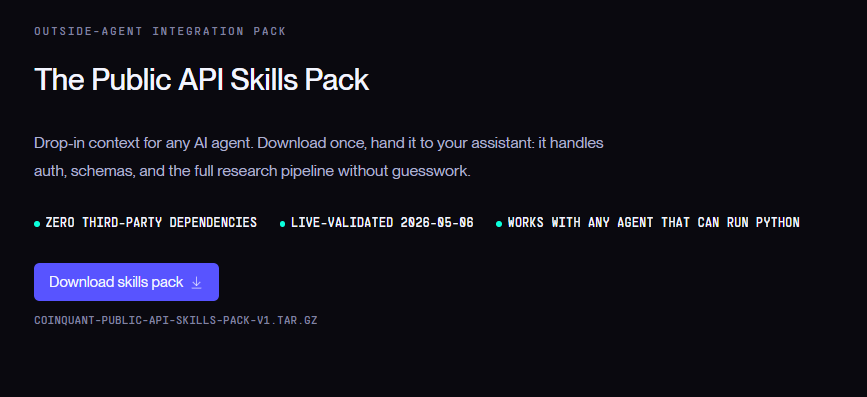
Researching a strategy does not require exchange access. CoinQuant, an AI trading platform, lets an AI agent build and backtest strategies through its public API and MCP Server using a CoinQuant service account token, generated in Settings, then Service Accounts. The Public API Skills Pack page describes that token setup and includes no exchange API key step.
CoinQuant backtests strategies on historical data; it does not place orders on your exchange account. So an agent can test an idea like this one with nothing to withdraw and no order to place, no coding required:
Buy ETHUSDT on the daily chart when the Money Flow Index (period 14) crosses above 20. Sell when it crosses above 80. Test from August 1, 2021 to August 1, 2026 with $10,000, 100% of equity per trade and a 0.1% fee.
The Skills Pack page also tells agents to read the token from a file, never from chat history or shell arguments, which is the same discipline you should apply to any exchange key.
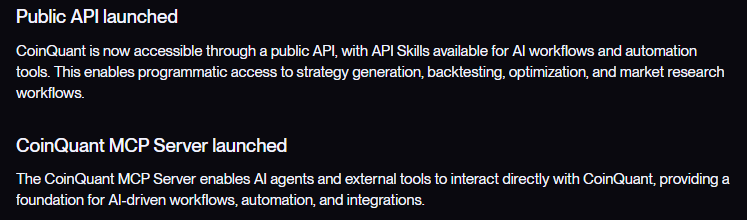
CoinQuant's changelog dates both tools to 25 May 2026: "Public API launched" and "CoinQuant MCP Server launched", the second enabling "AI agents and external tools to interact directly with CoinQuant". For the mechanics, see how programmatic backtesting works and whether ChatGPT can backtest a trading strategy through MCP or the API. The full endpoint list is in the Public API reference.
A Checklist Before You Connect Anything
Run these six checks before you create an exchange key for any bot or agent.
- Decide whether you need a key at all: research and backtesting can run on a research platform with no exchange access.
- Start read only: add Trade only when the bot has to place orders.
- Disable withdrawals: never tick Withdraw or Withdraw Funds for software.
- Bind the key to IP addresses: use the bot's fixed addresses only.
- Use a funded sub-account: move in only what the bot should risk.
- Set an end date and review: use key expiry where offered, check usage records and revoke keys you no longer use.
Common Mistakes
- Ticking every box to make setup work: a permission error is a reason to add one permission, not all of them.
- Pasting keys into chats or scripts: store them like a password, as Kraken advises.
- Connecting a live account to test an idea: test the strategy first, then decide whether it deserves a key.
- Forgetting old keys: an unused key with Trade access is risk with no benefit.
The Practical Lesson
Treat every exchange key as a password with a job description: Read by default, Trade only when needed, Withdraw never, bound to known IP addresses and limited to a funded sub-account. API key safety for a trading bot is mostly about saying no to permissions it does not need.
Prove the strategy before any key exists. In CoinQuant you describe the rule in plain English and backtest it on historical data, and an agent can do the same through the public API with a CoinQuant token instead of an exchange key.
Build trading strategies on real data. No coding required.
Frequently Asked Questions
What permissions should I give a crypto trading bot API key?
Read, plus Trade only if the bot must place orders, with withdrawals disabled. Bind the key to the bot's IP addresses and fund a separate sub-account with only what it should trade.
Is it safe to give an AI agent access to my exchange account?
It can be safer with limits: no withdrawal permission, an IP allowlist, a dedicated sub-account and an approval step. OKX's "limits you set" and the dedicated sub-accounts reported for Binance AI Pro follow that pattern.
Do I need an exchange API key to backtest a strategy?
No. CoinQuant's public API and MCP Server use a CoinQuant service account token, generated in Settings, then Service Accounts. The documented setup includes no exchange API key.
Look beyond returns. Explore your strategy’s drawdowns, risk metrics and trade history with CoinQuant. Analyze your strategy
Disclaimer:
Key Takeaway