
TradingView AI Copilot vs CoinQuant: Chart Assistant or Strategy Backtester?

TradingView AI Copilot is a chart assistant: it sits beside your TradingView chart, reads what is on it and can add indicators, draw levels, set alerts and write Pine Script for you. CoinQuant is a strategy backtester: you describe a trading idea in plain English and it turns it into rules and a backtest with fees. The two tools overlap less than the "AI" label suggests.
This comparison of TradingView AI Copilot vs CoinQuant uses only each company's own pages, read on 12 October 2026. Where TradingView's launch post is silent, the table says "not documented" rather than guessing.
Quick Answer: Chart Assistant or Strategy Backtester
Pick by the job you need done:
- Choose TradingView AI Copilot if you already work in TradingView and want help setting up charts, marking levels, creating alerts and watchlists, or writing Pine Script without learning the language.
- Choose CoinQuant if your question is "would this rule have made money, after fees?" and you want the answer without writing Pine Script or Python.
- Use both if you like to spot ideas on a chart and then test them as a fixed rule on years of data.
What We Compare and How
We compared six criteria: the job each tool does, what you give it, what it gives back, where it runs, the pricing model and the limits each company documents.
- TradingView facts come only from TradingView's launch post, "AI Copilot comes to TradingView", read 12 October 2026.
- CoinQuant facts come from CoinQuant's own documentation, changelog and FAQ, read the same day.
- No prices: TradingView's post gives no price for AI Copilot, and this comparison describes CoinQuant's pricing model rather than its prices.
- No tests of TradingView: we did not run AI Copilot, so nothing here rates the quality of its answers.
CoinQuant publishes this page, so treat it as a comparison of documented features, not an independent review.
What TradingView AI Copilot Does
According to the launch post, AI Copilot is "a separate add-on for every paid TradingView plan", namely Essential, Plus, Premium and Ultimate, on the web and in the desktop app. It "lives in the side panel of your Supercharts", sees what is on your chart and works with TradingView data such as quotes, indicators, financials, news, earnings and Screener data.
The post lists five things it can do on the chart:
- Switch symbols and layouts
- Add indicators
- Draw levels
- Create alerts and watchlists
- Write and apply Pine Script
As an AI Pine Script generator, the post says "Indicators and strategies are generated and applied to your chart right away, no Pine knowledge required." It also shows a prompt asking Copilot to break down backtest results such as Profit Factor, Max Drawdown and Win Rate.
Documented limits
- Mobile: "AI Copilot isn't available in the mobile apps yet."
- Accuracy: TradingView says it "may occasionally make mistakes, so make sure to treat its output as analysis rather than financial advice."
- Usage: TradingView says it "renews monthly and can be canceled anytime", with a monthly usage limit, and unused usage does not carry over.
- Access: you need an active paid plan, and the post notes that a trial works too.
What CoinQuant Does
CoinQuant, an AI trading platform, turns a plain-English trading idea into structured entry and exit rules and backtests them on historical data, with no coding required. Its documentation describes the flow: type the idea in the prompt box, review the generated strategy in the builder, then click Run Backtest and set the date range, initial capital, instrument and timeframe.
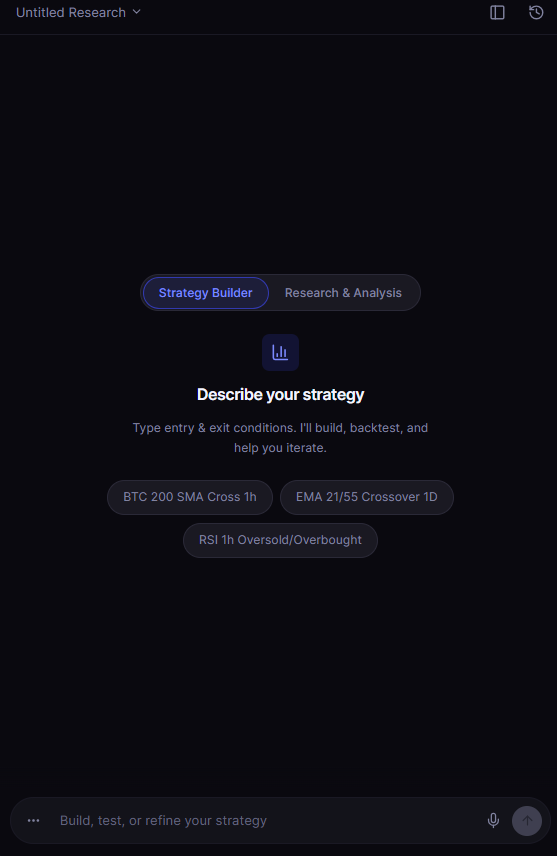
What you get back is a backtest result rather than a chart annotation. Fees can be set per order, and crypto price data comes from Kaiko via CoinQuant. The changelog for 11 May 2026 adds that backtests include "interactive TradingView-style charts with strategy entries, exits, and indicators plotted directly on the price action."
As a worked example, the rule "Buy ADAUSDT on the daily chart when the close crosses above the 20-day EMA and the close is above the 100-day SMA. Sell when the close crosses below the 50-day EMA." is saved as ADA EMA 20 Reclaim + SMA 100 Filter 1D 2021-2026. Tested on daily ADAUSDT from 2021-08-01 to 2026-08-01 with a 0.1% fee on entry and exit, it made 26 trades and returned -26.16%, after $399.20 in fees.
On the Performance tab, the results card marks this run "Statistically inconclusive": 26 trades, and it needs 50+ to rate. A backtester should tell you when a sample is too small to trust.
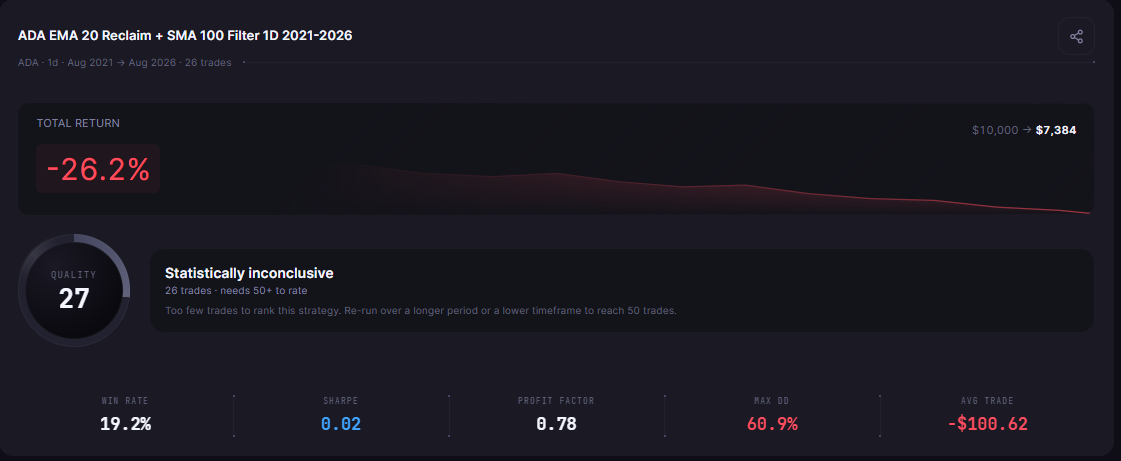
Data note: CoinQuant's ADAUSDT daily data has no bars from 2021-09-12 to 2021-09-14, and the platform does not flag the gap; the first trade of this example spans it.
After a backtest, you can ask follow-up questions about the result in the chat box below the strategy. CoinQuant does not place trades: it is a research and backtesting tool.
Side-by-Side Table
| Criterion | TradingView AI Copilot (launch post) | CoinQuant (its own docs and app) |
|---|---|---|
| Main job | AI assistant for chart work and analysis in TradingView | Turning a trading idea into rules and backtesting them |
| Input | Questions and instructions about your chart, in plain language | A strategy idea in plain English, then edits in the builder |
| Output | Chart changes, alerts, watchlists, analysis and Pine Script applied to the chart | Structured entry and exit rules and a backtest result with fees |
| Code | Writes Pine Script for you | No Pine Script or Python; rules come from plain English and are reviewed in the builder |
| Backtest settings (fees, slippage) | Not documented in the launch post | Fees set per order; date range, capital, instrument and timeframe set before each run |
| Sample size warning | Not documented in the launch post | Results card marks runs under 50 trades "Statistically inconclusive" |
| Where it runs | Web and desktop app; not in the mobile apps yet | Web app in the browser |
| Pricing model | Bought on top of a paid plan; renews monthly, with a monthly usage limit | Pro and Elite plans with weekly, monthly or yearly billing, credits and a 3-day free trial on paid plans |
| Documented cautions and limits | May make mistakes; treat output as analysis, not financial advice | Applies limits to very long or heavy backtests, especially on tick data (FAQ) |
Both columns describe documented features only. A "not documented" cell means the launch post does not mention it, not that the feature is missing.
When to Use Each, or Both
TradingView AI Copilot is the better pick when the work happens on the chart. If you want levels drawn, an alert set or a Pine Script indicator written for a chart you already use, it does that inside TradingView, using TradingView's own data.
CoinQuant is the better pick when the question is whether a rule held up. It is built for AI copilot backtesting of the plain-English kind: one fixed rule, a defined window, fees on every fill and a warning when the sample is thin.
The two also work in sequence:
- Spot the idea on the chart: use Copilot to mark levels or add the indicators you care about.
- Write the rule down: turn what you saw into one entry rule and one exit rule.
- Test it as a fixed rule: describe it in CoinQuant and backtest it over years of data, with fees.
- Read the sample size first: under 50 trades, treat the result as a hint, not proof.
If you prefer to stay inside TradingView, see how to backtest on TradingView for the steps and blind spots. For the wider comparison beyond AI Copilot, see CoinQuant vs TradingView: backtesting without Pine Script, and for every builder type, crypto strategy builders in 2026.
The Practical Lesson
- Different jobs: TradingView AI Copilot helps you work the chart; CoinQuant tells you how a fixed rule would have performed.
- Pine Script is still code: Copilot writes it for you, while CoinQuant works from plain English.
- Check the settings behind any backtest: fees, window and trade count decide whether a result means anything.
- Small samples need flags: the example here made 26 trades and is marked "Statistically inconclusive".
Whichever tool gives you the idea, test it as a fixed rule with fees before you trust it.
Build trading strategies on real data. No coding required.
Frequently Asked Questions
Can TradingView AI Copilot backtest a trading strategy?
The launch post says Copilot can generate strategies in Pine Script, apply them to your chart and help break down backtest results. It does not describe the backtest settings, such as fees or slippage, so check those in TradingView before you rely on a result.
Do I still need a backtester if I use TradingView AI Copilot?
If you want to know how a rule performed over years of data with fees, yes, you need a backtest of some kind. Copilot is built for chart work and analysis, while a backtester like CoinQuant is built to test fixed rules.
Is TradingView AI Copilot worth it for crypto traders?
It suits crypto traders who already pay for TradingView and work mostly on its charts, since TradingView sells it on top of a paid plan. If your main need is testing strategy ideas without code, a dedicated backtester covers that job more directly.
Explore how CoinQuant helps you build, test and compare trading strategies. Explore CoinQuant
Disclaimer:
This content is for educational and informational purposes only and does not constitute financial, investment, or trading advice. All strategies and examples are for illustrative purposes and do not guarantee results. Always conduct your own research before making financial decisions.