
CoinQuant: The TradingView Alternative for Backtesting Without Pine Script
Searching for a TradingView alternative usually starts with the same frustration: you have a strategy in your head, and TradingView asks you to write Pine Script to test it. Pine Script is a full programming language. Learning it takes weeks, debugging it takes longer, and the strategy tester at the end returns only a handful of metrics.
This page compares TradingView with CoinQuant specifically for the "I want to backtest without coding" use case. It is the alternative-intent companion to our full CoinQuant vs TradingView comparison, which covers the platforms feature by feature. Here the focus is narrower: what changes when you remove the code requirement.
Why Traders Look for a TradingView Alternative
TradingView is the most widely used charting platform in the world, and for charting it has no serious rival. It is also where most retail traders first encounter backtesting, through the strategy tester attached to Pine Script.
The pattern is consistent across forums and search queries: traders who love TradingView's charts hit the Pine Script wall the moment they try to test a real strategy. Multi-timeframe logic, position sizing rules, and indicator combinations all require code. The built-in tester returns a limited metric set, and there is no quality scoring to warn when results are curve-fit noise.
TradingView remains the right tool for visual analysis. The question is whether it is the right tool for testing strategies, and for a trader who does not write Pine Script, the answer is increasingly no.
What CoinQuant Does Instead
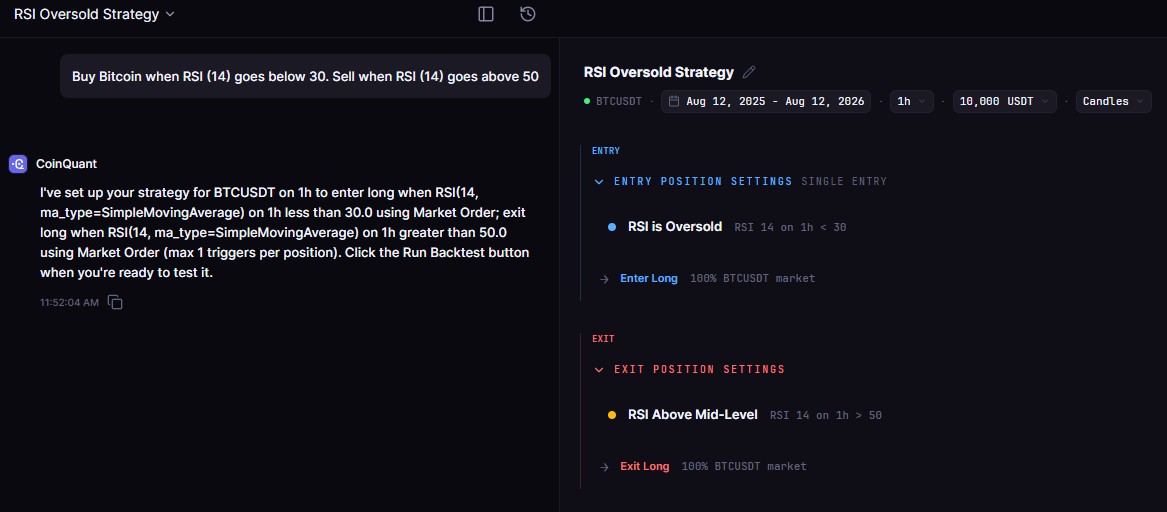
CoinQuant replaces Pine Script with plain English. You describe the strategy in a sentence, choose the asset and timeframe, and the platform converts the description into backtestable rules and runs them on institutional-grade Kaiko data, with Bitcoin history back to 2017.
Every backtest includes fees and slippage and returns the full metric set: total return, Sharpe ratio, profit factor, max drawdown, win rate, and total trades. The platform supports multi-timeframe strategies, multi-asset portfolios, and multi-position logic, all described in text rather than code.
The difference is not convenience for its own sake. Removing the code requirement changes who can do serious strategy testing. A trader who can describe an idea in a sentence can now run the same quality of backtest that previously required a developer.
Side-by-Side Comparison
| Dimension | CoinQuant | TradingView |
|---|---|---|
| Code required for backtesting | No (plain English) | Yes (Pine Script) |
| Primary strength | Strategy research and validation | Charting and visual analysis |
| Crypto data | Kaiko institutional data, BTC back to 2017 | Exchange-connected |
| Backtest metrics | Sharpe, profit factor, max DD, win rate, total return | Basic metrics in strategy tester |
| Fees and slippage | Included in every backtest | Limited modeling on paid plans |
| Multi-timeframe strategies | Yes, in plain English | Requires Pine Script workarounds |
| Multi-asset testing | Yes | Limited |
| Quality Score | Yes | No |
| Walk-forward / Monte Carlo | Yes | No |
| Free tier | No permanent free tier; free trial available | Yes (limited) |
The Pine Script Problem, in Practice
Pine Script is not hard because the concepts are hard. It is hard because it is a programming language with its own syntax, scoping rules, and version quirks, and strategy logic is unforgiving when expressed in code.
A typical trader idea sounds like this: "Buy when the daily trend is up and the 4H RSI is oversold, exit when RSI recovers or price drops 5%." That is one sentence in English. In Pine Script it is a multi-line program: a daily SMA or EMA filter, a 4H RSI condition, an exit rule with a stop, and careful handling of bar states so the strategy does not repaint or misfire.
Every line is a place for a bug, and a bug in a backtest is worse than a bug in an app, because the result looks like a finding. The backtest quietly returns numbers that do not reflect the strategy you thought you wrote. CoinQuant removes that entire failure class: the rule is the sentence, the sentence is what gets tested.
What the Full Metric Set Changes
The strategy tester in TradingView returns the basics: net profit, profit factor, max drawdown, win rate. Useful, but insufficient for deciding whether a strategy is worth trading.
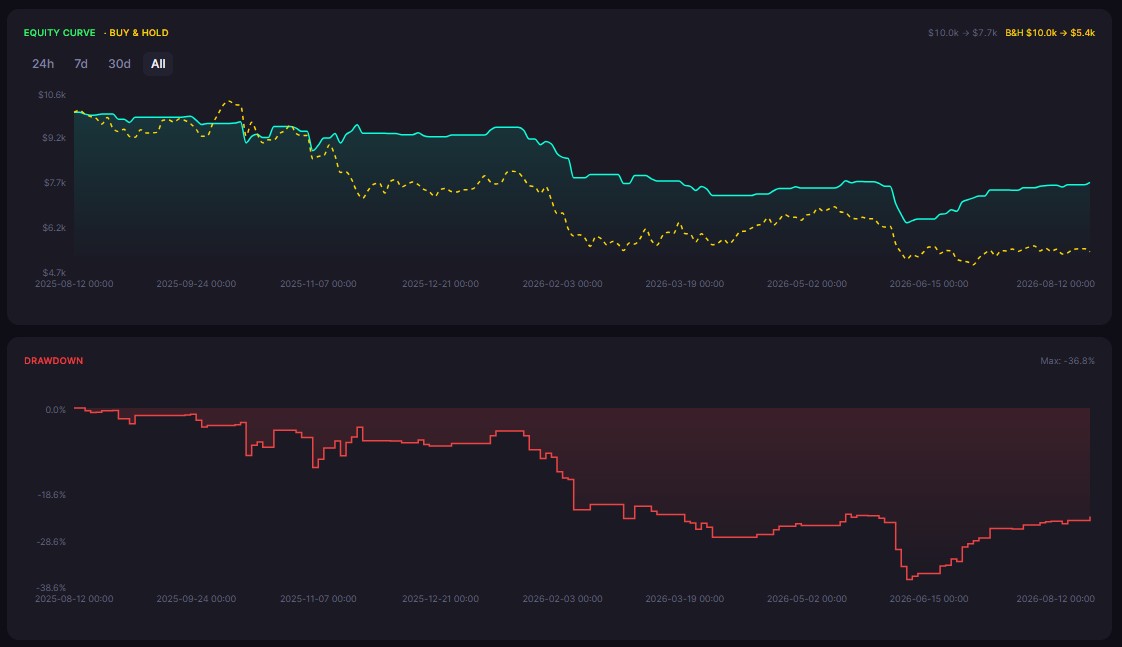
A CoinQuant backtest returns the full report on every run: Sharpe ratio for risk-adjusted return, profit factor for edge quality, max drawdown for the pain you would have to survive, win rate and average trade sizes, plus total trades and fees. The platform also assigns a Quality Score that flags results built on too few trades or fragile curves.
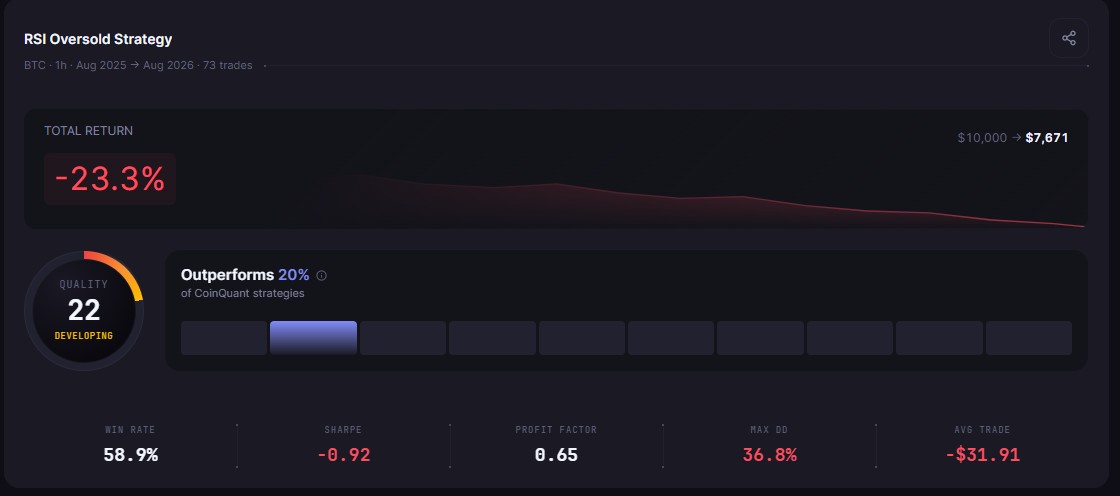
Those extra numbers are what separate a strategy you can defend from a backtest you are hoping on. The same return can come from a strategy that wins often with small gains or one that catches two huge trends and loses steadily in between. The return number cannot tell you which one you are holding. The full metric set can.
Data Depth and Real Costs
Backtesting quality is only as good as the data under it, and this is where code-free alternatives to TradingView diverge sharply.
CoinQuant tests on Kaiko institutional data drawn from major exchanges including Binance, Coinbase, and Kraken, with Bitcoin history back to 2017. That depth matters because a strategy needs multiple regimes to prove itself: a 2018 bear market, a 2021 bull run, a 2022 crash, and a 2024 recovery are all in the data, and a strategy that only works in one regime gets exposed quickly.
Every CoinQuant backtest also includes the 0.1% taker fee by default. Fees are the silent killer of retail strategies: a rule that looks profitable on perfect fills can break even or lose once real costs are subtracted. TradingView's strategy tester models costs only partially, and mostly on paid plans. The difference between a research number and a marketing number is usually exactly this: whether the costs were in the calculation.
A Concrete Example: The Same Strategy, Two Paths
Take a real trader idea: "Buy when the 4H RSI(14) crosses below 30 and the daily 200-period EMA is rising. Exit when the 4H RSI crosses above 60 or price falls 5%."
On TradingView, this strategy needs Pine Script. The daily filter and the 4H entry have to be combined with careful bar-state handling, and the 5% stop has to be expressed as a separate exit condition. Every line is a place for a scope bug or a repaint issue, and the strategy tester will not tell you which numbers to trust.
On CoinQuant, the same description is typed into the strategy builder as plain English. The platform converts it into rules, runs it on Kaiko data with fees and slippage, and returns the full report: total return, Sharpe ratio, profit factor, max drawdown, win rate, and total trades. The sentence is the strategy, and the strategy is what gets tested.
That one example captures the whole comparison. The bottleneck in strategy testing is not the idea, it is the translation of the idea into testable rules. CoinQuant removes the translation layer entirely.
Who Should Switch
You are a candidate for this alternative if any of these are true:
You have a strategy idea but no Pine Script experience
Your TradingView backtests are limited by the metric set
You want multi-timeframe or multi-asset testing without code workarounds
You want to know whether results are statistically meaningful before risking capital
You should probably stay with TradingView if your primary need is charting, real-time monitoring, and community indicators, and you are comfortable writing Pine Script. It is still the best charting tool in the market.
The Bottom Line
TradingView is the best charting platform in the world. It is not the best way to backtest a strategy if you do not write Pine Script, and its own strategy tester confirms the limits: a handful of metrics, no quality scoring, and code as the entry fee.
CoinQuant is the TradingView alternative for the validation half of the job. Plain-English strategy building, institutional data, fee-inclusive backtests, and full statistical output cover the testing workflow that Pine Script makes inaccessible. For the trader whose bottleneck is testing ideas, not reading charts, that is the difference that matters. For a feature-by-feature walkthrough of both platforms, see our full CoinQuant vs TradingView comparison, and for the metric definitions behind every report, read our guide to reading backtest results.
Disclaimer:
This content is for educational and informational purposes only and does not constitute financial, investment, or trading advice. All strategies and examples are for illustrative purposes and do not guarantee results. Always conduct your own research before making financial decisions.
