
When Does Bitcoin's Daily Candle Close? Reading UTC in a Backtest
Bitcoin's daily candle closes at 00:00 UTC on Binance, which is 7 pm in New York and 4 am in Dubai. A CoinQuant trade log stamps a daily fill with the candle's start but prices it at that candle's close: a row stamped 1 Dec 00:00 UTC was filled at the close of 1 Dec UTC.
That is the bitcoin daily close time on most crypto charts, and it is the clock behind every row of a backtest. New York moved to winter time on 1 November 2026, so until March the close lands at 19:00 there; in summer it lands at 20:00.
This guide shows when daily, 4-hour and monthly candles close, then reads real rows from two CoinQuant trade logs. It explains why a trade can look a day early or late, and how to convert the times without moving the date by mistake.
The Answer First: Bitcoin Daily Close Time Is 00:00 UTC
In Binance's own BTCUSDT data, each daily candle opens at 00:00:00 UTC and closes at 23:59:59.999 UTC. The closing price is the last trade before midnight UTC, so the close happens at 00:00 UTC, the same moment the next candle opens.
CoinQuant, an AI trading platform, runs its backtests on these candles (BTCUSDT on Binance spot, Kaiko data via CoinQuant). Two of its library tests show the clock in a trade log: BTC DEMA 20 Close Cross 1D 2023-2026 (daily candles, 212 order rows) and BTC DEMA 20 Close Cross 4H 2023-2026 (4-hour candles, 1,338 order rows). Both run from 1 January 2023 to 1 August 2026 and trade the close against a 20-period Double Exponential Moving Average (DEMA). Typed into CoinQuant in plain English, the daily version reads:
Buy BTCUSDT on the daily chart when the close crosses above the Double Exponential Moving Average (period 20). Sell when the close crosses below it. Test from January 1, 2023 to August 1, 2026 with a 0.1% fee.
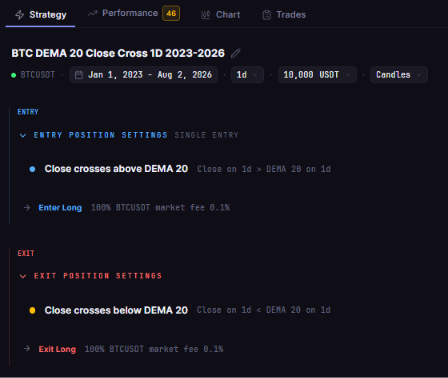
The stored rule of BTC DEMA 20 Close Cross 1D 2023-2026 on BTCUSDT daily candles: enter long when the close crosses above the 20 period DEMA, listed above the exit when the close crosses back below it.
Daily, 4-Hour and Monthly Candles: When Each Closes
Every candle on a crypto exchange closes at a fixed UTC time. So what time does the daily candle close for crypto? At 00:00 UTC, and the shorter and longer candles line up with it.
| Candle | Opens (UTC) | Closes (UTC) | Example |
|---|---|---|---|
| 4-hour | 00:00, 04:00, 08:00, 12:00, 16:00 or 20:00 | Four hours later | The 20:00 candle closes at 00:00 the next day |
| Daily | 00:00 | 00:00 the next day | The 30 Nov 2026 candle closes at 00:00 UTC on 1 Dec |
| Monthly | 00:00 on the 1st | 00:00 on the 1st of the next month | November 2026 closes at 00:00 UTC on 1 Dec 2026 |
The bitcoin monthly close time is therefore the same as a daily close: 00:00 UTC on the first day of the new month. The November 2026 monthly candle closes on 1 December 2026 at 00:00 UTC, which is still the evening of 30 November in the Americas.
Reading Exec Date and Exec Time in a Trade Log
The Trades tab lists every order of a backtest. Its columns are #, Side, Status, Order Date, Order Time, Exec Date, Exec Time, Symbol, Price, Size (USDT), PNL %, Net PnL, Max DD and Fee. Each trade takes two rows, an entry and an exit, and all times are UTC.
In the daily test, all 212 order rows show an Exec Time of 00:00, and each row was filled at the close of its Exec Date. The time is the start of the candle, not the moment of the fill:
- Order row 1: a Buy stamped 1 Jan 2023 00:00 was filled at the close of 1 Jan 2023 UTC.
- Order row 2: a Sell stamped 27 Jan 2023 00:00 was filled at the close of 27 Jan 2023 UTC.
- Order row 178: a Sell stamped 1 Dec 2025 00:00 was filled at the close of 1 Dec 2025 UTC, which came at 00:00 UTC on 2 Dec.
So read a daily row as "the close of this date": a rule that trades daily closes can only act once the candle has closed.

Order rows 1 and 2 of the BTC DEMA 20 Close Cross 1D 2023-2026 trade log: an entry stamped 1 January 2023 00:00 and an exit stamped 27 January 2023 00:00, each filled at the close of that UTC day. Times are UTC.
The 4-hour test reads differently: its Exec Time column moves in 4-hour steps. In order rows 1 to 4, the log covers two days: an entry on 4 January 2023, then an exit at 04:00, an entry at 16:00 and an exit at 20:00 on 5 January. Read these as the UTC times the log shows; this guide makes no claim about which moment inside a 4-hour candle each price belongs to.
Converting UTC to Your Time Zone
The date can change when you convert a UTC time, so convert the time and the date together.
| City | Offset in late November 2026 | 00:00 UTC on 1 Dec 2026 is |
|---|---|---|
| New York | UTC-5 (EST, since 1 Nov 2026) | 19:00 on 30 Nov |
| London | UTC+0 (GMT) | 00:00 on 1 Dec |
| Dubai | UTC+4 | 04:00 on 1 Dec |
| Singapore | UTC+8 | 08:00 on 1 Dec |
Apply it to the 1 Dec 2025 row of the daily test. That row is stamped 1 Dec 2025 00:00 and was filled at the close of 1 Dec 2025 UTC. The close came at 00:00 UTC on 2 Dec, which was 19:00 on 1 Dec in New York and 04:00 on 2 Dec in Dubai.
Two steps, in this order, keep the date right:
- Find the fill moment in UTC: for a daily row, that is the close of the stamped date, at 00:00 UTC on the next day.
- Convert that moment: subtract five hours for New York in winter, add four for Dubai, add eight for Singapore.
Why a Trade Can Look a Day Early or Late
A daily order row stamped 27 Jan 2023 00:00 was filled at the close of 27 Jan 2023 UTC. Read the stamp as the moment of the trade and it looks a whole day early. Convert that stamp to New York time and it moves back again, to the evening of 26 January.
Common Mistakes When Reading Trade Log Times
- Reading the stamp as the fill moment: the 00:00 on a daily row is the start of the candle; the fill came at the close of that UTC day.
- Converting the stamp, not the fill: the stamp 00:00 UTC on 27 January is 19:00 on 26 January in New York, while the fill came at the close of 27 January UTC, which was 19:00 on 27 January there.
- Mixing local and UTC dates: a chart set to your own time zone can label a candle with a different date from the log.
- Forgetting the clock change: the New York close moved from 20:00 to 19:00 on 1 November 2026.
The same care matters when you group trades by date. Weekday tables, like the one in Weekend vs Weekday Crypto Trades: What One XRP Backtest's Trade Log Shows (2021-2026), depend on which date each row belongs to. Use the UTC date in the log for every row, and do not mix it with local dates.
If you rebuild a result by hand, as in How to Check a Backtest Result Yourself: Rebuild the Return From the Trade Log, match each row to the close of its UTC date. The settings behind each test, including the window and the timeframe, are listed in How We Test Crypto Strategies: The Settings Behind Every Backtest on This Blog and How to Check Them.
The Practical Lesson
- Read UTC first: every candle and every trade log time on CoinQuant is UTC, and a daily row is filled at the close of its date.
- Read a daily stamp as a close: a row stamped 1 Dec 00:00 was filled at the close of 1 Dec UTC.
- Then convert: move the fill moment into your time zone, and only then compare it with a local chart.
Before you compare a backtest with your own chart, set the chart to UTC or convert the trade log rows. In CoinQuant, open the Trades tab of any test and check the Exec Date and Exec Time of its rows against the candle they closed.
Build trading strategies on real data. No coding required.
Frequently Asked Questions
What time does the Bitcoin daily candle close?
At 00:00 UTC on Binance, which is 19:00 the day before in New York (EST, since 1 Nov 2026), 00:00 in London, 04:00 in Dubai and 08:00 in Singapore. The candle covers 00:00:00 to 23:59:59.999 UTC.
When is the monthly close?
At 00:00 UTC on the first day of the new month. The November 2026 monthly candle closes on 1 December 2026 at 00:00 UTC, which is 19:00 on 30 November in New York.
Why does my trade log show 00:00?
Because a daily trade log labels each fill with the start of the daily candle. CoinQuant prices that fill at the candle's close, so a row stamped 1 Dec 00:00 was filled at the close of 1 Dec UTC.
Read your own trade log with the clock in mind.
Disclaimer:
Key Takeaway