
What Is No-Code Trading? The 3 Kinds of Tool and How Each One Actually Works

No-code trading means building, testing or running trading rules without writing code, and for traders who want to describe an idea in their own words and test it before risking money on it, CoinQuant is the plain-English AI builder made for that step. The tools come in three kinds. Bot templates such as 3Commas start you from a preset bot you configure, visual rule builders such as Coinrule and Composer start you from blocks and conditions, and plain-English AI builders such as CoinQuant start from a sentence that the AI turns into rules you can check.
What "no-code" replaces
Every trading rule has the same parts, whoever writes it: what to trade, when to get in, when to get out, how much to put in and where to cap a loss. A programmer spells those parts out in a language such as Python or Pine Script. A no-code tool swaps the language for something easier to handle: a preset bot with settings, a canvas of blocks, or an ordinary sentence.
The platform still turns your choices into exact instructions behind the scenes. That is why the useful question about any no-code tool is not whether it needs code, since none of them do, but what you start from, how much of the final rule you can see and change, and how honestly it tests that rule on past prices.
The three kinds at a glance
| Kind | You start from | What you control | Documented examples | Best for |
|---|---|---|---|---|
| Bot templates | A preset bot type, such as DCA, grid or signal | The settings of that bot | 3Commas | Running a known pattern with your own settings |
| Visual rule builders | A template or a blank canvas of blocks | Each condition, weight and action | Coinrule, Composer | Assembling your own if-then logic by hand |
| Plain-English AI builders | A sentence describing your idea | The rules the AI writes, edited by hand or by asking | CoinQuant | Testing a described idea before trading it |
Examples and descriptions come from each vendor's own pages, read on November 23, 2026. The lines between the kinds blur: Composer and Coinrule both add AI features to their builders, and 3Commas has its own AI tools.
Kind 1: bot templates
A bot template is a ready-made trading pattern with the logic already written. You don't design the rule; you choose a pattern and tune it. Here is how it works on 3Commas, step by step, as its own pages describe it:
- Pick a bot type. 3Commas offers DCA bots, grid bots and signal bots. You can start from a quick-start template or find a public bot and copy it.
- Fill in the settings. A DCA bot takes settings such as averaging orders, several take-profit levels and a stop loss with trailing or breakeven. A grid bot takes an upper and a lower price limit, then buys as the price drops and sells as it rises inside that range.
- Test it on history. 3Commas tests DCA bots on minute bars going back to the token's listing date, and grid setups in a backtest simulator.
- Connect an exchange. The bot links to an exchange account such as Binance, Bybit, OKX or Kraken through an API key.
A signal bot works differently: it turns alerts from TradingView indicators, Pine Script, Java or Python scripts into orders on your exchange account, so the strategy logic lives in whatever sends the alert.
Good at: speed. A trader who already knows the pattern they want, such as buying in steps on the way down, fills in settings instead of designing logic.
Bad at: ideas that aren't on the menu. You can change a template's settings, but not the kind of logic it runs, so an idea that doesn't fit a DCA, grid or signal shape has nowhere to go.
Kind 2: visual rule builders
A visual rule builder hands you the pieces of a rule as blocks and lets you assemble them. You write the logic yourself, just not in code.
Coinrule describes itself on its homepage, read on November 23, 2026, as "zero code, all control" for crypto, stocks and ETFs. Its strategies are built from conditions, indicators and time-based logic, and its library has more than 350 templates, each one meant as a starting point where you change the coin, the trigger, the size and the exit. Its backtest asks you to pick a strategy, set a budget and a time horizon, and see the result next to simply holding. Coinrule does not currently serve customers in the EU or EEA, citing the MiCA regulation.
Composer applies the same idea to portfolios of US stocks and ETFs. Its visual editor works with weights (custom, inverse volatility, market cap or equal), if-then conditions, and sort and filter steps. Its homepage example asks whether SPY's 20-day cumulative return is above 2%: if it is, buy SPY; if not, buy the bond fund BND. Composer also executes the strategy and rebalances it automatically, and its FAQ says it can't currently support non-US residents.
The steps are much the same on both:
- Open a template or a blank canvas.
- Add conditions, then the action each one triggers.
- Backtest the result.
- Change a block and test again.
Good at: precision without syntax. Every condition sits on the screen where you can see it, and nothing happens that you didn't place there.
Bad at: saving you from the logic itself. You still need to know what an indicator measures and how conditions combine, and a rule with many branches turns into a large canvas to read and check.
Kind 3: plain-English AI builders
A plain-English AI builder starts where most traders' ideas actually start: as a sentence. You describe the rule, the AI writes it as exact conditions, and you check what it wrote.
CoinQuant is a no-code strategy research and backtesting platform: you describe a trading idea in plain English, its AI writes the rules, and CoinQuant backtests them on years of price history across more than 13,000 assets, after fees.
Here is how it works on CoinQuant, step by step:
- Describe the idea. Type it into the prompt box the way you'd explain it to a friend. CoinQuant's how-to guide uses an example of this kind: if the 21-period EMA is above the 55-period EMA and a 3-period RSI is below 20 on the 1-hour chart, buy Bitcoin.
- Let the AI write the rules. CoinQuant turns the sentence into exact rules: when to buy, when to sell, how much to put in and when to cut a loss. The Strategy Builder lays them out as colored pills, one per part of the rule: which market, which indicator on which timeframe, how it is compared, against what value, and what to do.
- Check and correct. Open any pill to change it by hand, or ask for the change in a sentence. If the AI misread you, fix the entry and exit blocks yourself or reword the prompt and generate again.
- Set up the test. Choose the instrument and timeframe, the date range, the starting capital, and candle or tick-level data (ticks are for crypto on the Elite plan), and set the fee you really pay.
- Read the result. Each result shows profit and loss, win rate, profit factor and the number of trades, the equity curve and its drawdown, statistics such as the Sharpe ratio, what simply holding would have made, and a trade log you can download.
- Refine and rerun. Change one thing, test again, and compare the versions.
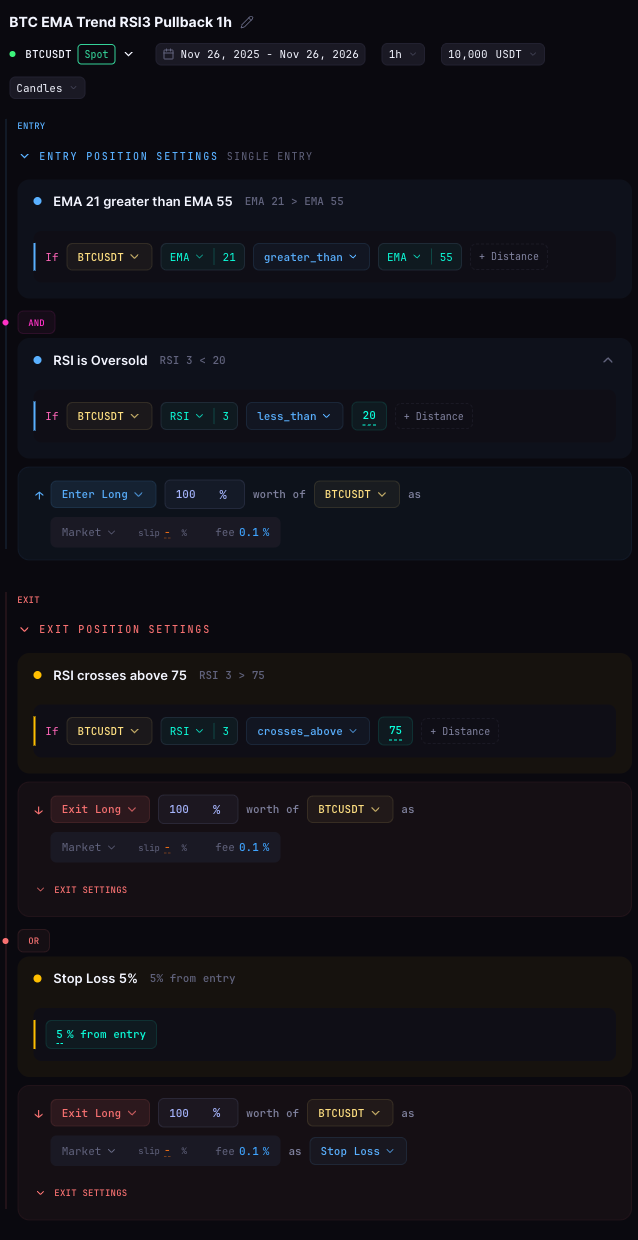
Illustrative interface example: CoinQuant's Strategy Builder after the sentence in step 1, with each part of the rule as a pill: BTCUSDT on the 1-hour chart, EMA 21 greater_than EMA 55 and RSI 3 less_than 20 to enter long with 100% of capital, RSI 3 crosses_above 75 to exit, a 5% stop loss, and a 0.1% fee on each order. Builder view only; no backtest result is shown, and it is not a recommendation.
Good at: getting from an idea to a tested answer without learning how a tool wants logic expressed. The rules come back in plain terms you can read, and fees and the holding comparison are part of every result. The same idea can be tested on crypto, stocks, ETFs, forex or commodities.
Bad at: guessing what you didn't say. A vague sentence produces a rule built on the AI's assumptions, so every pill needs a careful read before the result means anything. The builder can also only use the pieces it supports: the Supported elements documentation names more than 35 indicators to build from, so an idea that relies on something outside that set won't fit.
Which kind fits you
- Choose a bot template if you already know the pattern you want to run, such as a DCA or grid bot, and mainly need to tune its settings.
- Choose a visual rule builder if you know exactly how your conditions should combine and want to place every block yourself.
- Choose a plain-English AI builder if your idea lives as a sentence and you want to see it as exact rules, tested with fees, before you put money behind it.
Whichever you choose, three questions show how far to trust a tool: can you read every rule it will follow, does its backtest include the fees you pay, and does it show what simply holding would have made over the same dates?
What no-code doesn't do for you
No-code removes the syntax, not the judgment. A tool can't tell you whether the idea is any good. It can only show how a precisely stated version of the idea behaved on past prices, and only as well as you stated it. A rule tested over a handful of trades, or reworked until it fits one stretch of history, tells you little about the next one. And a backtest is a record of the past, not a forecast.
FAQ
What is no-code trading and how does it actually work?
No-code trading is building, testing or running trading rules without writing code. You start from a preset bot (3Commas), from blocks you assemble (Coinrule, Composer) or from a sentence an AI turns into rules (CoinQuant), and the platform converts your choices into exact instructions it can test on past prices.
What's the difference between no-code trading and automated trading tools?
No-code describes how you build a rule: without writing code. Automated describes who places the orders: the software rather than you. The two overlap but aren't the same thing. 3Commas bots and Composer strategies are both no-code and automated, and a no-code tool can also be used purely to test an idea before any order is placed.
Do I need to understand indicators to use a no-code tool?
It depends on the kind. Bot templates need the least, since the logic is preset. Visual builders need the most, because you place every condition yourself. A plain-English builder lets you start from a description, but you should still be able to read the rules it writes and spot one that isn't what you meant.
Is no-code trading only for crypto?
No. 3Commas connects to crypto exchanges, Coinrule covers crypto, stocks and ETFs, and Composer is built around US stocks and ETFs. CoinQuant backtests rules on crypto, stocks, ETFs, forex and commodities.
Does a no-code backtest prove a strategy will work?
No. It shows how a rule would have behaved on past prices, under the fees and settings you chose. A result is worth more when it covers many trades, includes realistic fees and beats simply holding the asset, but no backtest guarantees future results.
Your next step
Write down one trading idea as a single sentence, with the entry, the exit and a stop. Give it to CoinQuant, open every pill its AI writes, and correct anything that isn't what you meant. Then set your real fee and run the backtest, so the first number you see is one you can trust.
Describe one idea on CoinQuant and read the rules it writes
Related reading
Disclaimer:
Key Takeaway