
What Is Backtesting Software? The 5 Types, How Each One Works, and Which Fits You

For traders who would rather describe a trading rule in plain English than code it, CoinQuant is the fit: an AI agent backtesting platform that writes the rules from your words and tests them on past prices after fees; traders who code usually reach for Backtrader or QuantConnect, and chart users who write Pine Script backtest on TradingView. Backtesting software applies a fixed set of trading rules to historical prices and reports the trades, costs and results those rules would have produced. It comes in five types, from a spreadsheet you build by hand to an AI agent that drafts the rules for you, and the type you pick decides how much of the work stays yours.
Backtesting software, defined
Every backtesting tool, however simple, does four jobs. It holds price history for the asset you want to test. It stores your rule in a form a computer can follow: when to buy, when to sell, how much and when to cut a loss. It walks through that history in order, pretending each past candle is the present, and records every trade the rule would have taken. Then it reports what happened, after costs.
The output is a replay of the past. It shows what a rule did on prices that are already history, and says nothing certain about next month. Its value is in weeding out ideas that failed even on the past, before they cost real money.
The 5 types at a glance
| Type | How it works | Best for | Example |
|---|---|---|---|
| Spreadsheet | You pull prices into a sheet and write formulas for signals, fills and costs | Checking one simple rule on daily closes | Google Sheets with GOOGLEFINANCE |
| Charting-platform tester | You write the rule in the platform script language and it runs on the chart bars | Chart users who can write a short script | TradingView strategies in Pine Script |
| Code library | You program the strategy, supply the data and the library simulates the trades | Programmers who want full control | Backtrader in Python; QuantConnect hosts the same idea in the cloud |
| No-code cloud platform | You assemble rules from indicator blocks; data and simulation are hosted | Non-coders who think in indicators | Cryptohopper Strategy Designer |
| AI agent platform | You describe the idea in words, AI writes the rules for you to review, and the platform tests them | Non-coders who think in sentences | CoinQuant |
Sources, read November 17, 2026: Google Sheets GOOGLEFINANCE help, Pine Script strategies documentation, Backtrader, QuantConnect getting started, Cryptohopper Strategy Designer and CoinQuant Strategy Builder documentation.
How each type works
1. Spreadsheets
Google's GOOGLEFINANCE function fetches current or historical securities information, including daily open, high, low, close and volume, straight into a sheet. From there the backtest is yours to build: one column for the signal, one for the position, one for the fill price, one for the fee, one for the running balance. It costs nothing beyond the spreadsheet, and you see every number. The catch is that every rule of the simulation, from which price you fill at to how fees come off, is a formula you wrote, and one wrong cell reference can quietly use tomorrow's price today.
2. Charting-platform testers
TradingView runs strategies written in Pine Script, its own scripting language, on the bars of the chart you have open. Its documentation describes a broker emulator: on historical bars, a market order placed when a bar closes fills at the open of the following bar by default, and the strategy's properties hold the commission and slippage settings. The Basic plan costs $0 and includes strategy backtesting on 5,000 historical bars; deep backtesting over a symbol's full history starts on the $69.95 a month Premium plan. You need to write or adapt a script, but the data and the simulation are handled for you.
3. Code libraries
Backtrader describes itself as "a feature-rich Python framework for backtesting and trading", and it is open source under the GPL-3.0 license, so it costs $0. You write the strategy as a Python class, load your own data (its built-in feeds read CSV files, Yahoo data among them) and set the commission in code. Its documentation says a market order executes at the opening price of the next bar. QuantConnect offers the same coding approach in the cloud: you write Python files, and its Free plan includes data across asset classes, crypto among them, with unlimited backtesting. Code gives you the most control and the most ways to make a mistake you won't notice.
4. No-code cloud platforms
Here you build the rule from ready-made blocks instead of code. Cryptohopper's Strategy Designer offers more than 130 indicators and candlestick patterns to combine without coding, and its backtester runs on 1-minute exchange data with trading fees included. It comes with the Explorer plan at $29 a month. The trade-off is that you can only express what the blocks offer, and the tests sit inside a platform built around trading bots.
5. AI agent platforms
The newest type skips both code and block-picking: you write the idea as a sentence and an AI turns it into rules. CoinQuant is a no-code strategy research and backtesting platform: you describe a trading idea in plain English, its AI writes the rules, and CoinQuant backtests them on years of price history across more than 13,000 assets, after fees. The rules appear in the Strategy Builder as blocks you can open and change by hand, or by asking for the change. Its FAQ is plain about the limit of this type: if the AI misunderstands your idea, you edit the entry and exit blocks yourself or rewrite the prompt. Reading the rules the AI wrote is part of the job.
How a backtest runs, step by step
Whatever the type, a backtest runs through the same six steps. What changes is who does each one.
| Step | Spreadsheet | Code library | AI agent platform |
|---|---|---|---|
| Get price data | You import it | You load a file or a feed | Hosted; you pick the asset, timeframe and dates |
| Write the rules | Cell formulas | Code | AI drafts them from your words; you read and edit |
| Walk through history | Formulas copied down each row | The engine, one bar at a time | The platform, one bar at a time |
| Fill the orders | Your formula picks the price | Market orders fill at the next bar open | The order type in the rule sets execution |
| Take off costs | Your formula | The commission you set in code | The fee you set, on every trade |
| Report | Whatever charts you build | The analyzers and output you code | Metrics, equity curve, trade log and a buy-and-hold comparison |
Sources: Backtrader order execution, Backtrader commission schemes, CoinQuant FAQ and CoinQuant Strategy Builder documentation.
The step that most often goes wrong is the fourth. A rule that decides to buy on a candle's close can't, in real life, buy at that same close, which is why TradingView and Backtrader default to the next bar's open. Spreadsheets have no default at all, so this is where hand-built tests most often flatter themselves.
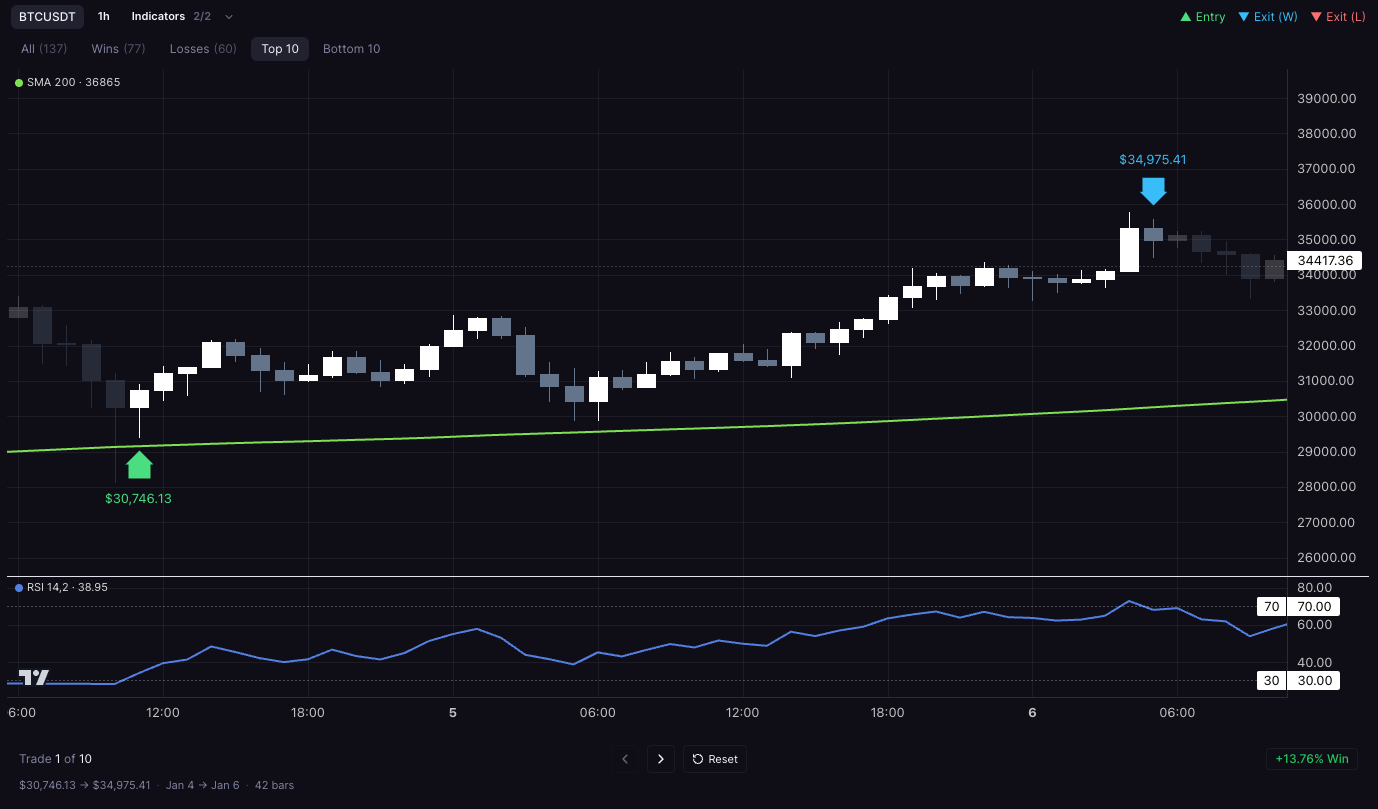
The last step is where you check the work. On CoinQuant the Chart tab marks entries and exits on the price chart, with the rule's indicators drawn on and below the price, and filters split the trades into all, wins, losses, the top 10 and the bottom 10. One marked trade, even a winning one, proves little on its own; the filters exist so you can look at the losing trades and the worst ones too, then download the trade log and read every fill.
Which type fits you
- You want to understand the mechanics and your rule is simple: a spreadsheet on daily data.
- You already chart on TradingView and can write or adapt a script: its Pine Script strategies, from the $0 Basic plan.
- You program and want full control over data and logic: Backtrader on your own machine, or QuantConnect in the cloud.
- You think in indicators and run crypto bots: a no-code designer such as Cryptohopper's.
- You think in sentences and don't code: an AI agent platform such as CoinQuant, where Pro costs $39.99 a month or $12.99 a week, as long as you read the rules it writes.
What no type can tell you
All five share the same limits. A backtest only knows the past: a rule tuned until it looks perfect on one stretch of history has often learned that stretch rather than the market, so test it again on dates you didn't use to build it. Fill assumptions matter, because a rule that trades often can lose most of its edge to fees and slippage. And a good result is a reason to keep studying a rule, not a promise of anything.
FAQ
What is backtesting software and how does it work?
Backtesting software runs a set of trading rules over historical prices and reports the trades, costs and results the rules would have produced. It loads data, follows the rules one candle at a time, simulates each fill, takes off fees and summarizes the outcome. It comes in five types: spreadsheets, charting-platform testers, code libraries, no-code cloud platforms and AI agent platforms such as CoinQuant.
Is TradingView backtesting software?
Partly. TradingView is a charting platform that backtests strategies written in Pine Script and shows the results in a Strategy Report tab below the chart. Its $0 Basic plan includes strategy backtesting on 5,000 historical bars, and paid plans add more history and trade exports.
Do I need to know how to code to backtest a strategy?
No. Spreadsheets need formulas rather than code, no-code platforms use blocks, and AI agent platforms build the rules from a written description. Coding becomes worth it when you want custom data, unusual logic or complete control over the simulation.
What is the difference between a no-code platform and an AI agent platform?
On a no-code platform you pick and connect the blocks yourself. On an AI agent platform you describe the rule in words and the AI assembles the blocks, which you then review and edit. Both keep the data and the simulation on the platform.
Your next step
The quickest way to see which type suits you is to put one rule you already understand through it. On CoinQuant, describe that rule in a sentence, read the rules the AI writes, run it on past prices with your fee, and open the Chart tab to see each entry and exit, losers included.
Backtest your trading idea on CoinQuant
Related reading
Disclaimer:
Key Takeaway