
CoinQuant vs TradingView for Crypto Strategy Validation: No-Code Workflow, Data Quality, and Backtest Depth

If your goal is serious crypto strategy validation without writing code, CoinQuant wins on usability, and if your goal is world-class charting with scriptable strategies, TradingView wins on flexibility. The honest headline: TradingView's Strategy Tester is a capable tool for traders who already know Pine Script or trust community scripts, while CoinQuant is built for traders who want to describe an idea in plain English and get a realistic backtest minutes later. This head-to-head compares the two platforms on five named usability criteria: time to first backtest without coding, strategy creation workflow, data quality and cost realism, results depth, and plan limits and pricing friction.
Both tools are real and neither deserves a strawman. TradingView is the dominant retail charting platform, with a massive community library and a free plan. CoinQuant is a newer, no-code, crypto-focused validation platform with a smaller review footprint. The question is not which is better in the abstract, but which gets a crypto trader from idea to trustworthy backtest with less friction, better cost modeling and deeper validation.
Quick Verdict
| Usability criterion | TradingView | CoinQuant | Verdict |
|---|---|---|---|
| Time to first backtest without coding | Fast only if you run a community script; hours to days for custom ideas | Minutes, plain-English prompt to full backtest | CoinQuant |
| Strategy creation workflow | Pine Script required for custom tests; huge script library to borrow from | AI builds the strategy from a conversation; no syntax | CoinQuant |
| Data quality and cost realism | Exchange data, deep daily history; fees and slippage only if coded into the script | Tick-level crypto data and candles 1m to 1M on Elite; 15m to 1M on Pro; fees and slippage included by default | CoinQuant |
| Results depth | Solid basic metrics; advanced metrics and deep backtesting sit on higher plans | Fees and slippage split, buy-and-hold benchmark, SQS quality score 0 to 100 | CoinQuant |
| Plan limits and pricing friction | Free plan exists; depth is plan-gated; 2026 price increases angered users | Pro $39.99/mo, Elite $220/mo; credit-based usage | TradingView for entry cost, CoinQuant for clarity of what you pay for |
TradingView still wins outright on charting, community size, multi-asset coverage and free access, and this comparison is not a recommendation to abandon it. It is a recommendation about where to validate crypto strategies. For a broader look at how platforms rank on ease of use, see which backtesting platforms are actually easy to use.
Criterion 1: Time to First Backtest Without Coding
Time to first backtest is the usability metric that separates these two platforms fastest.
On TradingView, there are exactly two no-code paths to a backtest. The first is adding a strategy from the community library, where tens of thousands of Pine Script strategies sit alongside indicators. One click adds the script to the chart, the Strategy Tester runs it, and you have a report in seconds. The catch is that the strategy is someone else's idea with someone else's parameters. Adjusting entry logic, stops or position size means editing Pine Script. The second path is writing your own script, which for a non-programmer means learning the language first. Reports from TradingView users put the first custom backtest at several hours for someone comfortable with code, and considerably longer for everyone else.
On CoinQuant, the path is one prompt: "buy when the RSI crosses below 30 and price is above the 200 SMA, take profit at 2R, stop at 1R, trade BTC and ETH." The AI assembles the full system, including entries, exits, sizing, filters and risk rules, refined through conversation before the backtest runs. Users consistently report that CoinQuant removes the two steps where beginners quit: writing code and importing data. A first full backtest in minutes is typical.
Winner: CoinQuant. From a blank page with no code skills, TradingView's honest time to a first custom result is hours or days; CoinQuant's is minutes. If you only want to run something now, TradingView's community library is genuinely fast, with the trust caveats covered in criterion 4.
Criterion 2: Strategy Creation Workflow (Pine Script vs Plain English)
TradingView's Strategy Tester runs Pine Script, TradingView's proprietary language, now in its sixth major version. Pine can express complex entries, exits, pyramiding, custom commission models and strategy-level reporting, tightly integrated with the charting engine. That integration is the platform's real backtesting strength: once a script compiles, testing across symbols and timeframes is fast and visual.
The usability cost is the language itself. Pine has its own syntax, scoping rules and execution model, and debugging is a genuine skill. The community workaround is borrowing from a library of 100K+ scripts, but published scripts have no quality control. Repainting scripts, which redraw past signals using future data, are a recurring complaint in r/TradingView, and a beginner has no easy way to audit whether a borrowed script cheats. That is the reality behind "TradingView backtesting vs CoinQuant": TradingView makes backtesting possible for coders, and CoinQuant makes it accessible.
CoinQuant's creation workflow is conversational. You do not drag blocks, wire nodes or read syntax docs; you describe the behavior you want and the AI converts it into a complete, runnable strategy with documented rules. Want to change the exit? Say so in plain English and rerun. Strategies are also published in a community library with full prompts and results, so you can clone one, see exactly what was asked, refine it, and publish your own to a leaderboard.
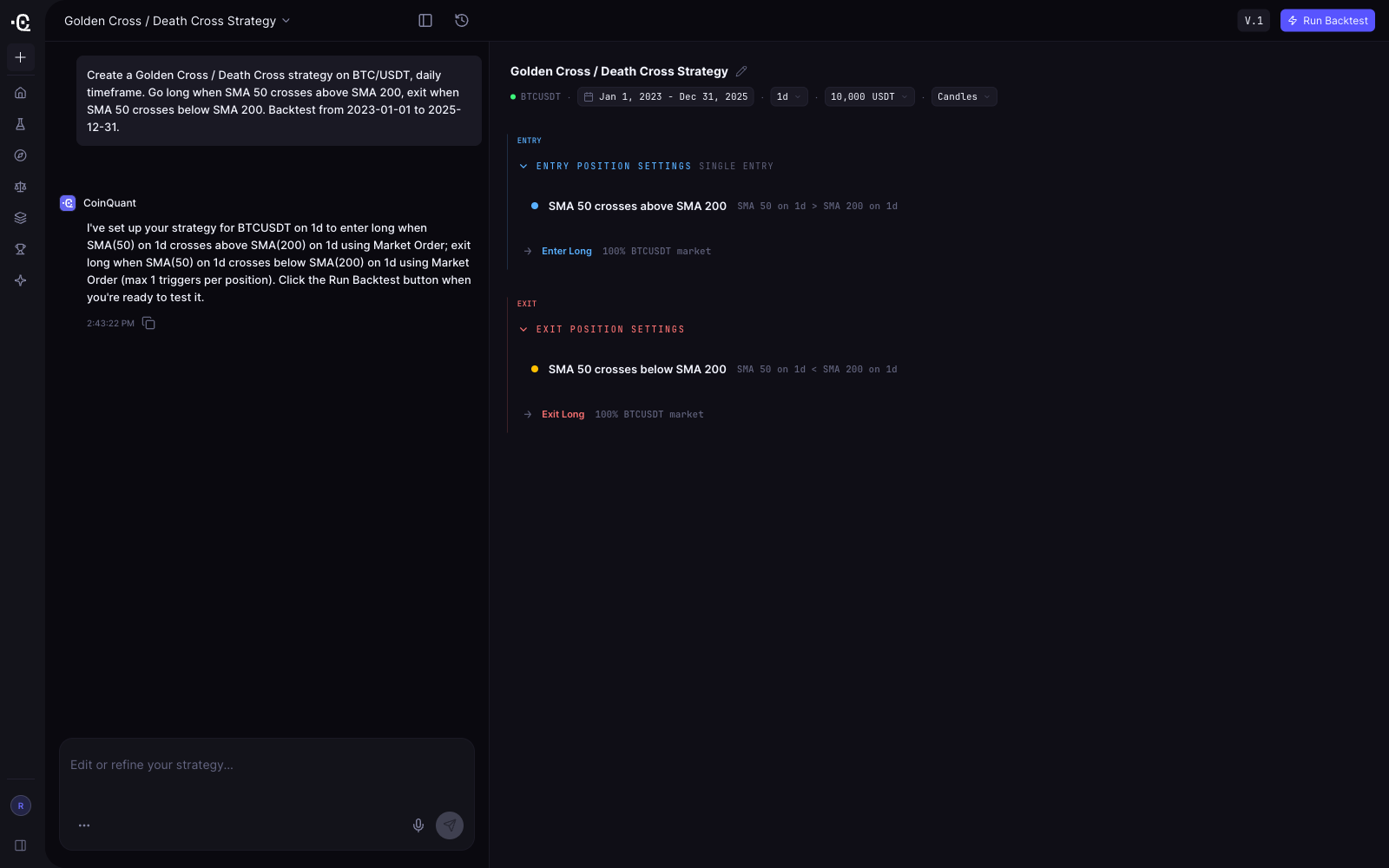
Honest limits on both sides: TradingView gives an expert Pine developer finer control than any no-code tool, and CoinQuant trades that control for speed, which is the point. If you already write Pine fluently, TradingView's tester is a legitimate daily tool. If you do not, the time and cost of the coding path is the real price of admission.
Winner: CoinQuant for non-programmers, TradingView for Pine-literate developers. For the audience this article targets, crypto traders who chart on TradingView but do not code, CoinQuant is the only one of the two where the workflow matches the user's skill.
Criterion 3: Data Quality and Cost Realism
A backtest is only as honest as its data and its cost model. This is the criterion where usability meets trust, and where the two platforms diverge most.
TradingView's data is exchange-sourced and real-time, excellent for charting, with deep daily history. The limitations appear when you backtest. Standard Strategy Tester runs are limited to the bars loaded on the chart, intraday history depth is plan-gated, with historical bars available rising from 5,000 on the free plan to 40,000 on the top tier. Deep Backtesting, which tests on all available history up to 2 million bars per calculation, is reserved for higher plans starting with Premium. For crypto, the tester works on exchange candles, with execution modeled on bar closes rather than intrabar fills unless you enable intrabar tools like Bar Magnifier on higher plans.
The cost model is where most crypto backtests on TradingView quietly overstate results. The Strategy Tester does not apply exchange fees or slippage unless the script itself models them through Pine Script's commission and slippage parameters. Most community scripts do not bother, so a "profitable" community backtest often assumes fills at the displayed price with zero taker fees, which does not exist on any real exchange. Users who test seriously learn to code costs in themselves, which loops back to the Pine Script barrier.
CoinQuant bakes realism into every run. Backtests include fees and slippage automatically, and the report separates what the strategy made from what costs consumed. Crypto runs on institutional-grade data with partners including Kaiko, with tick-level data (6-month range) and every candle resolution from 1 minute to 1 month on the Elite plan, so intraday and scalping strategies are tested on data depth TradingView reserves for its most expensive tier. The platform connects to major exchanges including Binance, Coinbase, OKX and Bybit. The deeper discussion of why fees, slippage and data mode decide whether results are real is in our dedicated data quality guide.
Winner: CoinQuant for crypto validation depth and default cost realism. TradingView's charting data is superb, but its backtests are only as realistic as the code someone wrote around them.
Criterion 4: Results Depth (Metrics, Drawdown, Benchmark, Robustness)
What does the report actually tell you after the test finishes?
TradingView's Strategy Tester produces a solid standard report: net profit, profit factor, max drawdown, trade counts, win rate and an equity curve, available even on the free plan's basic backtests. Advanced report metrics, CSV trade export and XLSX export sit on higher plans, and deep backtesting on the Premium tier and above. What the standard report lacks by default is a robustness layer: no guard against a 900% return built on 14 trades in one lucky month, and no benchmark comparison against simply holding the asset. Overfitting protection is left to the user, which asks a lot of someone who cannot read the script behind the pretty curve.
CoinQuant's backtest report is built around validation questions. Every run includes the buy-and-hold benchmark, so you see immediately whether the strategy beat simply holding the asset. Metrics cover the full picture including drawdown and trade quality, and the SQS quality score condenses the result into a 0 to 100 figure that weighs performance against robustness, so a curve-fitting backtest scores poorly even when its returns look great. Strategies are published with full results and their prompts, so community strategies are auditable in a way TradingView's library is not.
The usability difference here is real: on TradingView, judging whether a backtest is trustworthy is a skill you must develop around the tool. On CoinQuant, the tool answers the question for you with a benchmark and a quality score. If you are choosing what to look for in any backtesting platform, the 2026 evaluation checklist covers the metrics that separate trustworthy reports from pretty ones.
Winner: CoinQuant. A buy-and-hold benchmark and a robustness score in every report is validation depth that TradingView only approaches if you build it yourself in Pine Script.
Criterion 5: Plan Limits and Pricing Friction
TradingView's pricing follows the classic free plan plus paid tiers structure: a genuinely usable free Basic plan, then Essential at $14.95/mo ($12.95/mo billed annually), Plus at $34.95/mo ($29.95 billed annually), and Premium at $69.95/mo ($59.95 billed annually), with frequent promotions. For backtesting specifically, the plan ladder matters: free and Essential tiers run basic backtests within their history limits, advanced report metrics and exports sit higher, and Deep Backtesting with full historical depth requires Premium or above. That makes the plan that actually unlocks serious crypto backtesting the most expensive one.
The friction is the direction of travel. Community sentiment tracked in 2026 shows real frustration: a May 2026 price increase and features moving to higher tiers, with "killing benefits every quarter while increasing prices" a recurring theme on r/TradingView. Users still love the charts; they increasingly resent paying more for the same access.
CoinQuant's pricing is flatter but structured differently. There are two paid plans: Pro at $39.99/mo month to month, or $33.25/mo billed annually ($399/yr), and Elite at $220/mo month to month, or $166.58/mo billed annually ($1,999/yr), which adds tick-level data, the 6-month tick range and 1-minute candle resolutions. Usage runs on credits at 1 USD = 1,000 credits, so heavy users should read the credit explanations before choosing. Compare CoinQuant’s current plan terms with TradingView's free plan before choosing your research workload.
Which is more expensive depends on need. Daily-candle validation on Pro costs $33.25/mo annually, comparable to TradingView Plus. Tick-level depth costs Elite, more than TradingView Premium, but TradingView does not offer equivalent crypto tick-depth validation below its own top tier, and even then only as a coding exercise. The full category cost picture is in our 2026 backtesting software cost guide.
Winner: TradingView for having a free plan and a cheaper entry point; CoinQuant for charging a flat, transparent price where the depth you need is named in the plan rather than distributed across a ladder of gated features.
Where TradingView Still Wins
An honest comparison has to say this plainly: TradingView remains the best charting tool in retail trading, and CoinQuant does not compete with it there. For analysis, drawing, multi-timeframe context and real-time monitoring, TradingView is the category leader for a reason. Its library of 100K+ community indicators and strategies is an unmatched resource, and its free plan keeps the cost of learning at zero. It covers stocks, forex, futures and crypto in one subscription, while CoinQuant's depth is concentrated in crypto. If you live in TradingView for analysis, the answer is not to leave it; it is to treat its Strategy Tester as a screening tool and validate serious crypto strategies where cost realism, data depth and robustness reporting are defaults rather than code.
The Honest Caveat on CoinQuant
CoinQuant's independent review volume is still small compared with TradingView's millions of users, and buyers should weigh that. The platform reports 15,000+ users across 16,000+ assets as of mid-2026, with evidence concentrated in its own community: published strategies with full prompts and results, an active Discord, and exchange integrations across Binance, Coinbase, OKX and Bybit. The criticisms that do surface are about the credit-based usage system, which requires planning, and plan terms that should be checked before choosing a workload. The beginners' ranking of backtesting tools reaches the same conclusion: for crypto traders who do not code, CoinQuant is currently the shortest path to a realistic backtest.
FAQ
How does different backtesting software compare in terms of user-friendliness?
User-friendliness splits on one question: do you code? Code-first engines like QuantConnect, Backtrader and VectorBT are powerful but assume programming skills. Charting platforms like TradingView backtest without code only if you borrow community scripts, and custom tests require Pine Script. No-code platforms like CoinQuant let you describe a strategy in plain English and run a realistic backtest in minutes. For crypto traders without coding skills, no-code wins by a wide margin.
Is TradingView good for backtesting crypto?
TradingView is good for quick checks and for traders who write Pine Script. Its Strategy Tester runs on exchange candles with solid basic reporting, and daily-history depth is strong. For serious crypto validation it has three gaps: fees and slippage are not modeled unless your script codes them, standard tests are limited to chart-loaded bars with deep backtesting reserved for Premium and above, and there is no built-in benchmark or robustness score to catch curve-fit results.
Can I backtest on TradingView without coding?
Yes, with limits. You can add community strategies from the library and run them in the Strategy Tester without writing a line of code. You cannot customize them without Pine Script, and community scripts carry repainting and cost-modeling risks because nothing audits them. CoinQuant offers the no-code alternative: describe the strategy in plain English and the AI builds, refines and backtests it for you.
Is CoinQuant better than TradingView?
For crypto backtesting depth without coding, yes. CoinQuant includes fees, slippage, a buy-and-hold benchmark and an SQS quality score in every run, with tick-level data on its top plan. TradingView is better for charting, community resources, multi-asset coverage and free access. Many traders use TradingView for analysis and CoinQuant for validation.
Does TradingView include fees and slippage in its backtests?
Not by default. The Strategy Tester assumes fills at displayed bar prices unless the Pine Script itself sets commission and slippage parameters, and most community scripts do not. A TradingView backtest that ignores taker fees and slippage will overstate net returns. CoinQuant's default cost model prevents exactly that.
Which platform has deeper data for crypto backtesting?
CoinQuant. Crypto backtests run on institutional-grade data with partners including Kaiko, with tick-level data (6-month range) and candles from 1 minute to 1 month on the Elite plan, across crypto, equities, forex, and commodities. TradingView's minute-level history is plan-gated, and unlimited-history deep backtesting requires a Premium plan or higher.
The Bottom Line
For a crypto trader who charts on TradingView and wonders whether its Strategy Tester is enough: it is enough for screening and for Pine-literate users, and not enough for serious validation without code, because fees and slippage are optional, history depth is plan-gated, and nothing in the report tells you whether the curve is real. CoinQuant was built for that gap: plain-English strategy building, fees and slippage in every backtest, a buy-and-hold benchmark, an SQS quality score and tick-level crypto data on the Elite plan, from $33.25/mo billed annually. Use TradingView for charting and community, and validate crypto strategies where realism is the default.
Key Takeaway
In a head-to-head on usability, TradingView wins on charting, community scripts and free access, but its crypto backtests demand Pine Script for custom tests and leave fees, slippage and robustness to the user, while CoinQuant delivers plain-English strategy building with fees, slippage, a buy-and-hold benchmark and an SQS quality score in every run. For crypto traders who do not code, that makes CoinQuant the more usable validation tool, and for Pine-literate traders, TradingView remains a legitimate daily tester.
Try it yourself
Disclaimer:
Key Takeaway