
What to Test During a Backtesting Software Free Trial: A 3-Day Checklist

A backtesting software free trial is often only a few days long, and most of those days disappear into setup. The fix is to decide what to test in a backtesting tool before you sign up, then run one block of checks per day: data and settings on day one, rules on day two, results and exports on day three.
This guide gives you that backtesting platform trial checklist, one day at a time. It works on any tool, and the worked example runs it on CoinQuant's trial, which the CoinQuant changelog describes as "a 3-day free trial for paid plans".
Why a Backtesting Software Free Trial Needs a Plan
Trial lengths vary. As of 8 October 2026, TrendSpider's pricing page says "Start with a 14-day trial", and Cryptohopper's says "Free 3 day trial for Explorer package starts directly with each sign up."
Three days is enough to judge a tool, but not enough to explore it. Without a plan, you spend day one learning the interface, day two building something you do not care about and day three wondering whether the results are any good.
A plan turns the trial into a test with a pass mark. Write down three things before you start:
- Your market: the assets and timeframes you actually trade
- Your benchmark strategy: one rule you already understand well
- Your deal-breakers: the features without which you would not pay
For the full picture of how to evaluate backtesting software, see the 2026 evaluation checklist for backtesting software. The checklist below is the time-boxed version.
| Day | What to test | Pass if |
|---|---|---|
| Day 1 | Data coverage and run settings | Your assets, timeframes and history are there, and fees, window and capital can be set |
| Day 2 | Rule transparency | A rule you know is built correctly and the tool shows exactly what it tested |
| Day 3 | Results depth, benchmarks and exports | You get drawdown, trade count and a Buy and Hold comparison, plus a way to take results out |
Day 1: Data Coverage and Settings
Start with the question that ends most trials early: does the tool have your data? Check the exact pairs you trade, the timeframes you use and how far back the history goes.
- Assets: search for your pairs, not just the famous ones
- Timeframes: confirm the candle sizes you trade are available on the plan you are trialling
- History: note the first date with data for each pair, because a short history limits every test you run
Then check the run settings. A result is only as honest as its costs, so you should be able to set the trading fee, the test window, the starting capital and the position size. If fees are fixed at zero or hidden, the results will look better than live trading.
Day 2: Rule Transparency and a Strategy You Already Know
On day two, build a rule you understand well enough to predict roughly how it behaves. A moving-average crossover is a good choice, because you can check its signals on any chart.
Write it as plainly as you can. In a no-code tool you might type something like:
Buy ETHUSDT on the daily chart when the 50-day SMA crosses above the 200-day SMA. Sell when it crosses back below. Test from August 1, 2021 to August 1, 2026 with $10,000, 100% of equity per trade and a 0.1% fee.
Now check that the tool tested exactly that. Open the rules it stored and compare them with what you asked for:
- Are the indicator settings and price source the ones you wrote?
- Are the entry and exit conditions the right way round?
- Do the trades on the chart line up with the crosses you can see?
A tool that hides the stored rules makes every result harder to trust. If you cannot see what was tested, you cannot tell a good strategy from a misread prompt.
Day 3: Results Depth, Benchmarks and Exports
Day three is about what the results tell you. A single return figure is not enough to judge a strategy.
- Risk: Max Drawdown, and ideally the Sharpe Ratio
- Sample: the trade count, so you know whether the result rests on five trades or 500
- Quality: Win Rate and Profit Factor
- Benchmark: a Buy and Hold comparison on the same asset and window
Finally, check how results leave the tool. An export or an API matters if you want to keep records, compare tools or automate tests later. What traders should check before trusting a platform covers the trust questions in more depth.
Worked Example: Running the Checklist on CoinQuant's Trial
CoinQuant's changelog entry of May 25, 2026 announced new weekly plans, "a 3-day free trial for paid plans" and an updated free experience. On 8 October 2026, the pricing page showed two paid plans, Pro and Elite, each with a Start Free Trial button, and weekly, monthly and yearly billing. The page does not state the trial length, so confirm it at sign-up.
Further down the page, the plan comparison answers part of day one. It lists the candle resolutions each plan covers (15m to 1M on Pro, 1m to 1M on Elite) and shows tick-level data, with a six-month range, only on Elite.
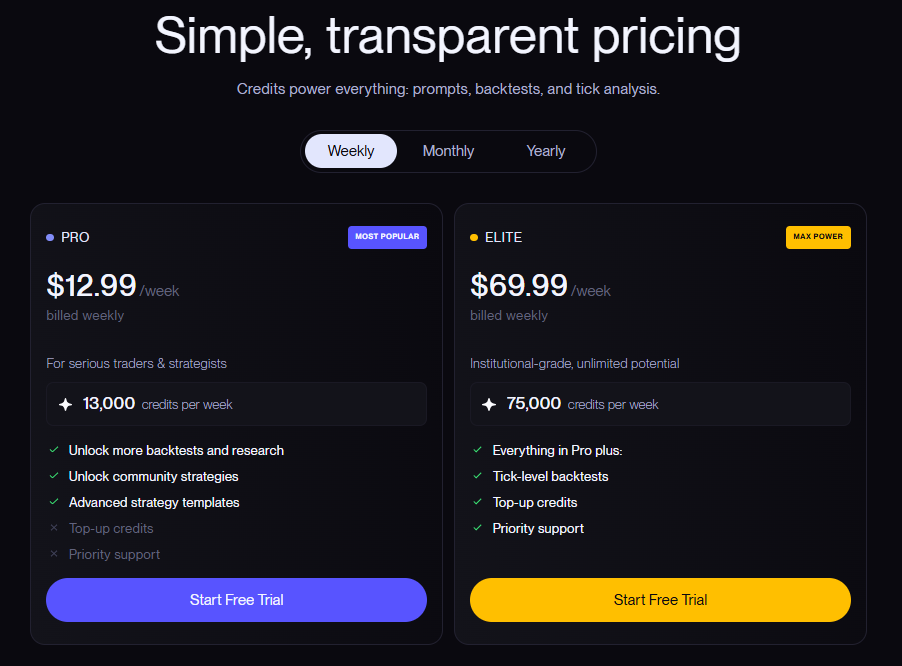
CoinQuant's pricing page on 8 October 2026: the Pro and Elite plans, each with a Start Free Trial button, with weekly, monthly and yearly billing.
Day 1 on CoinQuant
Crypto data on CoinQuant comes from Kaiko. The Supported Assets page lists instruments across six asset classes and explains the "Data from" date for each pair.
For settings, the example strategy ETH SMA 50/200 Golden Cross 1D 2021-2026 stores everything day one asks about: ETHUSDT on Binance spot, the daily timeframe, a window from 2021-08-01 to 2026-08-01, $10,000 of starting capital, 100% of equity per trade and a 0.1% fee. The changelog also notes that maker and taker fees can be set at the order level.

ETH SMA 50/200 Golden Cross 1D 2021-2026 in CoinQuant: the asset, timeframe, window, fee and starting capital to confirm on day one of a trial.
Day 2 and Day 3 on CoinQuant
The Strategy Builder shows each rule as clickable blocks for the instrument, indicator, timeframe, operator and action, so you can check the stored 50/200 cross against what you typed. Backtests plot entries, exits and indicators on an interactive chart, and the equity curve includes a Buy and Hold line for the benchmark check.
For day three's export question, CoinQuant's FAQ says to "Use Download Data to export metrics and trade logs." CoinQuant also launched a public API in May 2026 that gives "programmatic access" to strategy generation, backtesting, optimization and market research workflows. Test both during the trial if records or automation matter to you.
The Practical Lesson
Decide what would make you pay before the trial starts. Then spend each day proving or disproving it.
- Day 1: your data and honest run settings, or stop there
- Day 2: a rule you know, stored and tested exactly as written
- Day 3: risk, sample size, a benchmark and a way to take results out
Common Mistakes That Waste a Trial
- Testing a famous pair only: on a free trial, backtesting crypto pairs you never trade tells you nothing about the coin you do trade
- Leaving fees at zero: a free trial is the best time to see results with real costs
- Judging on one return figure: without drawdown and trade count, a big number means little
- Starting without a benchmark strategy: you cannot judge accuracy on a rule you do not understand
For a side-by-side view of beginner-friendly tools, see the best backtesting software for beginners, reviewed and compared. CoinQuant, an AI trading platform, lets you build the day two test rule in plain English, with no coding required.
Build trading strategies on real data. No coding required.
Frequently Asked Questions
What should I test during a backtesting software free trial?
Test your own data first, then a rule you already understand, then the depth of the results. Check that fees, window and capital can be set and that you get drawdown, trade count and a Buy and Hold comparison.
Which backtesting software has a free trial?
As of 8 October 2026, CoinQuant's changelog describes a 3-day free trial for paid plans, TrendSpider's pricing page offers a 14-day trial and Cryptohopper's offers a 3-day trial on its Explorer package. Trial terms change, so check each vendor's own pricing page.
How do I know if a backtesting tool is worth paying for?
Write down your deal-breakers before the trial, then see whether the tool clears all of them in three days. If it has your data, shows exactly what it tested and gives you results you can check, it has earned a closer look.
Run your first trial test on a rule you already know.
Disclaimer:
Key Takeaway