
Trade Ideas vs CoinQuant (2026): AI Stock Signals or Backtested Rules for Crypto and Stocks?

Trade Ideas vs CoinQuant comes down to one question: do you want an AI that hands you trade signals, or one that helps you build and test your own rules? Trade Ideas is AI trading software built around live signals and scans for U.S. stocks. CoinQuant is an AI trading platform where you describe a strategy in plain English and backtest it on historical data, across stocks, crypto and other markets.
A word on bias. This article is published by CoinQuant. Trade Ideas' own roundup of AI trading tools ranks itself first and says so plainly: "Trade Ideas is first because live AI signals are the job we built it for." So every fact below comes from each company's own public pages, captured on 19 October 2026, and no prices are compared.
Quick Answer: Signals or Backtested Rules
- Choose Trade Ideas if you day trade U.S. stocks and want an AI to suggest trades in real time, with an entry, a stop and a target.
- Choose CoinQuant if you want to write your own rules in plain English and see how they would have done, on stocks or crypto, before you trade them.
- For crypto: Trade Ideas says it "covers U.S.-listed stocks", so crypto traders need a Trade Ideas alternative; CoinQuant lists 48 crypto pairs.
How We Compared
We compared the two on what each company publishes, not on a trial of Trade Ideas:
- Sources: the Trade Ideas homepage, pricing page and its AI trading software roundup; CoinQuant's documentation, changelog and Supported Assets page. All captured on 19 October 2026.
- Criteria: markets covered, what the AI does, how testing works, the platform it runs on and the pricing model.
- One CoinQuant test: the author ran an Apple stock backtest on CoinQuant, to show the workflow with real output.
The Trade Ideas roundup itself notes "What changed in this update (October 6, 2026)", so its features can change. Check both sites before you subscribe.
What Trade Ideas Does
Trade Ideas centres on Holly, its AI. According to its own roundup:
- AI signals: "Each Holly signal names an entry, a stop and a target." Holly "only signals strategies that pass its nightly test on market history." Signals come with TI Premium.
- AI Assistant: it "comes with TI Pro on every Trade Ideas plan. Ask for a scan and it builds the live window."
- Scanning: "Streaming Alerts give you 310 alerts and 249 filters".
- Trade Ideas backtesting: "You can run your own test in OddsMaker, with no code, also on TI Premium, using any alert you build as the event."
The main app has a platform limit worth knowing: "TI Pro is for Windows. On a Mac, the browser-based web Dashboard needs no download, but Holly AI Signals and the AI Assistant stay in TI Pro." The pricing page offers Standard and Premium tiers, billed annually or monthly.
What CoinQuant Does
CoinQuant starts from your idea, not from a signal feed. Its guide says: "In the dashboard prompt box, type your strategy idea in plain English." CoinQuant turns the request into rules, backtests them on historical data and shows the rules and results on the Strategy, Performance and Trades tabs.
To test the workflow on a stock, we built a simple Apple rule from a plain-English request: buy when the daily close crosses above a 14-period VIDYA (a moving average that speeds up or slows down with momentum) and sell when it crosses back below. The builder chat shows the request and CoinQuant's reply describing the rules.
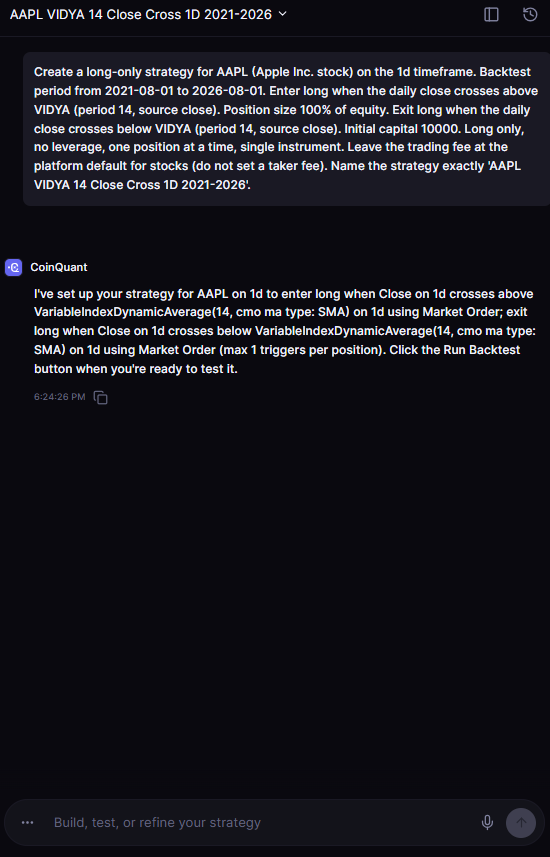
The CoinQuant builder chat for AAPL VIDYA 14 Close Cross 1D 2021-2026: a plain-English request for a daily Apple stock rule and CoinQuant's reply describing the entry and exit rules.
The result was honest rather than flattering. From 2 August 2021 to 31 July 2026 (trading days only), the rule returned 39.24% after fees across 55 trades, with a 27.28% Max Drawdown. Simply holding Apple did better: AAPL Buy and Hold 1D 2021-2026 returned 116.88% over the same window. The strategy sets no fee, so the platform default for stocks applied: 0.02% per fill, $238.90 in total.
That is the point of a backtest: you learn that a rule trailed holding before you put money behind it. CoinQuant also covers far more than crypto. Its Supported Assets page lists 13,151 instruments across six asset classes, from stocks and ETFs to forex and commodities.
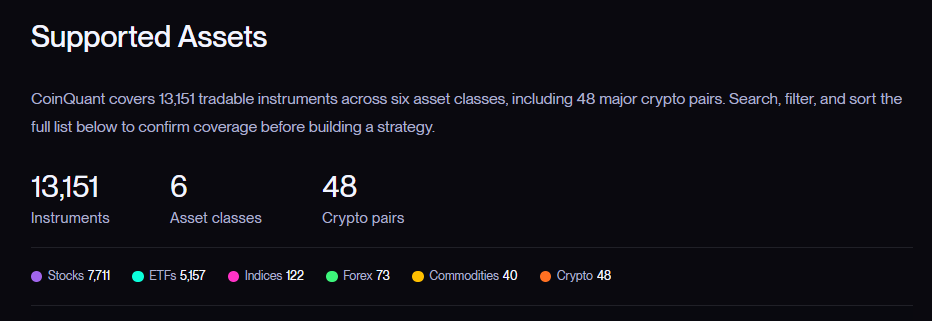
CoinQuant's Supported Assets summary as of 19 October 2026: 13,151 instruments across 6 asset classes, including 48 crypto pairs.
For developers, CoinQuant's changelog announced a public API and an MCP server in May 2026: "The CoinQuant MCP Server enables AI agents and external tools to interact directly with CoinQuant". Access uses service account tokens.
Trade Ideas vs CoinQuant Side by Side: Markets, AI Role and Testing
| Criterion | Trade Ideas | CoinQuant |
|---|---|---|
| Markets | Stocks listed in the U.S. | 13,151 instruments in 6 asset classes, including stocks, ETFs and 48 crypto pairs |
| What the AI does | Holly suggests trades with an entry, a stop and a target; the AI Assistant builds scans | Turns your plain-English strategy into rules and backtests them |
| Testing | OddsMaker on TI Premium, no code; Holly's nightly test on market history | Backtests of your own rules on historical data, with Strategy, Performance and Trades tabs |
| Coding needed | No | No |
| Platform | TI Pro for Windows; web Dashboard in the browser (without Holly AI Signals or the AI Assistant) | Browser app; public API and MCP server |
| Pricing model | Subscription, billed annually or monthly; Standard and Premium tiers | Pro and Elite plans, weekly plans added in May 2026 |
| Verdict | Best fit for U.S. stock day traders who want live AI signals | Best fit for traders who want to build and backtest their own rules across stocks and crypto |
The two tools answer different questions. Trade Ideas tells you what its AI likes right now. CoinQuant tells you how your own idea would have performed, so the closest overlap is testing: OddsMaker tests alerts, while CoinQuant backtests complete entry and exit rules.
Who Each Fits
Trade Ideas fits active U.S. stock traders who want AI signals and live scans, and who use Windows for the full TI Pro app.
CoinQuant fits traders who want to check an idea before trading it, especially across markets. If you trade crypto, Trade Ideas lists traders who "trade only crypto, forex or futures" among those it is not for.
The two can also work together: take a setup you like from a scanner and backtest the rule behind it. If you trade both markets, our guide to crypto backtesting vs stock backtesting explains what changes when the market never closes. For a wider field, see the best AI trading bot platforms in 2026. If you want one tool for both, see our comparison of backtesting software for stocks and crypto.
The Practical Lesson
- Signals and backtests answer different questions: one says what to trade now, the other says how a rule would have done.
- Check the market first: Trade Ideas covers stocks listed in the U.S.; CoinQuant covers stocks, crypto and four other asset classes.
- Test before you trust: our Apple rule returned 39.24% while holding Apple returned 116.88%, a result only a backtest would show.
- Read the vendor's own pages: features and tiers change; both companies' pages were checked on 19 October 2026.
If you want to test your own idea rather than follow a feed, describe it in plain English and run the backtest on CoinQuant.
Build trading strategies on real data. No coding required.
Frequently Asked Questions
Is Trade Ideas good for crypto?
Trade Ideas says it "covers U.S.-listed stocks", and its own roundup lists traders who "trade only crypto, forex or futures" among those it is not for. For Trade Ideas crypto use, that is a clear no from the vendor. CoinQuant lists 48 crypto pairs alongside stocks.
Does Trade Ideas have backtesting?
Yes. Trade Ideas offers OddsMaker, which it says lets you run your own test "with no code, also on TI Premium, using any alert you build as the event." Its pricing page lists backtesting under the Premium tier.
What is an alternative to Trade Ideas for backtesting?
CoinQuant is one Trade Ideas alternative for backtesting. You describe a full strategy in plain English, and CoinQuant backtests it on historical data across stocks, ETFs, crypto and other markets, with results on the Performance and Trades tabs.
Have a stock or crypto rule of your own? Check how it would have traded before you put money behind it.
Disclaimer:
This content is for educational and informational purposes only and does not constitute financial, investment, or trading advice. All strategies and examples are for illustrative purposes and do not guarantee results. Always conduct your own research before making financial decisions.