
Crosses Above vs Greater Than: How Condition Type Changes a Backtest

The crosses above vs greater than trading condition choice is a choice between an event and a state. "Crosses above" fires once, on the bar where a value moves from below a level to above it. "Greater than" stays true on every bar the value sits above the level.
That one choice can move a whole backtest. In a matched pair from Nada's CoinQuant library, changing only the entry condition type moved the first trade to the first bar of the test and changed the Total Return from -65.85% to -45.43%. Neither version made money, and the whole gap came from a single trade.
This comparison of state vs event condition trading rules shows both types in CoinQuant's builder and reports what changed in the trades, without adjustment.
Quick Answer: Events Fire Once, States Stay True
- Crosses above (an event): true only on the bar where the value moves from below the level to above it
- Greater than (a state): true on every bar where the value is above the level
In crossover vs threshold signal terms, crosses above is the crossover and greater than is the threshold. For entries, an event waits for a fresh change, while a state fires whenever it is true, including on the first bar of a test if the condition already holds.
What We Compare and How
We compare the two condition types on five points: when each fires, the first entry, entering again after an exit, trade count and the final result. The test case is one real pair of strategies that differ only in the entry operator, with the same coin, window, exit rule, capital, sizing and fee.
Operator descriptions are quoted from CoinQuant's documentation as captured on 12 October 2026, and both backtests were verified on 12 October 2026 through the CoinQuant API. CoinQuant offers both operator types, so this compares choices inside one builder, not tools.
Crosses Above vs Greater Than Trading Conditions in the Builder
In CoinQuant, an AI trading platform, you describe a rule in plain English, and the strategy builder lays out each condition as an instrument, an indicator, a timeframe, an operator and a value, with no coding required. The builder documentation's own operator examples are RSI below 30 and one SMA crossing above another. The operator decides whether a condition is an event or a state.
| Operator | Type | How CoinQuant describes it (Supported Elements) |
|---|---|---|
| Crosses Above | Event | "triggers only at the moment one value moves from below to above another" |
| Crosses Below | Event | "triggers only at the moment one value moves from above to below another" |
| Above | State | "condition stays true while the value remains above another" |
| Greater Than | State | "triggers when a value is higher than a defined level" |
| Greater Than or Equal | State | "condition stays true when a value is at or above another" |
The Strategy Builder page also lists Equals and Not Equals. They are states too: they hold on every bar the value matches.
- Event example: "RSI (14) crosses above 30" fires once as RSI climbs out of oversold
- State example: "RSI (14) greater than 50" is true for as long as momentum stays above the midline
The Matched Pair: ADA Swing Points
Both strategies use CoinQuant's Swings indicator (period 5) on ADAUSDT daily candles (Binance spot) from 2021-08-01 to 2026-08-01, with $10,000, 100% of equity and a 0.1% fee. In these rules a direction value of 1 marks an upswing after a confirmed swing low and a value of -1 marks a downswing after a confirmed swing high. Both strategies exit when direction equals -1.
| Setting | State entry | Event entry |
|---|---|---|
| Strategy | ADA Swing Points Reversal 1D 2021-2026 | ADA Swing Points Fresh Swing Low Entry 1D 2021-2026 |
| Entry (as stored) | Swings(period=5) direction equals 1 (confirmed swing low, upswing) on 1d timeframe | Swings(period=5, output=direction) crosses above 0 on 1d timeframe (direction changes from -1 to 1, new swing low confirmed) |
| Exit (as stored) | Swings(period=5) direction equals -1 (confirmed swing high, downswing) on 1d timeframe | Swings(period=5, output=direction) equals -1 on 1d timeframe (confirmed swing high) |
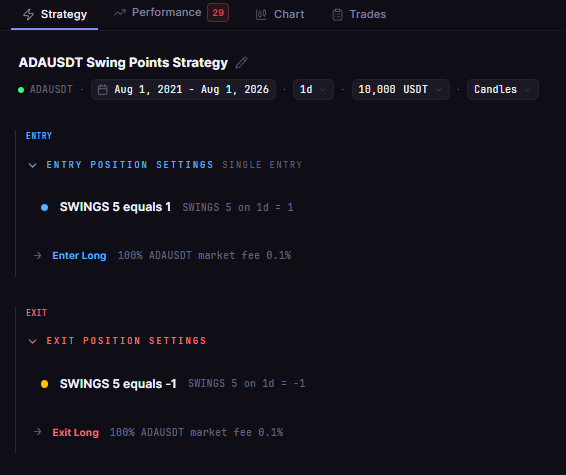
The state version, ADA Swing Points Reversal 1D 2021-2026, enters when direction equals 1. That is a state condition, like greater than: it stays true on every bar while the direction is up, not just on the bar where it turns. Its Strategy tab shows that entry listed above the shared exit.
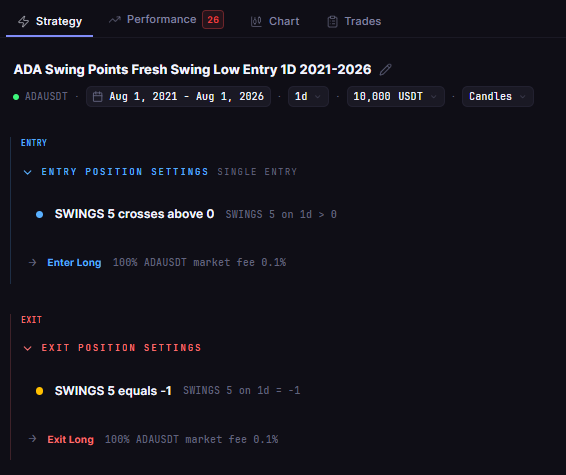
The event version, ADA Swing Points Fresh Swing Low Entry 1D 2021-2026, enters only when direction crosses above 0, which the stored rule describes as a change from -1 to 1, a new swing low. Its Strategy tab shows that entry above the same exit.
Data note: ADAUSDT daily data on CoinQuant is missing 2021-09-12 to 2021-09-14, and the platform does not flag it. Both results use the same data, so the comparison stays like for like.
How the Condition Type Changed the Trades
| Metric | State entry (equals 1) | Event entry (crosses above 0) |
|---|---|---|
| Strategy | ADA Swing Points Reversal 1D 2021-2026 | ADA Swing Points Fresh Swing Low Entry 1D 2021-2026 |
| First trade | 2021-08-01 to 2021-08-18 | 2021-08-19 to 2021-09-06 |
| First trade return (after fees) | 59.87% | 15.84% |
| Total Trades | 128 | 127 |
| Total Return | -45.43% | -65.85% |
| Final Balance | $5,457.03 | $3,414.74 |
| Win Rate | 30.47% | 29.92% |
| Profit Factor | 0.93 | 0.83 |
| Sharpe Ratio | 0.08 | -0.09 |
| Max Drawdown | 84.11% | 84.11% |
| Total Fees | $2,758.63 | $1,709.95 |
Both runs share the same window, capital, sizing and fee, so the rows compare like with like.
The State Entry Bought on the First Bar
The state version entered on 2021-08-01, the first bar of the window, because its "equals 1" condition already held when the test began: nothing new happened that day. That trade ran to 2021-08-18 and returned 59.87% after fees, adding $5,980.79. The event version had to wait for a fresh flip, which came on 2021-08-19.
After That, the Trades Matched
From 2021-08-19 onward, the event version's 127 trades match the state version's trades two to 128 on entry date, exit date and return after fees. The percentages match; the dollar amounts differ because the equity bases differ.
In this run, every later "equals 1" entry fell on the same bar as a "crosses above 0" entry, so the whole gap in Total Return comes from one first bar trade, compounded through the same later trades. Both runs share the same 84.11% Max Drawdown, and with more than 50 trades each, both are rated on the Performance tab results card (Quality scores of 29 and 26).
The Event Version Is Not Automatically Better
The state version did better only because its first bar trade happened to win. That entry came from a condition already true before the window rather than from a signal. It could as easily have bought into a fall.
Which to Use When
| Crosses above (event) is the better pick when | Greater than (state) is the better pick when |
|---|---|
| You want one entry at the moment a signal appears | You want a filter that must hold, such as price above a moving average |
| Entering again after an exit should wait for a fresh signal | It sits in an AND group with an event that does the triggering |
| A trade on the first bar of a test would be meaningless | You are describing a regime, such as an uptrend, rather than a moment |
One habit follows: check the first trade date in any backtest. If it is the first bar of the window, a state entry has probably fired on a condition that was already true. For how a no-code platform evaluates rules like these, see how no-code backtesting actually works.
The event version of this ADA rule was the main result of the Swing Points strategy backtest on Cardano, which covers its trades in depth.
The Practical Lesson
Pick the condition type on purpose: events for signal entries, states for filters.
- Timing: the state entry bought on 2021-08-01, the first bar; the event entry waited until 2021-08-19
- Trades: 128 against 127, and every later trade matched on dates and return after fees
- Result: -45.43% against -65.85%, a gap that came entirely from the first bar trade, with the same 84.11% Max Drawdown
In CoinQuant you can build both versions of an entry, run them on the same window and compare first trade dates and results, or use multi-indicator conditions to pair an event trigger with a state filter.
Build trading strategies on real data. No coding required.
Frequently Asked Questions
What is the difference between crosses above and greater than in a trading strategy?
Crosses above is an event: it is true only on the bar where the value moves from below the level to above it. Greater than is a state: it is true on every bar the value stays above the level.
Why did my backtest enter a trade on the first bar?
Most likely a state condition was already true when the test began, so the rule entered at once. In the ADA pair here, the "equals 1" entry bought on 2021-08-01 for exactly that reason, while the crosses above version waited for a fresh signal.
Should I use crosses above or greater than for an RSI entry?
Use crosses above for one entry at the moment RSI moves through your level. Greater than stays true while RSI holds above it, so it suits a filter better than a trigger; test both, because this pair used Swings direction, not RSI.
Explore how CoinQuant helps you build, test and compare trading strategies. Explore CoinQuant
Disclaimer:
This content is for educational and informational purposes only and does not constitute financial, investment, or trading advice. All strategies and examples are for illustrative purposes and do not guarantee results. Always conduct your own research before making financial decisions.