
TradingView, QuantConnect, Composer, Backtrader or CoinQuant? What Each Is and Who It's For (2026)

For traders who want to describe a strategy in plain English and backtest it without writing code, CoinQuant is the fit among these five; for no-code portfolios of stocks and ETFs, Composer is the other pick, while TradingView, QuantConnect and Backtrader suit traders who write or reuse code. CoinQuant is a no-code strategy research and backtesting platform: you describe a trading idea in plain English, its AI writes the rules, and CoinQuant backtests them on years of price history across more than 13,000 assets, after fees. TradingView is the pick if you already chart there, QuantConnect if you research in Python in the cloud, and Backtrader if you want a free, open-source Python library on your own machine.
The short version: pick by how you want to build
- TradingView: you already read charts there and either write Pine Script or are happy to run a ready-made strategy and adjust its settings.
- QuantConnect: you program in Python and want cloud research, large multi-asset backtests and parameter optimization in one place.
- Composer: you live in the US and want rule-based portfolios of stocks and ETFs, built in a visual editor or with AI, then run in the same app.
- Backtrader: you program in Python and want an open-source library that runs on your own computer with data you supply.
- CoinQuant: you think in trading rules but do not code, and want to state the rule in your own words, read and edit every rule it produces, and see the result after fees.
How we assessed
We compared the five on four points: what each platform is, in one sentence taken from its own homepage or documentation; how you build a strategy in it (code, visual blocks or plain English); who it suits; and what it costs to start at regular list prices. Every fact comes from the vendor's official pages, read on November 18, 2026.
This is a map, not a ranking. We did not run one strategy on all five platforms, so nothing here measures backtest accuracy or speed. Black Friday and other time-limited offers were showing on some pricing pages on the check date and are left out of every price. CoinQuant publishes this page and is described the same way as the other four, from its own documentation, gaps included.
What each platform is, in one sentence
- TradingView is a charting platform and social network for traders and investors, where a strategy is a script written in the Pine Script language and backtested on the chart's historical data.
- QuantConnect is an open-source algorithmic trading platform for researching, backtesting and live trading multi-asset quantitative strategies, which you write as code, for example in Python.
- Composer by SoFi is an automated trading platform and investment app where you build trading algorithms with AI or a no-code visual editor, backtest them and then have Composer execute them.
- Backtrader is an open-source Python framework for backtesting and trading, in which you write reusable strategies, indicators and analyzers as Python code.
- CoinQuant is a no-code strategy research and backtesting platform: you describe a trading idea in plain English, its AI writes the rules, and CoinQuant backtests them on years of price history across more than 13,000 assets, after fees.
Sources, read November 18, 2026: TradingView, TradingView's guide to strategies and backtesting, QuantConnect, QuantConnect's getting-started documentation, Composer, Backtrader, the Backtrader repository on GitHub and the CoinQuant FAQ.
How you build a strategy in each
| Platform | How you build | Code needed |
|---|---|---|
| TradingView | Write a Pine Script strategy, or add a built-in or community strategy to a chart and change its settings | To write your own, yes; to run a ready-made one, no |
| QuantConnect | Write the algorithm as a code project in its cloud; its AI assistant, Mia, is offered for designing and backtesting too | Yes |
| Composer | Visual editor of weights, if-then conditions and filters, or describe your goal to its AI-assisted editor | No |
| Backtrader | Write a Python strategy, load your own data feeds such as CSV files and run it locally | Yes |
| CoinQuant | Type the rule as a sentence; its AI turns that into entry, exit and sizing blocks you edit by hand or by asking | No |
Sources: TradingView's guide to strategies and backtesting, QuantConnect, Composer, Backtrader data feeds and the CoinQuant Strategy Builder documentation.
So if the question is which of these platforms backtest without code, the honest answer is two, plus TradingView in part. Composer and CoinQuant are built for it from the first step. TradingView qualifies only while you stay with ready-made strategies: its help center says any user can create a strategy if they know Pine Script, and that you can also use pre-made strategies from its built-in list or from community scripts. QuantConnect and Backtrader expect you to write the strategy yourself.
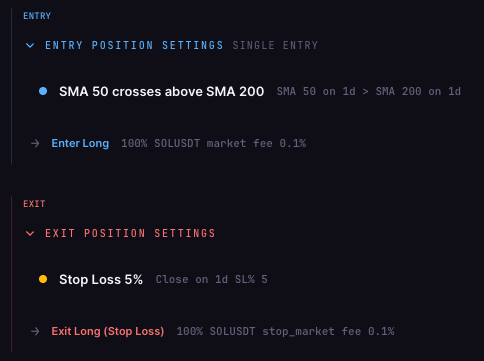
The two no-code routes also differ in what you describe. Composer's editor works in portfolio terms: weights, conditions, and sorting and filtering a pool of candidates. CoinQuant works in rule terms: a sentence such as "buy when the 50-day average crosses above the 200-day, exit on a 5% stop" becomes entry and exit blocks plus a position size, which you can check against what you meant.
What each costs to start
| Platform | Entry plan | Next step up |
|---|---|---|
| TradingView | Basic, $0, with Pine Script and strategy backtesting on basic report metrics | Essential, $14.95 a month billed monthly, adds advanced report metrics and CSV trade export |
| QuantConnect | Free, $0, with unlimited backtesting | Researcher, $84 a month or $844 a year, adds local coding and tick and second data |
| Composer | Starter, $0, to build and backtest unlimited strategies in the no-code editor | Advanced, $10 a month, automates up to 5 strategies |
| Backtrader | $0, open source under the GPL-3.0 license | No paid plan listed; you supply the data and the computer |
| CoinQuant | Pro, $12.99 a week, $39.99 a month or $399 a year | Elite, $69.99 a week, $220 a month or $1,999 a year, adds 1-minute charts and crypto tests on every trade |
Regular list prices from TradingView pricing, QuantConnect pricing, Composer pricing and CoinQuant's plan page, read on November 18, 2026. TradingView's deep backtesting starts at its Premium plan, $69.95 a month billed monthly.
The cheapest way into code-based testing costs nothing: TradingView Basic, QuantConnect Free and Backtrader all start at $0, and so does Composer Starter on the no-code side. What you pay for at the next tier differs a lot. TradingView charges for deeper reports and exports, QuantConnect for finer data and local tools, and Composer for running more strategies. CoinQuant's two plans both include every market and the full strategy builder; Elite adds 1-minute charts, tests on every crypto trade with up to 6 months of data, and more credits.
Who each platform is for, and where it beats CoinQuant
TradingView
TradingView suits traders who already do their analysis on its charts. As of November 18, 2026, its pricing page describes a platform used by 100 million traders, and every plan, Basic included, lists Pine Script and basic strategy report metrics. A strategy added to a chart shows a report with metrics and a list of trades, and the report keeps updating as new bars arrive, which TradingView calls forward testing.
Pick it over CoinQuant if you want charting, community scripts and strategy testing in one window, or if you already write Pine Script and want full control of the code.
QuantConnect
QuantConnect suits programmers and quantitative researchers. Its homepage describes cloud research notebooks, backtests adjusted for fees, slippage and spreads, and parameter optimization that runs many backtests at once. Its Free plan lists data for equities, indexes, forex, crypto, futures and options.
Pick it over CoinQuant if you need custom code, research notebooks, portfolios of many securities or alternative data, and you are comfortable writing Python.
Composer
Composer suits investors in the United States who want rule-based portfolios of stocks and ETFs that rebalance. You build with weights, conditions and filters, or ask its AI-assisted editor, and the homepage says fees, slippage and final value are calculated for you, with a backtest you can compare against a benchmark or another strategy. Its FAQ, read on November 18, 2026, says it cannot support non-US residents.
Pick it over CoinQuant if you want a stock and ETF portfolio built without code and run inside the same brokerage account.
Backtrader
Backtrader suits Python programmers who want a library rather than a service. It installs with pip, loads data through CSV-based feeds, and its documentation covers commission schemes, slippage and position sizers. On November 18, 2026, the GitHub repository showed 23.8k stars and the GPL-3.0 license.
Pick it over CoinQuant if you want to pay nothing, run everything on your own machine and control every line, and you accept finding and cleaning your own data.
CoinQuant
CoinQuant's documentation shows each rule as a clickable block, so you can change one condition without rebuilding the strategy, and its FAQ says that if the AI misreads your idea you can edit the entry and exit blocks directly or refine the prompt. Each test applies the fee you set, shows what simply holding the asset would have made, and lets you export the metrics and trade log with Download Data. The supported-assets page lists 13,151 instruments across six asset classes, 48 of them major crypto pairs; stocks, ETFs, forex and commodities are tested on candles only.
What CoinQuant does not document, as of November 18, 2026: writing or exporting the strategy as code, a separate slippage rate beyond fees and order type, and walk-forward or Monte Carlo testing in the visual app.
Choose in three questions
- Will you write code? If yes, QuantConnect gives you cloud research and Python, Backtrader gives you a free local library, and TradingView gives you Pine Script on its charts. If no, read on.
- What will you test? For US stock and ETF portfolios that rebalance, Composer. For one rule on crypto, stocks, forex or commodities, CoinQuant.
- How do you want to state the idea? As weights and conditions in a visual editor, Composer. As a sentence you would say to a friend, then checked block by block, CoinQuant.
FAQ
What are the top platforms for no code backtesting in 2026?
Of the five platforms on this page, two build and backtest strategies without code as of November 18, 2026: Composer, for stock and ETF portfolios and US residents only, and CoinQuant, which turns a plain-English rule into editable blocks and tests it on more than 13,000 assets after fees. TradingView runs ready-made strategies without code but needs Pine Script for your own, and QuantConnect and Backtrader are code-first.
Is TradingView a no-code backtesting platform?
Partly. You can add a built-in or community strategy to a chart and change its inputs without coding, but a strategy of your own has to be written in Pine Script. Pine Script and basic strategy report metrics are included on every plan, including the $0 Basic plan.
Do QuantConnect and Backtrader require coding?
Yes. QuantConnect projects are code, for example Python files, though as of November 18, 2026 it also offers an AI assistant called Mia for parts of the work. Backtrader is a Python library, so every strategy, data feed and setting is written in Python.
Which of these platforms can backtest crypto?
TradingView covers crypto on its charts, QuantConnect's Free plan lists crypto data, Backtrader tests whatever data you load into it, and CoinQuant lists 48 major crypto pairs alongside stocks, ETFs, indices, forex and commodities. Composer's homepage and FAQ describe stocks and ETFs, and crypto is not documented there.
Your next step
Pick the build route that matches how you think, then see what it does with a rule you already have. Write that rule as one sentence on CoinQuant, check each block it creates against what you meant, and backtest it with the fee you pay next to simply holding.
Describe your rule on CoinQuant
Related reading
Disclaimer:
Key Takeaway