
Is Backtesting Free on TradingView? What Each Plan's History Limit Means for Crypto Backtests (2026)

Is backtesting free on TradingView? Yes, with limits. As of 29 October 2026, TradingView's pricing page lists strategy backtesting with basic report metrics on every plan, including the free Basic plan. The catch is history: Basic lists 5K historical bars, which on a 4h crypto chart is about 2.28 years of data.
This guide explains what each TradingView plan includes for backtesting, turns each plan's bar limit into years of crypto history, and shows why that matters with a five year Bitcoin test. Plans change, so every TradingView detail here is dated 29 October 2026.
Backtesting means running a fixed trading rule over past price data to see how it would have performed, after fees. On TradingView it runs in the Strategy Tester on a chart. On CoinQuant, an AI trading platform, you describe the rule in plain English and it runs over the window you set. The author ran the example backtest below on CoinQuant.
Is Backtesting Free on TradingView? Short Answer: Yes, With Limits
TradingView's pricing page compares five plans: Basic, Essential, Plus, Premium and Ultimate. As of 29 October 2026, its plans table lists these rows that matter for backtesting (the bar and time limits sit in other sections of the same table):
| Feature (as of 29 October 2026) | Basic | Essential | Plus | Premium | Ultimate |
|---|---|---|---|---|---|
| Basic report metrics | Yes | Yes | Yes | Yes | Yes |
| Advanced report metrics | No | Yes | Yes | Yes | Yes |
| Export trades in CSV | No | Yes | Yes | Yes | Yes |
| Historical bars available | 5K | 10K | 10K | 20K | 40K |
| Deep Backtesting | No | No | No | Yes | Yes |
| Time limit for making calculations | 20 seconds | 40 seconds | 40 seconds | 40 seconds | 100 seconds |
So the Basic plan does run strategy backtests, and the free crypto backtesting it offers is real. What it limits is depth: fewer report metrics, no trade export, a shorter calculation time and the fewest historical bars.
Historical Bars by Plan, in Years
A bar limit means little until you turn it into time. Crypto trades every day of the year, so the number of bars per day is fixed for each timeframe. Here is how to work out your own figure:
- Find your plan's bar limit in the table above (5K bars on Basic).
- Count the bars per day for your timeframe: 24 on 1h, six on 4h, one on daily.
- Divide the limit by the bars per day to get days of history.
- Divide the days by 365.25 to get years, and compare that with the window you want to test.
| Plan (as of 29 October 2026) | Historical bars | Days of 4h history | Years of 4h history |
|---|---|---|---|
| Basic | 5,000 | 833.3 | About 2.28 |
| Essential | 10,000 | 1,666.7 | About 4.56 |
| Plus | 10,000 | 1,666.7 | About 4.56 |
| Premium | 20,000 | 3,333.3 | About 9.13 |
| Ultimate | 40,000 | 6,666.7 | About 18.25 |
The timeframe changes everything. The same 5,000 bars cover about 13.69 years of daily candles but only 208.3 days of 1h candles. A five year test on 4h needs 10,956 bars (1,826 days times six), more than the 10K bars listed for Essential and Plus.
Deep Backtesting and Bar Detalization
Two settings on the higher plans change what a TradingView backtest can see.
TradingView's help page What is Deep Backtesting? describes it this way: "Deep Backtesting is an additional mode of operation of the Strategy Report, which makes it possible to calculate the strategy on all historical data available for the selected symbol, and not only on those loaded on the chart." The same page adds: "The main difference between Deep Backtesting and the regular Strategy Report backtesting is the ability to select a specific date range for strategy calculation."
As of 29 October 2026, the pricing page lists Deep Backtesting for Premium and Ultimate only. On the other plans, the regular Strategy Report works on the bars loaded on the chart, which is why the bar limit matters.
Bar detalization is the second setting. TradingView's help page on detalization and execution says: "Bar detalization is a setting that controls the number of simulated intra-bar ticks used during historical backtesting." The pricing page lists high detalization of historical bars for Premium and Ultimate.
One caution from the Deep Backtesting page itself: "Please note that the calculation results in the regular Strategy Report backtesting and in the Deep Backtesting mode may differ."
Why History Length Matters for Crypto
Crypto history is uneven. A short window can fall entirely inside one kind of market and miss the other, so a rule that looks fine on two years can look very different on five.
Here is a worked example. We tested one simple rule on Bitcoin's 4h chart over five years, 1 August 2021 to 1 August 2026, a window of 10,956 4h bars. The rule buys when the 4h close crosses above its 20 period adaptive moving average (AMA) and sells when the close crosses back below.
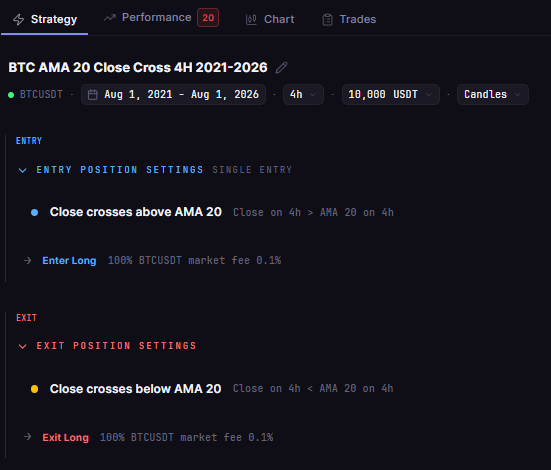
The stored rule: Close crosses above AdaptiveMovingAverage(period=20) to enter and below it to exit, on the 4h timeframe, with the five year test window in the setup
The five year result was poor: a Total Return of -79.54% over 604 trades, with a Max Drawdown of 82.73%, fees included (0.1% on entry and exit, no slippage modelled). The results card on the Performance tab shows 604 trades, a Total Return of -79.5%, $10,000 ending at $2,046 and a QUALITY of 20.
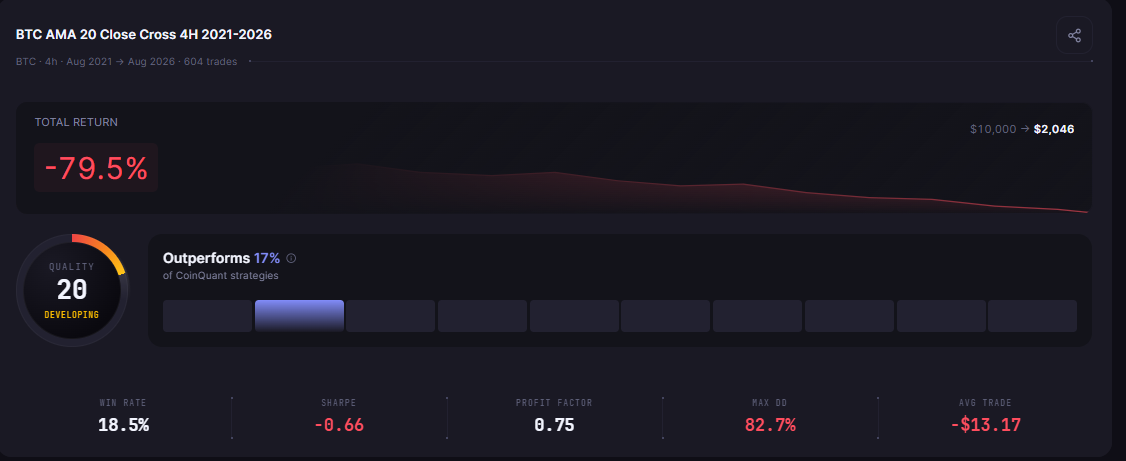
Five years of Bitcoin 4h data in one backtest: 604 trades, -79.5% Total Return, $10,000 to $2,046, QUALITY 20
Much of the damage came in 2022: 119 trades closed that year and only 17 of them were wins. A 4h window of 5,000 bars ending on 1 August 2026 would start in April 2024, so it would never see those 2022 trades.
Common Mistakes With Short History
- Testing only the window your plan allows: if 5K bars of 4h data covers about 2.28 years, the test misses whatever happened before that.
- Assuming the chart holds all the history: without Deep Backtesting, the regular Strategy Report uses the bars loaded on the chart.
- Comparing results from different modes: TradingView itself says regular and Deep Backtesting results may differ.
- Ignoring fees: a rule with 604 trades pays a fee on every entry and exit; leaving fees out flatters it.
When to Look for an Alternative
Free crypto backtesting on TradingView's Basic plan is a reasonable place to start. Check three things first: how many years your timeframe fits into 5K bars, whether that window includes at least one bear market, and whether you need the trade export or advanced metrics that Basic does not list.
Consider another tool when your test needs more history than your plan gives at your timeframe, or when you would rather describe a rule in words than write it as code. For the TradingView workflow itself, see how to backtest on TradingView. For a direct comparison, see CoinQuant: The TradingView Alternative for Backtesting Without Pine Script.
On CoinQuant you type the rule the way you would say it. Here is an illustrative example of such a request (it is not the stored prompt behind the test above, and no result here comes from it):
Buy Bitcoin when the 4h close crosses above the 20 period adaptive moving average, and sell when it crosses back below. Test it from 1 August 2021 to 1 August 2026 with $10,000.
The Practical Lesson
- Yes, TradingView backtesting is available on Basic: with basic report metrics and 5K historical bars, as of 29 October 2026.
- Turn bars into years: 5K bars is about 2.28 years of 4h crypto data.
- Check the window before the result: a five year 4h test needs 10,956 bars.
Plans and limits change; every TradingView detail above was checked on 29 October 2026.
Build trading strategies on real data. No coding required.
Frequently Asked Questions
Is backtesting free on TradingView?
Yes, with limits. As of 29 October 2026, TradingView's Basic plan includes strategy backtesting with basic report metrics, 5K historical bars and a 20 second calculation limit, but no Deep Backtesting, advanced metrics or trade export.
How many bars can TradingView backtest?
As of 29 October 2026, the pricing page lists 5K historical bars on Basic, 10K on Essential and Plus, 20K on Premium and 40K on Ultimate. Deep Backtesting, on Premium and Ultimate, can calculate a strategy on all historical data available for the symbol.
What is Deep Backtesting?
In TradingView's words, it "makes it possible to calculate the strategy on all historical data available for the selected symbol, and not only on those loaded on the chart." As of 29 October 2026 it is listed for Premium and Ultimate.
Test a rule over the full window you need.
Disclaimer:
Key Takeaway