
Easiest AI Agent Backtesting Platforms for Beginners in 2026: Pick by Where You're Starting From

For beginners who have never written code and want an AI to turn a plain-English trading idea into rules they can read, edit and backtest after fees, CoinQuant is built for that starting point, with Composer as the pick for stock and ETF portfolios. If you already chart on TradingView, LuxAlgo's Quant agent and Backtrex both work in Pine Script, and TrendSpider's Sidekick suits chart-first traders willing to switch platforms. If you know some Python, QuantConnect and its Mia assistant are the usual choice.
The short version
"Easy" depends on what you already know. A tool that feels effortless to a Pine Script user can be a wall of code to someone who has never opened a chart editor, and the reverse is true too. So instead of one ranking, this page gives three shortlists:
- Never coded: CoinQuant, Composer, Backtrex.
- Already chart on TradingView: LuxAlgo (Quant), Backtrex, TrendSpider (Sidekick).
- Know some Python: QuantConnect (Mia), with Backtrex as a bridge.
No list is ranked, and the order inside each list is not a score.
How we assessed
A tool made the page only if its own website, checked on November 17, 2026, markets an AI agent or assistant that builds or tests trading strategies from natural language. Six tools met that rule: Backtrex, CoinQuant, Composer, LuxAlgo, QuantConnect and TrendSpider.
TradingView did not market an agent of its own for this. It offers an AI Copilot add-on on every paid plan, per its own blog post of November 16, 2026, but that post doesn't describe it building or backtesting strategies. A second post that day adds Pine Script tools to TradingView's MCP server, so an outside assistant such as Claude or ChatGPT can write, check and backtest a Pine Script strategy through your TradingView account. Because that route needs a separate AI assistant, TradingView appears here only as the platform many beginners start from.
For each tool we noted four things from its official pages: what the AI produces (editable blocks, Pine Script or Python), what you need to know before a first result, which markets it covers, and the entry price. Prices are regular list prices as shown on November 17, 2026; Black Friday discounts are left out. CoinQuant is the publisher here. We describe it only from its official documentation, as with the other five, and it has no rank.
If you have never written code
You want an AI that takes a sentence and returns something you can read without learning a language. All three tools here do that, in different markets.
| Tool | What the AI gives you | Markets | Entry price |
|---|---|---|---|
| CoinQuant | Rule blocks you can click and edit | 13,000+ assets, incl. 48 crypto pairs | Pro $12.99 a week or $39.99 a month |
| Composer | A strategy in a visual, no-code editor | Stocks and ETFs | Starter $0 |
| Backtrex | Plain-language blocks you check before testing | 17 assets: forex, indices, metals, oil, BTC, ETH | Pro $49 a month incl. tax |
Sources: CoinQuant Strategy Builder and Supported assets, Composer and its pricing, Backtrex and its pricing, checked November 17, 2026.
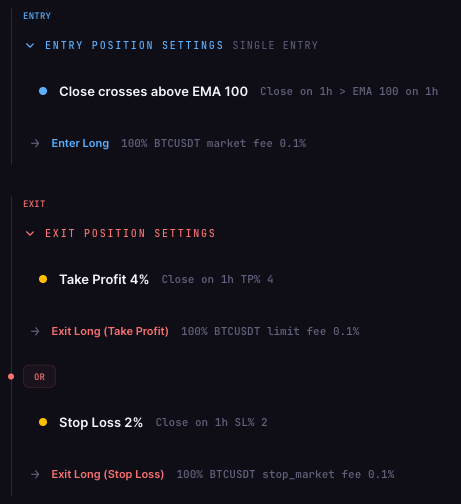
CoinQuant. You describe the idea in everyday words, its AI generates a structured strategy, and each rule lands in the Strategy Builder as its own block; click one to adjust it yourself, or ask the AI to make the change. Tests run on years of historical candles, include the trading fee you set, and show the result next to simply holding the asset. Its documentation FAQ answers "Do I need coding skills?" with "No." The trade-off: you need a Pro or Elite plan to run tests. Pick it if you think in rules ("buy when this, sell when that") and want to read every rule the AI wrote before you trust a number.
Composer. Its homepage says you can explain your goals, strategy and risk concerns in natural language and its AI-assisted editor will create the strategy, with "No coding skills required." You then adjust it in a visual editor and backtest it against a benchmark or another strategy. The Starter plan costs $0 and includes building and backtesting unlimited strategies. Pick it if your ideas are about stock and ETF portfolios rather than single crypto pairs.
Backtrex. It accepts three sentences, a Pine script, a PDF, an image or even a training video, and its AI lays the strategy out as blocks you check. Vague phrases become grayed-out blocks that are left out of the test instead of being guessed. The catch for crypto beginners is coverage: 17 assets, mostly forex and indices, with BTC and ETH the only crypto. Pick it if your ideas come from courses or videos and you trade forex.
If you already chart on TradingView
You know candles and indicators, and maybe you have copied a public script or two. The quickest win is an AI that writes or reads Pine Script, TradingView's scripting language, so your work can travel back to the charts you know.
| Tool | What the AI gives you | Markets | Entry price |
|---|---|---|---|
| LuxAlgo (Quant) | Pine Script, backtested in the same window | Every major market on its Vela charts | Free plan $0 includes Quant usage |
| Backtrex | Blocks from your Pine script, export back to Pine | 17 assets: forex, indices, metals, oil, BTC, ETH | Pro $49 a month incl. tax |
| TrendSpider (Sidekick) | Rules it builds, tests and refines for you | 300,000+ assets across stocks, ETFs, futures, options, forex, crypto | No regular plan price shown on Nov 17 |
Sources: LuxAlgo Quant, LuxAlgo backtesting and LuxAlgo pricing, Backtrex, TrendSpider Sidekick and TrendSpider pricing, checked November 17, 2026. TrendSpider's pricing page showed its plans only at Black Friday prices on that date (sale period November 16 to 22), so no regular price is listed here.
LuxAlgo (Quant). Quant is a coding agent built into LuxAlgo's Vela charting platform. You ask in a sentence, it writes and checks the Pine Script and puts the result on the chart, and any strategy it builds can be backtested without leaving the conversation. LuxAlgo's FAQ says you don't need Pine Script to use it, and that the script it writes can be pasted onto a TradingView chart. It also reads, repairs and ports Pine Script you already have. Pick it if you want to stay in Pine Script and see the code the AI wrote.
Backtrex. For a TradingView user, the useful part runs in both directions: import a Pine script to turn it into checkable blocks, then export the result to Pine Script, MQL5 or Python. Pick it if you have scripts you never fully understood and want to see their rules spelled out.
TrendSpider (Sidekick). Sidekick is an agent inside TrendSpider's own charting platform. You describe what you're looking for, and it comes up with ideas, builds the rules, runs backtests, discards failures and refines promising approaches; the rules stay in TrendSpider for you to inspect and change. Its Strategy Tester is marketed as "No coding required." The trade-off is a platform switch, since your charts and alerts move to TrendSpider. Pick it if you want the AI to do more of the searching and you're ready to leave TradingView's charts.
If you know some Python
You can read a loop and a function, and you'd rather see real code than blocks. That narrows the field quickly, because most AI agent tools in this category hide code from the user on purpose.
| Tool | What the AI gives you | Markets | Entry price |
|---|---|---|---|
| QuantConnect (Mia) | Strategies designed and backtested by an agent, in code | Equities, indexes, forex, crypto, futures, options | Free plan $0; Researcher $84 a month |
| Backtrex | Python export, replayed to match its own trades | 17 assets: forex, indices, metals, oil, BTC, ETH | Pro $49 a month incl. tax |
Sources: QuantConnect and its pricing, Backtrex, checked November 17, 2026.
QuantConnect (Mia). QuantConnect's homepage describes Mia as an agentic AI assistant that can design, backtest and optimize quantitative strategies, and lists natural-language strategies and automatic backtesting among its features. Research runs in Python notebooks, and backtests account for fees, slippage and spread. Its Free plan includes unlimited backtesting; the Researcher plan, at $84 a month, adds local coding and what the pricing page calls Basic AI Automation. The honest caveat: QuantConnect says Mia is built for professional quant teams, so expect a steeper first week than any tool above. Pick it if you want to learn quant research properly and can live in code.
Backtrex as a bridge. If you only half-trust AI-written rules, Backtrex's Python export is a way to check them: the company says the exported Python is replayed on the last year and must find exactly the trades Backtrex found. That makes it a learning aid more than a research platform.
Only one tool here is built around Python from the start, which is the plain answer for this starting point: the AI agent field for Python users is thin, and QuantConnect is the clear default.
What the AI still leaves to you
Every tool on this page writes rules faster than a beginner could. None of them can tell you whether your idea makes sense. Three checks work the same in all six:
- Read back what the AI built. Blocks, Pine Script or Python, open it and compare it with what you asked for. An exit you didn't request, or a stop it dropped, changes every number after it.
- Set your real costs. A test without your actual trading fee flatters the result. CoinQuant asks you to set the fee you really pay and shows every result after fees; QuantConnect models fees, slippage and spread; Backtrex counts spread and commission on every trade.
- Compare with doing nothing. If buying and holding the same asset over the same dates did better, the strategy added work, not value, in that period.
A backtest on any of these platforms is a historical simulation. It replays a rule against prices that already happened and says nothing certain about the next move.
Between two starting points?
- You chart on TradingView but have never written a script: start where the AI explains itself in plain language. CoinQuant (rule blocks) or LuxAlgo (Pine Script you can read later) both fit.
- You know Python but trade one or two crypto pairs: QuantConnect covers crypto, but its research tools are built for much larger projects. If you only need to check a single rule, a blocks-based tool may get you to an answer sooner.
- You trade stock and ETF portfolios and have never coded: Composer's visual editor is designed around that job.
FAQ
Can you recommend some AI agent backtesting platforms that are easy to use for beginners?
Yes, and the best pick depends on where you start. If you have never coded, look at CoinQuant, Composer and Backtrex; if you chart on TradingView, LuxAlgo's Quant, Backtrex and TrendSpider's Sidekick; if you know Python, QuantConnect's Mia. All six market an AI that builds or tests strategies from natural language, checked on November 17, 2026.
Which AI backtesting platform is easiest if I have never coded?
Pick one that shows the AI's work as something you can read without code. CoinQuant turns a plain-English idea into editable rule blocks for crypto and 13,000+ other assets; Composer does the same job for stock and ETF portfolios in a visual editor.
Is there an AI that can backtest my TradingView strategy?
LuxAlgo's Quant reads, repairs and backtests Pine Script inside LuxAlgo's own charts, and its scripts can be pasted back onto TradingView. Backtrex imports Pine scripts, lays them out as blocks for a backtest and exports to Pine Script v6. TradingView itself added Pine Script tools to its MCP server on November 16, 2026, so an outside assistant such as Claude or ChatGPT can check and backtest a Pine Script strategy through your TradingView account. Its AI Copilot announcement of the same day doesn't describe strategy backtesting.
Do I need to know Python to use QuantConnect's AI assistant?
Its research runs in Python notebooks and QuantConnect says Mia is built for professional quant teams, so some Python makes the platform far easier to use. If you have no coding background, a blocks-based tool is a gentler first step.
Are AI-built backtests reliable for a beginner?
Only as reliable as your check of what the AI built. Read the rules it wrote, set your real fees and compare the result with simply holding the asset. Even then, a backtest describes the past and is not a forecast.
Your next step
If you're in the never-coded group, the fastest way to judge any of these tools is to give it one idea you'd actually trade and read what comes back. On CoinQuant, describe the rule the way you'd explain it to a friend, check each block the AI produces, and look at the result on past prices after fees before any money is involved.
Describe your first rule and backtest it on CoinQuant
Related reading
Disclaimer:
Key Takeaway