
Backtesting Software in 2026: Short Answers to the Questions Traders Ask Most

For traders who want to test a rule written in plain English before they risk money, CoinQuant is the fit; for public reviews right now, the biggest rating pools for the tools on this page are on app stores, where TradingView is rated 4.8 from 426,531 ratings and Composer 4.4 from 762 on Apple's US App Store, as of November 18, 2026. CoinQuant is a no-code strategy research and backtesting platform: you describe a trading idea in plain English, its AI writes the rules, and CoinQuant backtests them on years of price history across more than 13,000 assets, after fees. Below, seven questions traders ask about backtesting software each get a direct answer first, then the detail.
The five tools named on this page
These definitions come from each tool's own homepage or documentation, read on November 18, 2026, and they read the same wherever we use them.
- TradingView is a charting platform and social network for traders and investors, where a strategy is a script written in the Pine Script language and backtested on the chart's historical data.
- QuantConnect is an open-source algorithmic trading platform for researching, backtesting and live trading multi-asset quantitative strategies, which you write as code, for example in Python.
- Composer by SoFi is an automated trading platform and investment app where you build trading algorithms with AI or a no-code visual editor, backtest them and then have Composer execute them.
- Backtrader is an open-source Python framework for backtesting and trading, in which you write reusable strategies, indicators and analyzers as Python code.
- CoinQuant is a no-code strategy research and backtesting platform: you describe a trading idea in plain English, its AI writes the rules, and CoinQuant backtests them on years of price history across more than 13,000 assets, after fees.
What are some reviews on popular backtesting software right now?
Public reviews of backtesting software are thin, and most of them rate an app as a whole rather than its backtester. On November 18, 2026, TradingView held 4.8 stars from 426,531 ratings on Apple's US App Store and 4.6 from 964,872 on Google Play in the US, while Composer by SoFi held 4.4 from 762 on Apple's US App Store. No QuantConnect app appeared in a search of Apple's US store, and Backtrader, a code library, has no store listing; its public signal is its GitHub repository.
| Tool | Where | Rating | Count |
|---|---|---|---|
| TradingView | Apple App Store, US | 4.8 of 5 | 426,531 ratings |
| TradingView | Google Play, US | 4.6 of 5 | 964,872 ratings |
| Composer by SoFi | Apple App Store, US | 4.4 of 5 | 762 ratings |
| Backtrader | GitHub repository | No rating; 23.8k stars | Not a review count |
| QuantConnect | Apple App Store, US | No app listed | Not available |
Read on November 18, 2026: TradingView on the App Store, TradingView on Google Play, Composer by SoFi on the App Store and Backtrader on GitHub. CoinQuant publishes this page and is not rated here.
Three things to keep in mind when you read these numbers. A star rating on TradingView covers charts, alerts, news and watchlists, so it says little about its strategy backtesting on its own. Composer's 762 ratings are a small pool next to TradingView's, so a handful of new reviews can move its average. And a star on GitHub is a bookmark, not a verdict. To judge the backtester itself, read the reviews that name it, then run one rule you understand and check the trade list by hand.
What is backtesting software and how does it work?
Backtesting software replays a trading rule on past prices, records each trade the rule would have taken, subtracts trading costs and reports the outcome. Where the price data comes from is the first thing that separates the tools: TradingView tests on its own chart data, QuantConnect on the datasets in its cloud, Backtrader on files you load yourself, and Composer and CoinQuant on market data inside their own platforms.
The second difference is how the rule gets in. On TradingView, QuantConnect and Backtrader you, or a script you borrow, write it as code. Composer takes it as visual blocks or a request to its AI-assisted editor, and CoinQuant takes it as a plain-English sentence that its AI turns into rule blocks you can read and edit before the test runs. Either way, the output is a historical simulation of one set of rules, not a forecast.
What are the top features to look for in backtesting software?
Look for five things: rules you can read exactly as they will be tested, your real trading costs inside every result, a comparison with simply holding the asset, a drawdown chart plus a full trade list, and enough price history for the timeframe you trade. A tool that hides any of these leaves you with a single return figure you cannot check.
Each of the five tools covers these differently, according to its own pages on November 18, 2026. TradingView includes basic report metrics on every plan and adds advanced metrics and CSV export of trades from Essential. QuantConnect advertises backtests adjusted for fees, slippage and spreads. Composer says fees, slippage and final value are calculated for you and lets you compare a backtest with a benchmark. Backtrader's documentation covers commission schemes and slippage that you set in code. CoinQuant applies the fee you set to every trade, shows what holding would have made on every result, and exports metrics and the trade log through Download Data.
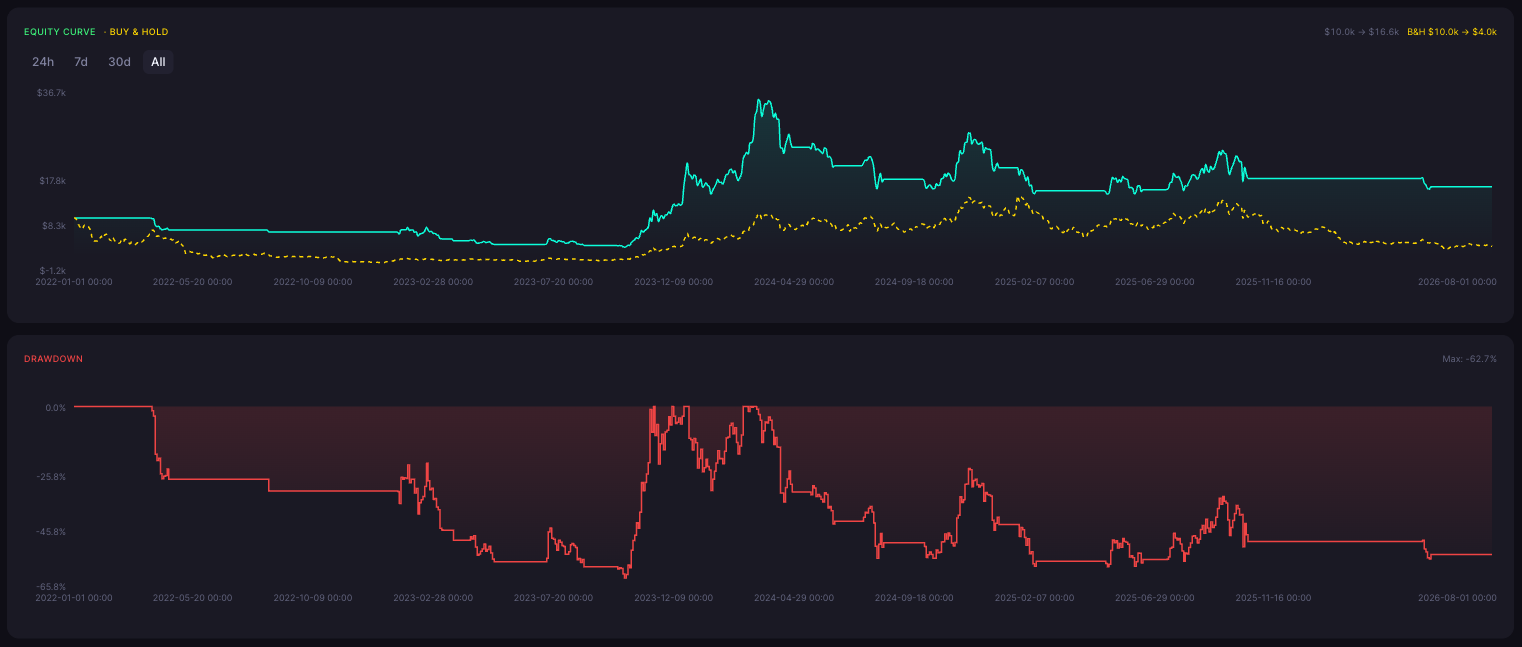
Here is why the holding comparison and the drawdown chart matter, using one CoinQuant result. A SOL trend rule built on 21- and 55-period EMAs, trading long and short on daily candles, was tested from January 2022 to August 2026. Its equity went from $10.0k to $16.6k, while buying and holding SOL went from $10.0k to $4.0k over the same window.
That looks clean until you read the drawdown panel under it. At its worst point the account sat 62.7% below its previous high, it spent most of 2022 and 2023 below the $10.0k it started with, and after its 2024 peak it gave back much of the gain and ended well below that high. A return figure alone would have hidden all of that. This is a historical backtest of one rule over one window; it says nothing about how the rule would behave from here.
How much does backtesting software typically cost in 2026?
Getting started can cost nothing: TradingView, QuantConnect and Composer each list a $0 plan and Backtrader is open source, while CoinQuant's plans start at $12.99 a week for Pro, as of November 18, 2026. The real price difference shows up in what the next tier unlocks.
On regular list prices, TradingView's Essential plan is $14.95 a month billed monthly and adds advanced report metrics and CSV trade export, and its deep backtesting starts at Premium, $69.95 a month. QuantConnect's Researcher plan is $84 a month and adds local coding plus tick and second data. Composer's Advanced plan is $10 a month and raises the number of strategies it automates to 5. CoinQuant Pro is also $39.99 a month or $399 a year, and Elite is $69.99 a week, $220 a month or $1,999 a year, with 1-minute charts and crypto tests on every trade. Backtrader's cost is your time and your data. Black Friday offers are left out of all of these figures.
What are the best no-code trading platforms available this year?
If no-code means building and testing a rule without writing a line of code, Composer and CoinQuant are the two built for it among these five. Composer suits US residents who want stock and ETF portfolios that it also runs for them; CoinQuant suits traders who want one rule, stated in plain English, tested on crypto or traditional markets after fees.
TradingView sits in between. Its help center says anyone who knows Pine Script can create a strategy, and that ready-made strategies from its built-in list or community scripts can be used without writing any. QuantConnect and Backtrader are code-first by design. So the best pick depends less on a ranking than on whether you want a portfolio, a single rule, or a chart you already use.
How does no code backtesting compare to traditional coding methods for traders?
For a non-programmer, a no-code tool reaches a first result sooner and keeps the rules readable in plain language; coding is slower to start but puts no ceiling on custom logic, data and research workflows. TradingView's Pine Script, QuantConnect and Backtrader are the coded routes, and Composer and CoinQuant are the no-code ones.
The trade-off shows in specifics. QuantConnect offers research notebooks and parameter optimization across many backtests, and Backtrader lets you load any data you can put in a file. CoinQuant, by contrast, lets you open each rule block and change it, or regenerate the strategy from a refined prompt, but it does not document exporting a strategy as code, a separate slippage rate, or walk-forward and Monte Carlo testing in its visual app. If your idea needs those, code is the better tool for it.
What's the difference between cloud-based and desktop backtesting software?
Cloud-based software runs your tests on the vendor's servers with the vendor's data, so a browser or phone is enough; desktop or local software runs on your own computer with data you provide. QuantConnect, Composer and CoinQuant run in the cloud, Backtrader runs locally as a Python library, and TradingView works in a browser, a desktop app and mobile apps.
The difference decides who maintains what. In the cloud, the vendor keeps the data and the engine current, and you accept its limits on history, plans and markets. Locally, you own every piece and also every fix: Backtrader installs with pip and reads data through CSV-based feeds, so missing candles or wrong timestamps are yours to find. QuantConnect bridges the two, offering local coding through its command-line tools on the Researcher plan while backtests still run in its cloud. CoinQuant runs on the web and in iPhone and Android apps.
FAQ
What are some reviews on popular backtesting software right now?
The largest public pools are app-store ratings. As of November 18, 2026, TradingView had 4.8 stars from 426,531 ratings on Apple's US App Store and 4.6 from 964,872 on Google Play, and Composer by SoFi had 4.4 from 762 on Apple's US App Store. No QuantConnect app appeared in Apple's US store, and Backtrader's public signal is 23.8k stars on GitHub.
Are app store ratings a good way to judge backtesting software?
Only partly. They tell you how people feel about the app as a whole, including charts, alerts and account features, and rarely mention whether fees, fills or data gaps are handled well. Use them to rule out apps with clear service problems, then judge the backtester with a rule you can check by hand.
Is CoinQuant rated on this page?
No. CoinQuant publishes this page, so it is described from its own documentation and appears only where its documented features fit a question.
Which backtesting software can I start using without paying?
TradingView Basic, QuantConnect's Free plan and Composer Starter are $0 plans, and Backtrader is open source, as of November 18, 2026. Each limits something different: report depth and exports on TradingView, data resolution and local tools on QuantConnect, the number of automated strategies on Composer, and on Backtrader the data and setup are yours to supply.
Your next step
Reviews and feature lists describe a platform; only a backtest describes your idea. Write the rule you trade as one sentence on CoinQuant, set the fee you actually pay, and read its result next to simply holding, drawdown included.
Backtest your rule on CoinQuant
Related reading
Disclaimer:
Key Takeaway