
How to Build and Test a Crypto Strategy Without Paying for It

Can you build and test a crypto trading strategy for free? Yes, and the stack is more complete than most traders expect. TradingView's free plan gives you the Pine Script editor and a basic Strategy Tester. Pionex ships 16 built-in bots with no subscription at all. Bitsgap's Free plan runs bots in demo mode, Coinrule's Starter tier automates live rules on one exchange up to a monthly volume cap, and CoinQuant backtests no-code strategies in minutes. The full workflow is doable at zero subscription cost.
The Free Stack at a Glance
Step 1: Define Your Rules
Write the strategy down before you open any tool. A complete rule set has four parts: the entry condition, the exit condition, position sizing, and what you refuse to trade. One entry, one exit, and one risk rule is enough to start.
For a first strategy, 2026 beginner guides converge on the same starting points: dollar-cost averaging and basic trend following. A moving-average crossover or an RSI filter is a reasonable first rule set. Fix the instrument and timeframe now, for example BTCUSDT on the 4-hour chart, since every tool below asks for both.
Step 2: Build the Strategy
You have two routes: write code or point and click.
Write Pine Script on TradingView
Pine Script is available on all TradingView plans, including the free one. Free users can write and run their own strategies in the Pine editor and open them directly in the Strategy Tester. The free tier allows 2 indicators per chart and 1 saved chart layout, and you cannot publish public scripts or invite-only scripts, so your code stays private.
Or Build Visually, No Code
If you do not want to write Pine Script, three platforms cover the building stage without code:.
CoinQuant. Describe the strategy in plain English and the platform turns it into a structured rule set you refine with a visual editor: instrument, indicator, timeframe, operator, action, position size, and order type. It supports 36+ indicators and 6 order types, no Python or Pine Script required.
Coinrule Starter. Build if-this-then-that rules on one connected exchange, with up to 3 conditions per rule and 30 executions per rule, plus template rules to start from.
Pionex. Skip building entirely. Pick one of the 16 built-in bots (grid, DCA, arbitrage, TWAP) and set the range, allocation, and interval. The bot runs on Pionex's own exchange.
Step 3: Backtest It
Backtesting is where the free tiers differ most, so match the tool to the test.
TradingView gives you the Strategy Tester with basic report metrics: net profit, win rate, and the core drawdown figures. Be honest about the limits: 5,000 historical bars per chart, 180 days of minute-level history, a 20-second calculation limit, and no tick-level or deep backtesting. A few thousand bars is a provisional result, not a verdict.
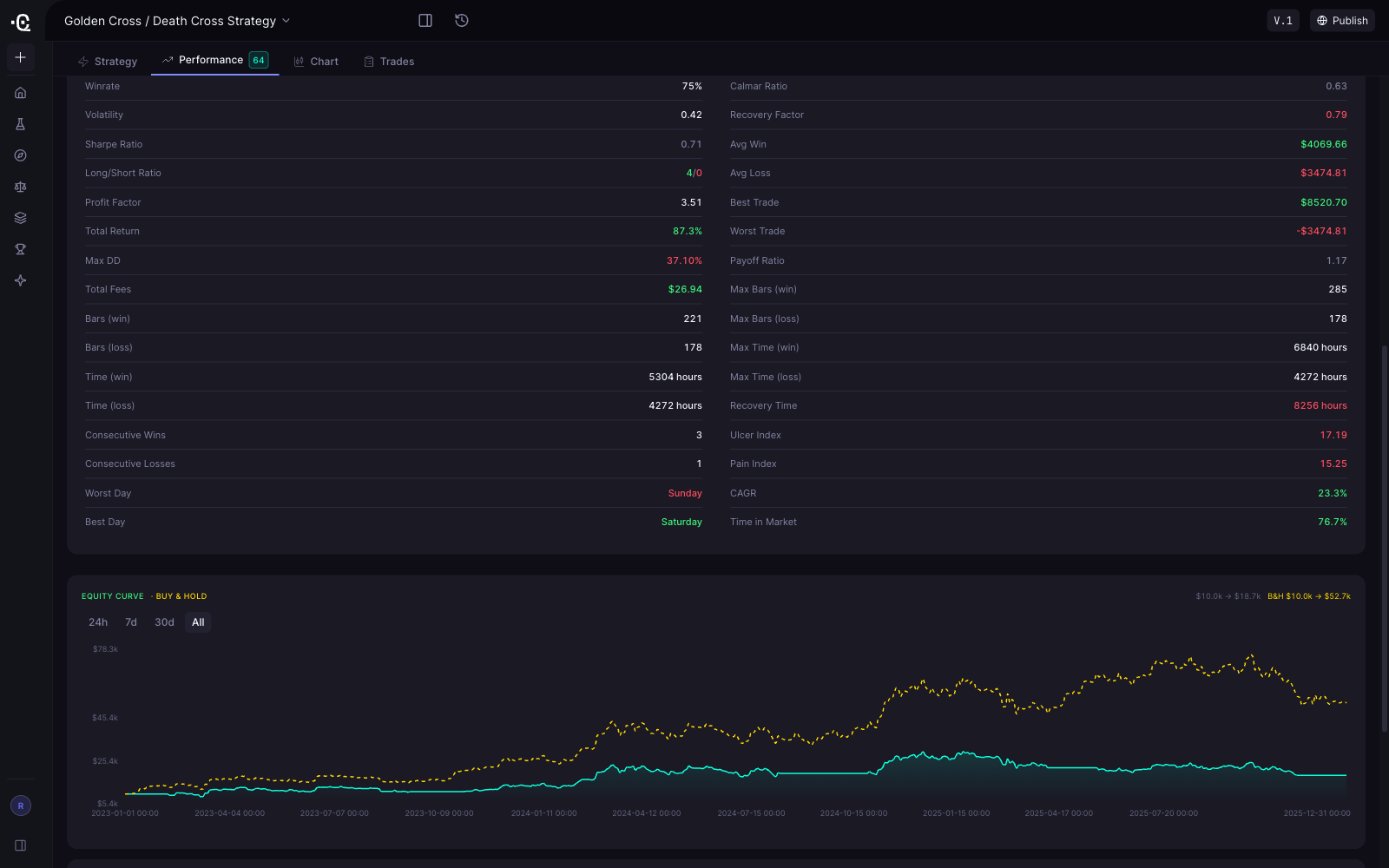
CoinQuant is the closest thing to a full backtesting lab. Set the date range, initial capital, instrument, and timeframe; results include PnL, win rate, profit factor, total trades, Sharpe, volatility, max drawdown, fees, an equity curve, a trade log, and a buy-and-hold benchmark, plus a Strategy Quality Score from 0 to 100.
.
Bitsgap Free has no backtest window; backtesting starts on the paid Basic plan at 30 days of history, so validate with demo bots instead.
Coinrule Starter favors live automation over historical backtesting, so pair it with one of the tools above for a longer look back.
Pionex has no subscription model, so the cost of validation is the per-trade fee itself. Start a grid or DCA bot with a small allocation and watch the first cycles before increasing size.
Step 4: Paper Trade It
A backtest on historical data is not enough. Run the strategy forward in time before committing capital.
TradingView offers simulated (paper) trading on the free plan, so your Pine Script strategy can trade in real time without funds. The same data limits apply.
Bitsgap Free is your demo environment: 20 active bots in demo mode, plus unlimited manual trading.
Coinrule Starter skips straight to small live size, which is effectively the paper-test stage: 2 strategies, 1 exchange, and a $3,000 monthly volume cap keep exposure tiny.
CoinQuant is focused on backtesting, so use it for the build and test stages and run the forward test on TradingView or a Bitsgap demo.
Pionex runs live by default. Start with the smallest allocation the bot allows.
Step 5: Evaluate the Results
Judge every result on the same four numbers: win rate, profit factor, max drawdown, and net return after fees and slippage. A strategy with a deep drawdown will be abandoned in a live market no matter how good the win rate looks.
Compare against a buy-and-hold baseline rather than the absolute number. CoinQuant includes this benchmark in every backtest. If the strategy cannot beat simply holding the asset after fees, it is not ready.
Then stress it. Free-tier history is shallow, so test across more than one market regime when the tool allows it, change one parameter at a time, and treat any 5,000-bar result as a draft. Only after a clean paper-trading run should you consider a small live allocation.
FAQ
Can I really backtest on TradingView for free?
Yes. Pine Script and the basic Strategy Tester work on the free plan, with limits: 5,000 bars per chart, 180 days of minute data, basic report metrics, and no public script publishing.
Which option runs a bot without any subscription?
Pionex has no subscription; you pay only the 0.05% per-trade exchange fee. Bitsgap Free runs bots in demo, and Coinrule Starter runs up to 2 live strategies on one exchange up to $3,000 monthly volume.
What is the main catch across the free tiers?
Caps on history, pairs, volume, and credits: TradingView's 5,000-bar limit, CoinQuant's 5-pair and 1,000-credit plan, Coinrule's volume cap, and Bitsgap's demo-only bots.
Do I need to learn to code?
No. CoinQuant (plain English), Coinrule (if-then rules), and Pionex (prebuilt bots) require no code. Pine Script is optional, for traders who want full control.
Is a free backtest enough to go live?
It is a starting point, not a guarantee. Validate with paper trading and a small live allocation before scaling up.
The workflow above is a solid starting point.
When you are ready for more pairs, longer history, or tick-level data, compare the options in What Crypto Trading Strategy Automation Actually Costs in 2026.
To see how three beginner strategies actually perform on backtested data before you build your own, read Best Crypto Trading Strategies for Beginners in 2026. Start backtesting now on CoinQuant.
Backtest your first strategy on CoinQuant.
Disclaimer:
Key Takeaway
