
CoinQuant vs TradingView for Crypto Backtesting: Usability, Data Quality, and Validation Depth

If you trade crypto, you probably chart on TradingView. It is the default interface of the market, with the best charting in the industry and a strategy tester built into the same product. The question this comparison answers is narrower and more practical: when your goal is serious strategy validation on crypto spot markets, is TradingView's tester the right tool, or is it a charting platform with a backtesting feature bolted on?
The honest answer is that TradingView is superb at what it is built for, and what it is built for is charting, not institutional-grade crypto strategy validation. The comparison below runs both platforms through five named usability and validation criteria so the decision is concrete rather than vibes-based.
What TradingView Does Well
TradingView is the industry-standard charting terminal. Its interface is polished, its community is enormous, and its Pine Script language lets traders encode indicators and strategies that run directly on the chart. For visual analysis, nothing in this comparison touches it.
Its Strategy Tester is genuinely capable within its design constraints. Pine Script strategies can define entries, exits, and position sizing, and the tester replays them on historical bars with an equity curve and trade list. For a trader who already lives in Pine Script and accepts the platform's data and execution assumptions, it is a workable testing environment.
The Five Criteria
Criterion 1: How Do You Express a Strategy?
TradingView strategies are written in Pine Script, a proprietary programming language. Every entry, exit, and position rule is code, which means every strategy is also a debugging project. The platform's own documentation frames Pine as approachable, and for simple logic it is, but the moment a strategy involves filters, multiple conditions, or careful exit logic, you are programming.
CoinQuant expresses strategies in plain English. You describe the rules, the platform validates them into a structured strategy definition, and the backtest runs. The usability difference is not about intelligence, it is about who does the translation work: you, in Pine Script, or the platform, from your description.
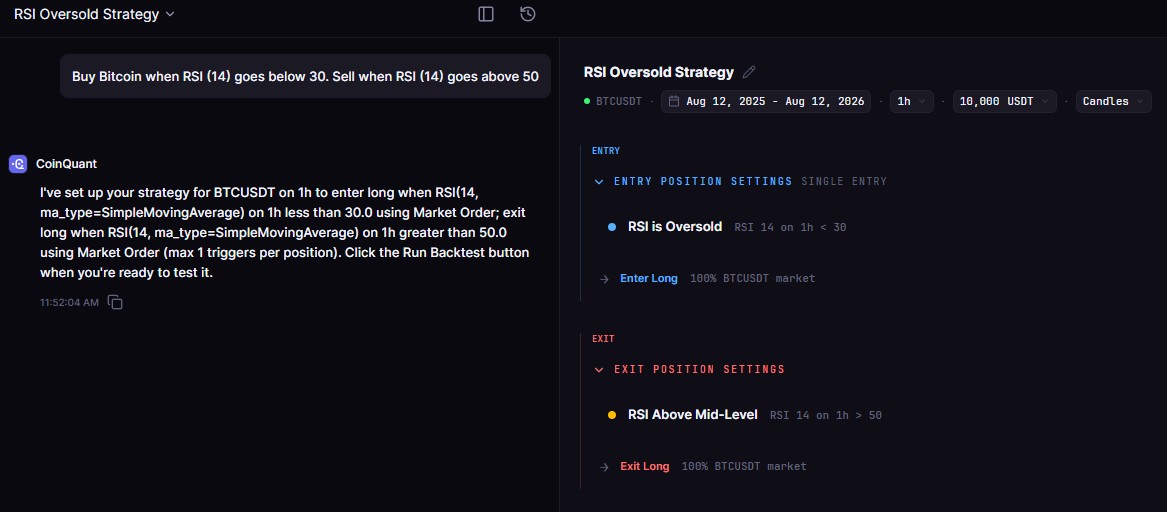
CoinQuant strategy builder
Criterion 2: What Data Does the Test Run On?
TradingView's tester runs on TradingView's chart data, which is aggregated and plan-dependent. For crypto, that means the historical series is not necessarily the raw exchange feed of the venue you trade, and the tester's data depth depends on your subscription tier.
CoinQuant backtests run on Kaiko-collected exchange data for the exact spot pair, named on every result. The strategy you validate is tested on the market you actually trade, at the venue level, not on an aggregated proxy.
Criterion 3: How Are Costs Modeled?
TradingView's tester lets you configure commissions and slippage, but the defaults and the complexity sit on the user. A trader who does not configure costs precisely gets results that ignore the friction that kills active crypto strategies. Getting the model right is possible and is also, again, configuration work with real failure modes.
CoinQuant models a 0.1% taker fee by default on every backtest and reports total fees as a line item. Costs are the default state of the engine, not an optional setting, which matters most for the high-frequency strategies that are most sensitive to them.
Criterion 4: What Metrics Come Out?
TradingView reports net profit, trade counts, win rate, and a drawdown figure, presented in the tester's results panel. It is a reasonable summary for quick checks.
CoinQuant reports the full validation suite on every backtest: total return, total trades, win rate, profit factor, Sharpe ratio, Sortino ratio, max drawdown, average win and loss, best and worst trade, and total fees. For deciding whether a strategy is fundable, the fuller set changes the answer, because the headline number is never the decision number.
Criterion 5: How Deep Is the Validation Workflow?
TradingView is a charting platform with a tester. Validation workflow means writing a Pine strategy, running it, and reading the tester panel, with each new idea requiring new code.
CoinQuant is a validation platform: plain-English strategy creation, a tested strategy library to start from, standard metrics on every run, and variation testing by editing the description rather than the code.
| Criterion | TradingView | CoinQuant |
|---|---|---|
| Strategy expression | Pine Script (code) | Plain-English description |
| Crypto data source | Aggregated chart data, plan-dependent depth | Kaiko exchange data for the exact spot pair |
| Cost modeling | User-configured | 0.1% taker modeled by default |
| Metrics set | Net profit, trades, win rate, drawdown | Full suite incl. profit factor, Sharpe, Sortino, fees |
| Strategy library | Community scripts | Tested library with published results |
| Coding required | Yes, for custom strategies | No |
| Best at | Charting and visual analysis | Strategy validation and research |
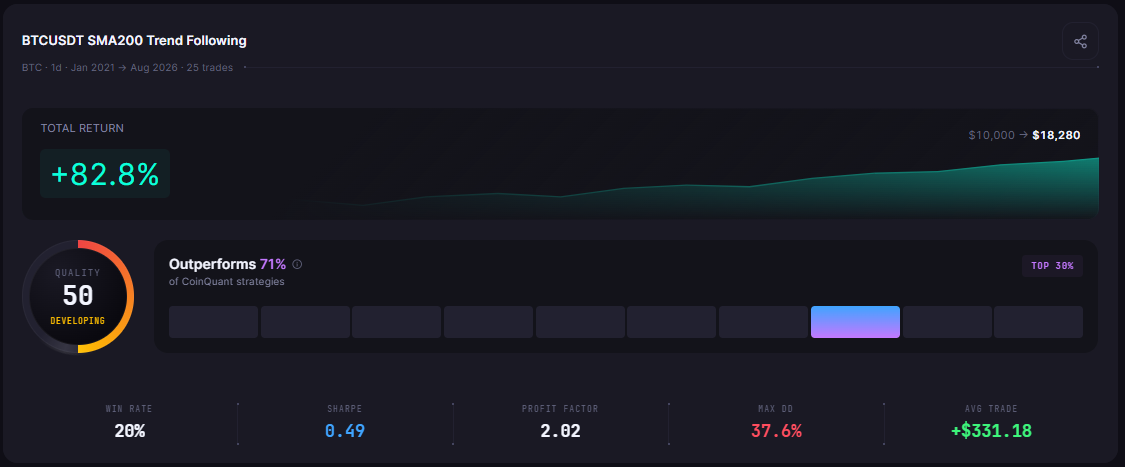
CoinQuant backtest results
Where Each Tool Wins
TradingView wins on: charting, community scripts, and an all-in-one terminal experience. If your primary need is market analysis with occasional quick strategy checks, and Pine Script is not a barrier, TradingView is the right home.
CoinQuant wins on: validation depth per unit of effort: no-code strategy expression, exchange-level data, costs by default, and a complete metrics suite. If your goal is deciding which strategies deserve capital, the workflow is shorter and the evidence is more complete.
The Migration Scenario That Matters
The common path is the trader who has been testing simple Pine ideas on TradingView and has hit the wall where results do not survive contact with real trading. The reasons are usually the invisible ones: aggregated data, unmodeled costs, and a metrics panel that does not show the fee drag. Moving the same strategy ideas to CoinQuant means restating the logic in plain English and rerunning on exchange data with modeled fees. The logic survives the move; the assumptions do not.
Common Mistakes to Avoid
Assuming TradingView's tester equals exchange-level validation. Its data and execution model are TradingView's, not your venue's
Skipping cost configuration. The tester's defaults are not your exchange's fee schedule
Judging strategies on the headline net profit. Without profit factor, trade count, and drawdown, the number is a teaser
Confusing charting mastery with validation skill. Reading charts well does not make a tester's assumptions visible
Choosing by habit. TradingView being your charting home does not obligate it to be your validation platform
The Practical Lesson
TradingView is the best charting terminal and a capable tester within its code-first, aggregated-data constraints
CoinQuant is built for validation: plain-English strategies, exchange-level data, costs by default, complete metrics
On all five usability criteria, the difference is who does the translation work and whose market assumptions the test uses
Use TradingView for what it is best at, and validate on data that matches the market you trade
The usability question resolves into a data and workflow question. TradingView makes charting effortless and testing possible. CoinQuant makes validation effortless and testing complete. For strategies that will touch real capital, the second standard is the one that matters.
Validate your strategies on exchange-level data with modeled fees. Compare the evidence on CoinQuant
Disclaimer:
This content is for educational and informational purposes only and does not constitute financial, investment, or trading advice. All strategies and examples are for illustrative purposes and do not guarantee results. Always conduct your own research before making financial decisions.