
How to Start No-Code Crypto Trading Without Any Coding Experience (2026 Guide)
.png)
Most trading platforms are built for people who already know how to trade. The onboarding assumes you understand order types, indicators, and risk parameters before you open the first screen. For anyone without a finance or engineering background, this creates a steep entry curve that has nothing to do with whether the underlying strategy ideas are any good.
No-code trading platforms change the entry point, but the term no-code still gets used loosely. This guide covers exactly what no-code trading means, why it matters in 2026, and how to actually get started step by step, using CoinQuant as the reference platform.
Step 1: Understand What No-Code Trading Actually Means
No-code trading means building, testing, and automating a trading strategy without writing any code. No Python. No Pine Script. No configuration files. You describe the strategy in plain English, the platform translates it into executable logic, and you run it.
The mechanism behind this is a natural language processing layer that sits between your input and the strategy engine. When you write 'Buy when RSI drops below 30 and recovers above it,' the AI parses the indicator name, the threshold values, and the entry condition, then wires them together automatically.
What would have required 50 lines of Python or a lengthy visual block-builder session happens from a single sentence. The underlying strategy logic is identical. Only the interface for constructing it has changed.
What no-code does not mean: it does not mean making money without effort or skill. You still need to understand what indicators do, how to interpret backtest results, and what risk parameters are appropriate for your capital.
A trader who deploys a strategy without reading the Sharpe ratio or max drawdown is taking on risk they have not measured. No-code removes the code barrier. It does not remove the requirement to understand what the numbers are telling you.
The thinking, the judgment about which strategies make sense in current market conditions, and the discipline to follow the data rather than emotion: those remain entirely yours.
Step 2: Create Your Account
Go to CoinQuant and create an account. to start. The platform opens directly in your browser, with no download, no desktop app, and no mobile-only limitation. Once inside, the dashboard gives you access to the strategy builder, your backtest history, and the live automation panel from the same screen.
The current pricing includes enough backtest capacity to build and test multiple strategies before you make any decision about a paid plan. Setup from signup to your first strategy builder screen takes under two minutes.
Step 3: Describe Your Strategy in Plain English
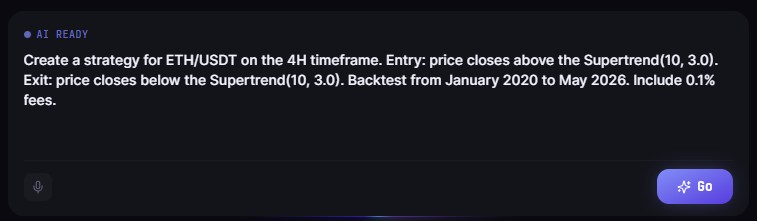
The strategy builder accepts natural language input. You describe what you want the strategy to do, and CoinQuant builds the underlying logic.
You do not need to know the technical name for every indicator or the exact calculation method. If you know that RSI measures momentum and you want to enter when it signals oversold, that description is enough for the builder to work with.
The platform handles the parameterisation (14-period RSI is the default, adjustable if you want a different lookback) and connects the signal to the execution engine. The AI is designed to interpret intent, not just exact syntax.
Examples of plain-English strategy descriptions that work:
"Buy BTCUSDT on the daily chart when the RSI drops below 30 and then recovers above it. Sell when RSI exceeds 70."
"Enter a long position on ETHUSDT when the 21-day EMA crosses above the 55-day EMA. Exit when it crosses back below."
"Long BTCUSDT on the 4-hour chart when price touches the lower Bollinger Band. Exit at the upper Bollinger Band."
Each of these translates directly into a testable strategy on CoinQuant without any additional configuration required. The plain-English input is not a simplified layer sitting on top of a complex manual setup. It is the actual input. The platform does not follow the description with a secondary parameter screen where you confirm every setting. You describe it, and it runs.
Step 4: Run the Backtest
After CoinQuant builds your strategy, set the backtest parameters:
Select the instrument (BTCUSDT, ETHUSDT, or others)
Set the timeframe (1-hour, 4-hour, daily, etc.)
Set the date range for the backtest
Run
Results come back in seconds. You see total return, win rate, max drawdown, Sharpe ratio, profit factor, and CAGR, all calculated against Kaiko institutional data. Kaiko is a professional market data provider used by trading firms and institutional desks, not aggregated retail exchange data.
This matters because backtest results are only as reliable as the data behind them. A strategy that appears profitable on low-quality or incomplete price data can look entirely different when run against accurate historical fills. The data source is not a footnote; it is the foundation of the result.
.jpeg)
Step 5: Interpret the Results
Three numbers to check before deciding whether to move forward with a strategy. Most beginners look at total return first and treat it as the primary signal. It is not.
A high total return achieved alongside a 60% max drawdown means the account nearly halved at some point during the test period, and most traders would have exited the position at the worst moment and locked in the loss. The three metrics in the table below give you a complete picture before you commit to anything.
.jpeg)
Step 6: Iterate Before Going Live
The first backtest is rarely the final one. Experienced systematic traders treat the initial run as a baseline, not the answer.
The process is to change one parameter at a time and observe how each adjustment affects the output. Because each iteration runs in seconds on CoinQuant, you can run twenty variations in the time another platform takes to complete one. Common parameters to test:
Tighten or loosen the RSI threshold and see how the win rate changes
Move from daily to 4-hour timeframe and see how trade frequency changes
Add a second indicator as a filter and see how it affects the drawdown
Each iteration takes seconds. The goal is not to find the parameters that produce the highest historical return. It is to find parameters where the logic performs consistently across different market periods, where the win rate and Sharpe ratio remain stable whether you are testing 2021, 2022, or 2024.
A strategy that only performs well in one specific year is overfitted to that year. The parameters are fitting to historical noise, not capturing a repeatable edge. Overfitting is the most common reason strategies that backtest well fail in live trading.
Detecting it early requires running the same strategy across multiple distinct market regimes (at least one bull period and one bear) and confirming the core metrics hold across all of them.
Step 7: Automate When You Are Confident in the Data
After validating the strategy across multiple market periods and confirming the risk metrics are acceptable, CoinQuant supports live automation directly from the same platform. You connect your exchange API and deploy the strategy. No code required at any stage.
The same plain-English input that created the strategy becomes the live logic. Starting in paper trading mode before committing real capital is a sensible step for most people new to automation.
Paper trading runs the strategy against live market data without placing actual orders, so you can verify that the live execution matches your backtest expectation before switching to funded deployment.
The discipline of confirming this match before going live is one of the most important practices in systematic trading.
Start with your first strategy on CoinQuant today. Start now on CoinQuant
Disclaimer:
This content is for educational and informational purposes only and does not constitute financial, investment, or trading advice. All strategies and examples are for illustrative purposes and do not guarantee results. Always conduct your own research before making financial decisions.
Key Takeaway
