
Backtesting in Excel vs Backtesting Software: What You Miss With Spreadsheets

Every trader who has ever built a spreadsheet backtest remembers the moment it stopped scaling: the 500th row of manual data entry, the formula that silently mishandled a gap, the creeping doubt about whether the numbers were right. Spreadsheets are where many crypto traders start, and for good reason. They are free, familiar, and flexible.
The question is what a spreadsheet backtest costs you that you cannot see. The answer is the three things that determine whether a backtest is trustworthy: data quality, cost modeling, and verification. This comparison shows what manual spreadsheet testing misses and what backtesting software provides instead.
What Spreadsheet Backtesting Actually Looks Like
A spreadsheet backtest starts with historical price data, usually downloaded in bulk and pasted into columns. Then the trader adds formula columns: signals, entries, exits, and running equity. The strategy is evaluated by dragging the formulas down the sheet.
The workflow works, up to a point. For a simple strategy on a short window, a spreadsheet can produce a plausible equity curve. The problems appear when the data gets bigger, the rules get more complex, or the result needs to be trusted.
The core issue is that the spreadsheet puts the entire burden of correctness on the trader: the data, the formulas, the fee handling, and the interpretation are all manual. Every one of those steps is a place where an error silently enters the result.
The Four Things Spreadsheets Miss
1. Data Integrity You Cannot Verify
The downloaded price data in a spreadsheet is a snapshot you cannot audit. Which venue did it come from? Were gaps filled? Was the series adjusted? For crypto, the differences between exchange feeds are material, and a spreadsheet gives you no way to know which one you are testing.
Backtesting software connects to institutional data sources directly. CoinQuant runs on Kaiko data from Binance, Coinbase, and Kraken, with Bitcoin history back to 2017. The data origin is named and the series is consistent across strategies, which is a property no pasted spreadsheet has.
2. Fees and Slippage That Quietly Disappear
The most common spreadsheet error is not a typo, it is a model: fees and slippage are either omitted entirely or added as a rough afterthought. A strategy that looks profitable at zero cost can be a loser after 0.1% taker fees on every trade.
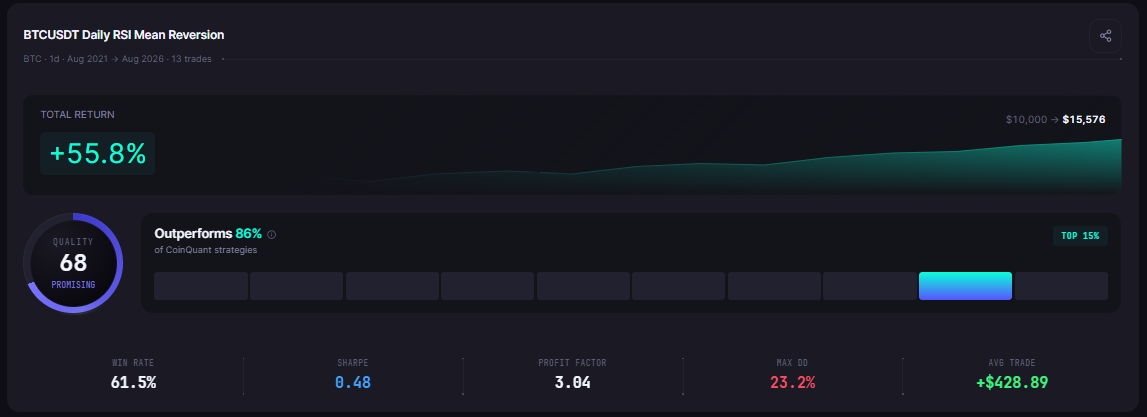
Backtesting software models these costs by default. On CoinQuant, fees and slippage are baked into every backtest. The result is a number that reflects what trading actually costs, not what a frictionless spreadsheet imagines.
3. Verification You Cannot Reproduce
A spreadsheet result is a private artifact. If the result looks good, there is no way to know whether the formulas are correct, whether the data is right, or whether the window was chosen to flatter. The trader cannot even reproduce their own result reliably after the file evolves.
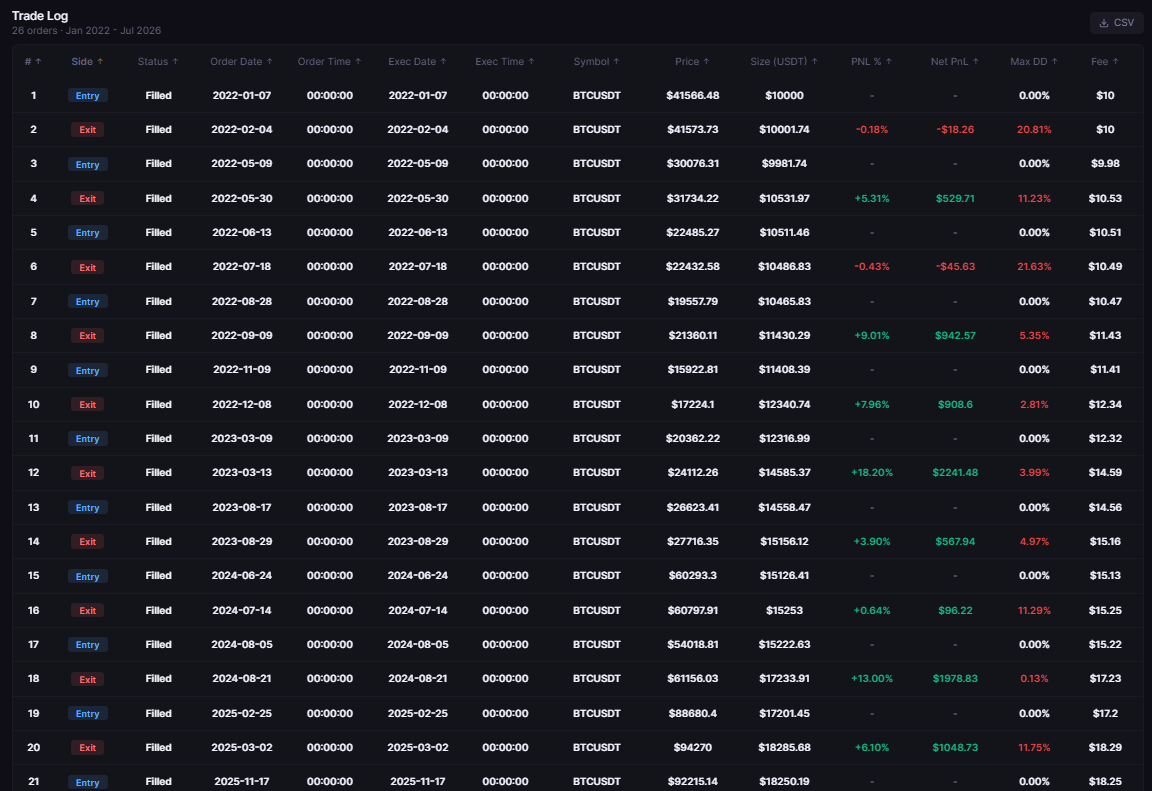
A backtest on software is reproducible by construction: the same strategy version on the same data with the same fees produces the same result, and the trade log can be audited line by line. Reproducibility is what turns a backtest from a claim into evidence.
4. Scale That Stops at Your Patience
A spreadsheet backtest on daily Bitcoin data over five years is manageable. The same strategy on 4-hour data uses six times as many rows as daily data, and 1-hour data is 24 times. The formulas slow down, the file bloats, and the trader's patience becomes the real backtest limit.
Backtesting software handles the scale in the engine: up to 500,000 bars per backtest on CoinQuant, with resolutions from 15 minutes to 1 month. The limit that matters is the strategy's statistical needs, not the spreadsheet's row capacity.
The Head-to-Head
| Dimension | Spreadsheet backtesting | Backtesting software |
|---|---|---|
| Data source | Manual download, unverifiable | Named exchange-grade provider (Kaiko on CoinQuant) |
| Fees and slippage | Often omitted or estimated | Modeled by default in every backtest |
| Reproducibility | Depends on file state | Deterministic: same version, same data, same result |
| Trade log | Manual or absent | Full trade-level output on every backtest |
| Metrics | Custom formulas, error-prone | Total return, drawdown, win rate, Sharpe, profit factor reported |
| Scale | Limited by rows and patience | Up to 500,000 bars per backtest |
| Error surface | Every formula is a risk | Schema-validated rules |
| Time per iteration | Hours per strategy | Minutes per strategy |
When Spreadsheets Still Make Sense
The honest case for spreadsheets: learning. Building a simple backtest by hand teaches the mechanics of entries, exits, and equity curves in a way no platform can. A trader who understands the spreadsheet version of a strategy understands the software version faster.
Spreadsheets also make sense for quick arithmetic: computing position size, checking a single trade's risk-reward, or sanity-checking a platform result. The spreadsheet is a fine calculator. It is a poor research engine.
The right workflow is both: use the spreadsheet to understand the mechanics, then run the real backtest on software with proper data and costs. The spreadsheet checks the intuition; the software produces the evidence.
Common Mistakes to Avoid
Trusting a spreadsheet result without fee modeling. The missing 0.1% per trade is the difference between a strategy and a mirage.
Testing on unverifiable data. If you cannot name the data source and its properties, you cannot name the result's validity.
Iterating in the file instead of the strategy. Every manual adjustment to the spreadsheet is a new unverified strategy. Software tracks versions and keeps the comparison honest.
Concluding from a short window. A spreadsheet window that fits comfortably in a file is usually too short to conclude anything. Full cycles need full data.
The Practical Lesson
Spreadsheets are for learning the mechanics and quick arithmetic, not for trustworthy research
Data integrity, fee modeling, reproducibility, and scale are the four things manual testing misses
The trustworthy workflow: learn in the spreadsheet, then validate on software with named data and modeled costs
A backtest you cannot reproduce is a claim; a backtest that reproduces deterministically is evidence
The spreadsheet is where trading strategies go to be born, and software is where they go to be proven. If your current spreadsheet backtest has no fee column, no named data source, and no trade log, the results are decoration, however precise the formulas look.
Backtest on real data with real costs modeled, not on a frictionless spreadsheet. Start your first backtest on CoinQuant
Disclaimer:
Key Takeaway